115
be useful when there are several devices who are connecting with router.
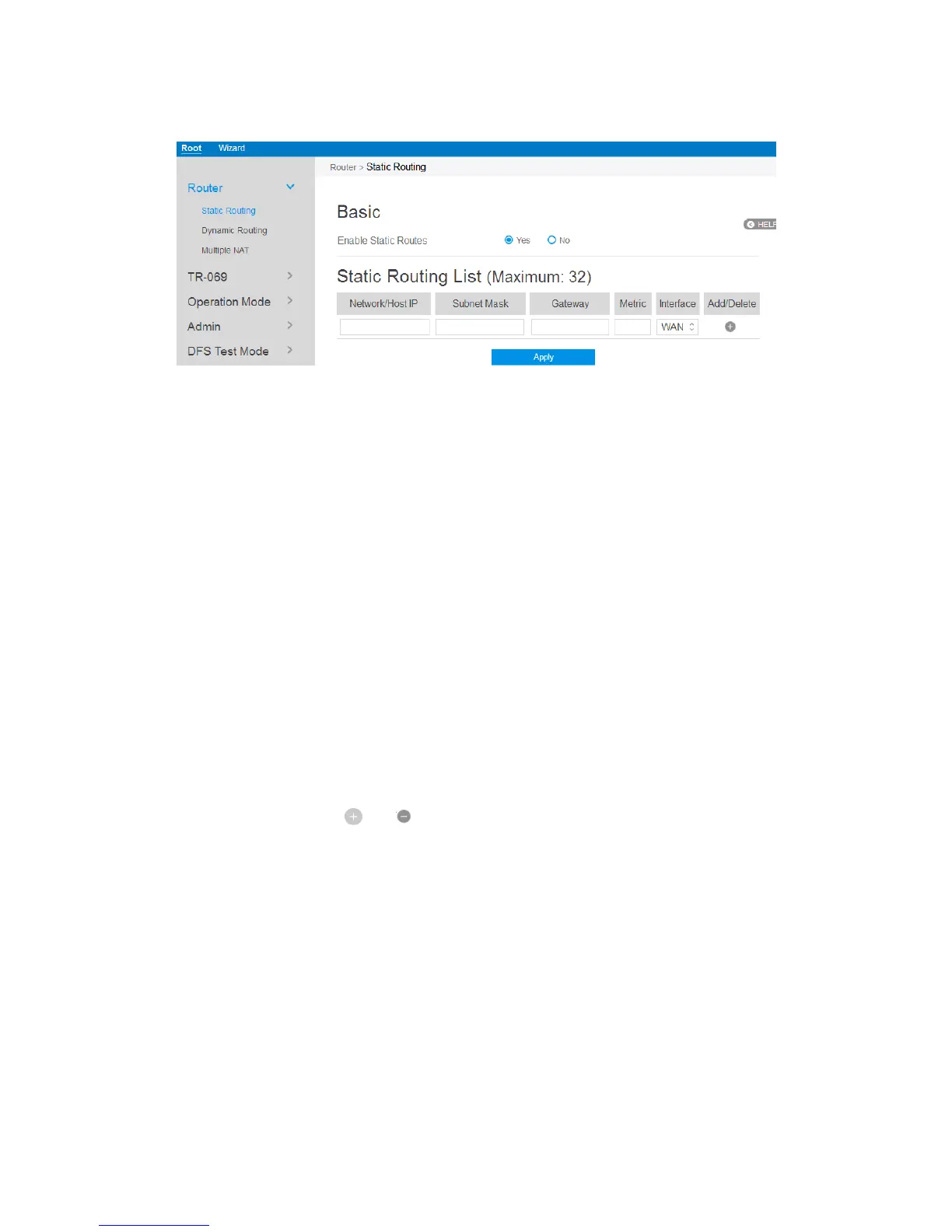
Steps to set Static Routing:
1. From the navigation panel, go to Root > Router > Static Routing.
2. Enable Static Routes: Select [Yes] to enable static routes.
3. Network/Host IP: The destination network or host of a route rule. It could be a
host address such as '192.168.123.11' or a network address such as '192.168.0.0'.
4. Subnet Mask: Indicates how many bits are for network ID and subnet ID. For
example: if the dotted-decimal Subnet Mask is 255.255.255.0, then its’ Subnet
Mask bits is 24. If the destination is a host, its Subnet Mask bits should be 32.
5. Gateway: This is the IP address of the gateway where packets are routed to. The
specified gateway must be setup and reachable first.
6. Metric: Metric is a value of distance for the network.
7. Interface: Network interface that the route rule will apply to.
8. Add/Delete: Click or to add/delete the profile.
9. When done, click Apply.



 To Next Page