RRM02 - Product Manual
Issue: 02 complete, approved
Page 41 of 68
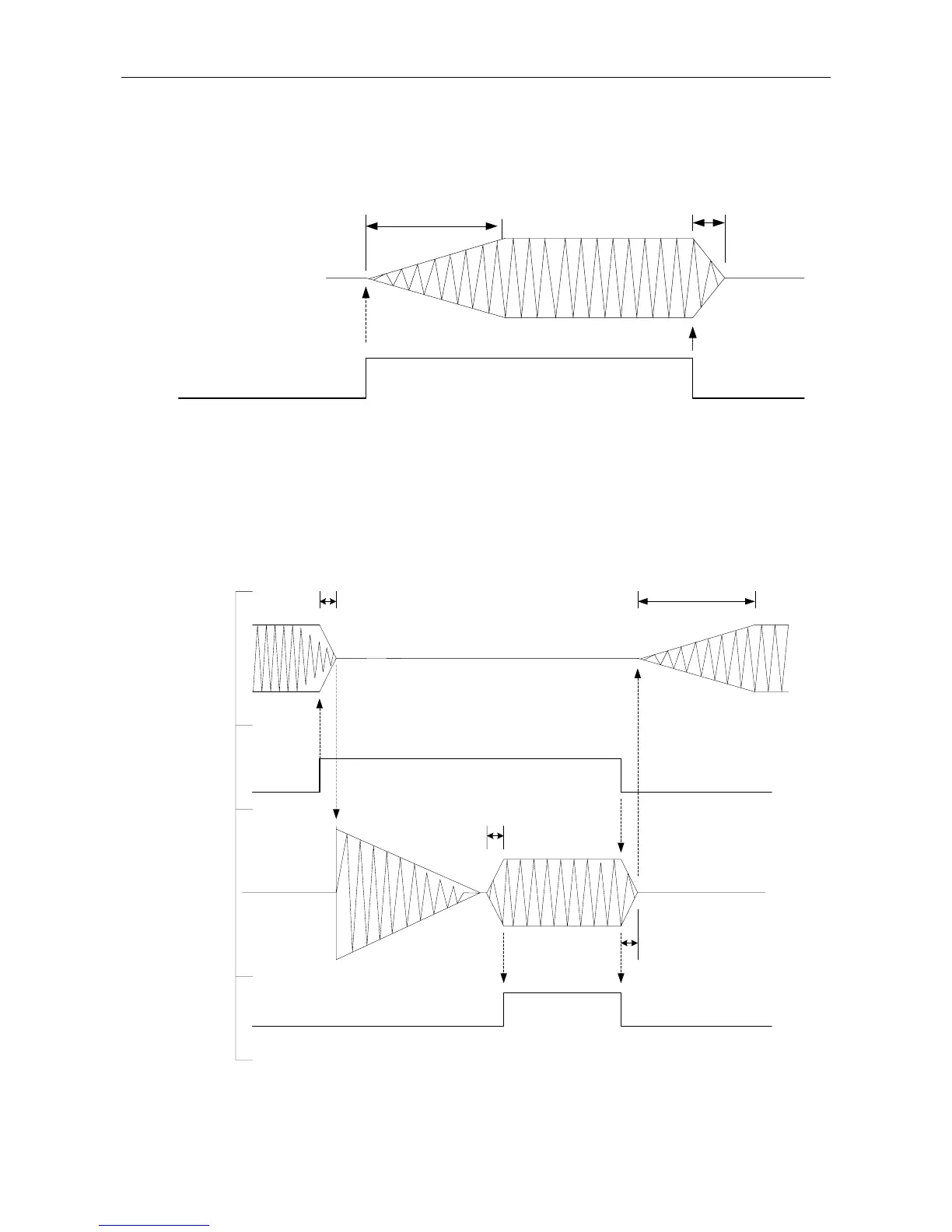
The diagram in Figure 23 illustrates the sequence of events during the enabling and disabling of a single
audio source (e.g. background music).
Figure 23 Sequence of Events for Single Audio Source
MUSIC
FADE UP=T1
FADE DOWN= T2
T1
MUSIC AUDIO
T2
ON
OFF
The diagram in Figure 24 illustrates the sequence of events during the override of a background music
source by a Paging Microphone with chime.
Note that the background music Fade Down time (T2) is not used in this instance. Instead the microphone
Fade Down time (T4) is used to fade out the background music before the microphone broadcast starts, as
well as to fade out the microphone at the end of its broadcast.
Figure 24 Sequence of Events for Paging Microphone Chime Overriding a Background Music
MUSIC
FADE UP=T1
FADE DOWN= T2
T4
T1
MICROPHONE
FADE UP=T3
FADE DOWN= T4
T3
T4
MICROPHONE
PTT
ON
ON
OFF
OFF
MUSIC AUDIO MUSIC AUDIO
MIC AUDIO
CHIME AUDIO
MICROPHONE
SPEAK-NOW LED
Configure the microphone signal fade up and down times as required.



 To Next Page