V1.1 22/01/15 Page 23 of 28
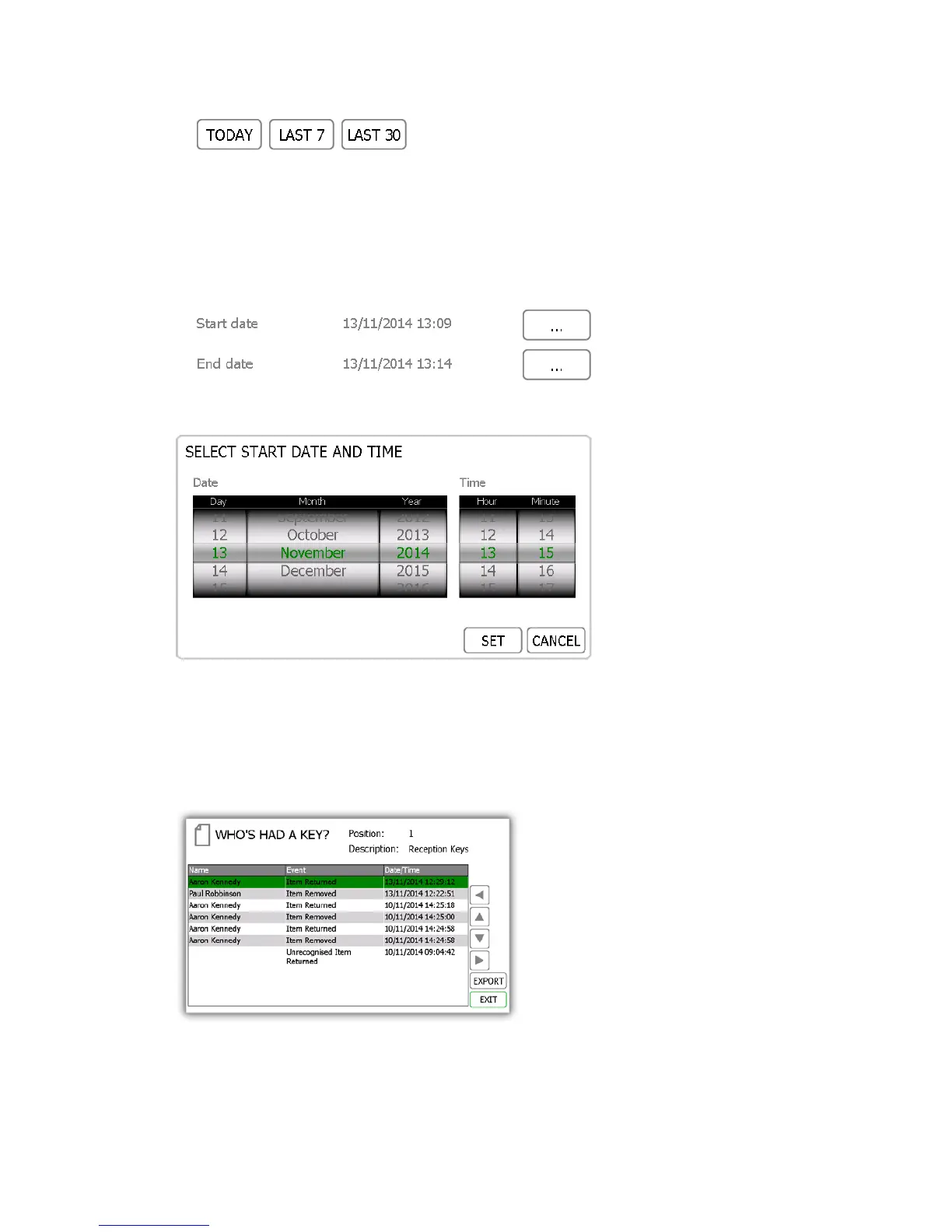
The pre-set buttons will automatically select the date range for you as follows...
• The ‘Today’ button will provide data for selected report beginning at 00:00 of today’s date and end
at the current time you are running the report.
• The ‘Last 7’ button will provide data for the selected report from the last seven days.
• The ‘Last 30’ button will provide data for the selected report from the past 30 days.
To manually filter the date range, select the button next to the start or end date.
A scrollable control will now allow you select the exact date and time you wish to run the report on.
8. Once you have selected your desired date range, click the forward button.
9. The report will now generate and display the list of users who have removed the selected key with the date
range.
NOTE: The key position is noted at the top of the page each time the report is run. E.g. position 1.
10. You can export this information to a USB memory stick if you wish by clicking the Export button. Please
review the Exporting Reports topic at the end of this section for more details.


 To Next Page