V1.1 22/01/15 Page 5 of 28
1. INTRODUCTION
This User Guide has been prepared to assist you (the end user) with the operating basics of the Traka21. Please keep
this guide handy for those times when you need to remember how to Add a Standard User, Add Keys or run a Report
.
This is a precursor to the full Traka21 User Guide (1 5 1 – Traka21 User Guide).
2. SYSTEM AND IFOB DIAGRAMS
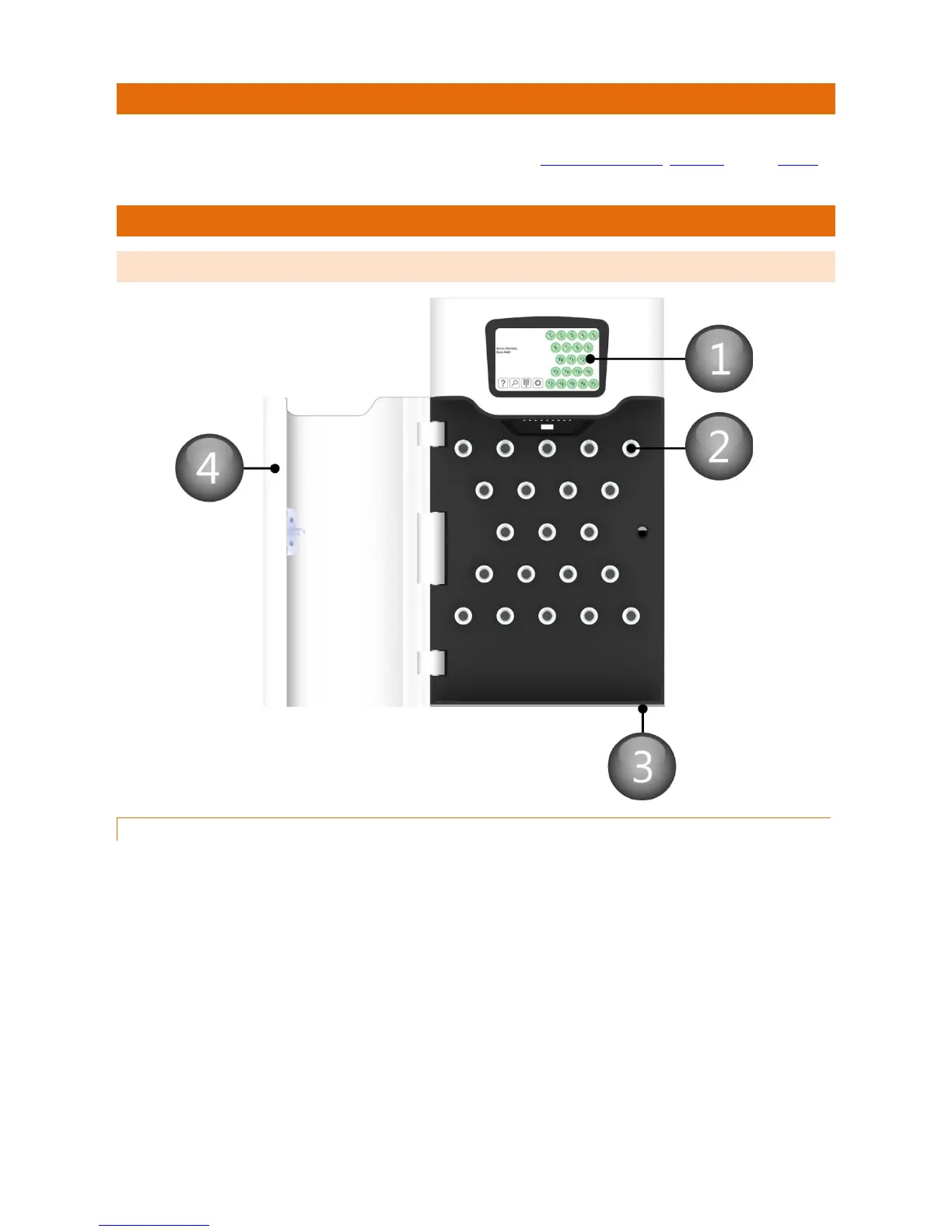
2.1 CABINET DIAGRAM
2.1.1 CABINET DIAGRAM KEY
1. Touch Screen
The Touch sensitive LCD works as a user friendly interface for our embedded application. The numeric
keypad, alphabetic keyboard and receptor buttons are incorporated into this easy to use 5” LCD.
2. Receptor Slot
The Receptor Slot holds and locks the iFob in place. iFobs are only related to authorised users
3. Door Override Cam Lock
This cam lock is a manual override for the cabinet door. Two keys will be supplied with your system; we ask
that you do not keep these keys in the Traka21. In case of system failure, you will be required to access
those keys and use this cam lock as a manual override to open the door.
4. System Door
Each Traka21 system is provided with a solid metal door for security and durability.


 To Next Page