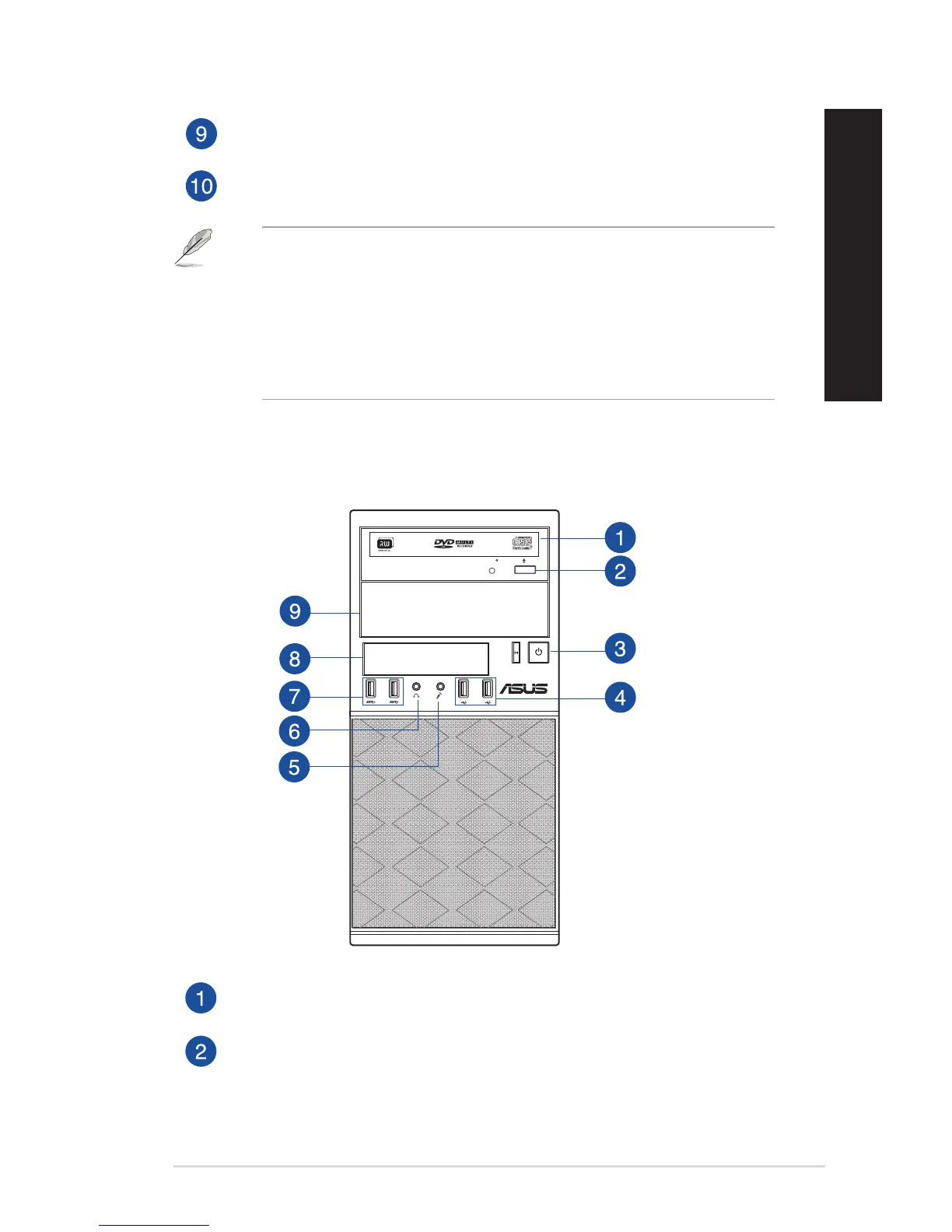
USB 2.0 ports. These Universal Serial Bus 2.0 (USB 2.0) ports connect to USB 2.0 devices
such as a mouse, printer, scanner, camera, PDA, and others.
USB 3.0 ports. These Universal Serial Bus 3.0 (USB 3.0) ports connect to USB 3.0 devices
such as a mouse, printer, scanner, camera, PDA, and others.
• DONOTconnectakeyboard/mousetoanyUSB3.0portwheninstallingaWindows®
operating system.
• DuetoUSB3.0controllerlimitations,USB3.0devicescanonlybeusedunderaWindows®
OS environment and after the USB 3.0 driver installation.
• USB3.0devicescanonlybeusedfordatastorage.
• WestronglyrecommendthatyouconnectUSB3.0devicestoUSB3.0portsforafasterand
better performance from your USB 3.0 devices.
MD330 (BM3CD)
Optical disk drive bay. There is an optical disk drive in this bay.
Optical disk drive eject button. Press this button to eject the optical disk drive tray.
ASUS Desktop PC 13
ENGLISH
ENGLISH



 To Next Page