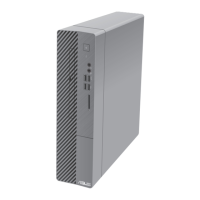
Power button. Press this button to turn on your computer.
USB 2.0 ports. These Universal Serial Bus 2.0 (USB 2.0) ports connect to USB 2.0 devices
such as a mouse, printer, scanner, camera, PDA, and others.
Microphone port. This Mic (pink) port connects a microphone.
Headphone port. This Line In (lime) port connects a headphone with a stereo mini-
plug.
USB 3.0 ports. These Universal Serial Bus 3.0 (USB 3.0) ports connect to USB 3.0 devices
such as a mouse, printer, scanner, camera, PDA, and others.
• DONOTconnectakeyboard/mousetoanyUSB3.0portwheninstallingaWindows®
operating system.
• DuetoUSB3.0controllerlimitations,USB3.0devicescanonlybeusedunderaWindows®
OS environment and after the USB 3.0 driver installation.
• USB3.0devicescanonlybeusedfordatastorage.
• WestronglyrecommendthatyouconnectUSB3.0devicestoUSB3.0portsforafasterand
better performance from your USB 3.0 devices.
3.5 inch drive bays. The 3.5 inch drive bays are for 3.5 inch hard disk drives / memory
card readers.
5.25 inch optical disk drive bay. The 5.25 inch optical disk drive bay is for 5.25 inch
DVD-ROM / CD-RW / DVD-RW devices.
14 Chapter 1: Getting started
ENGLISH
ENGLISH



 To Next Page