2-8
Chapter 2: Knowing the Parts
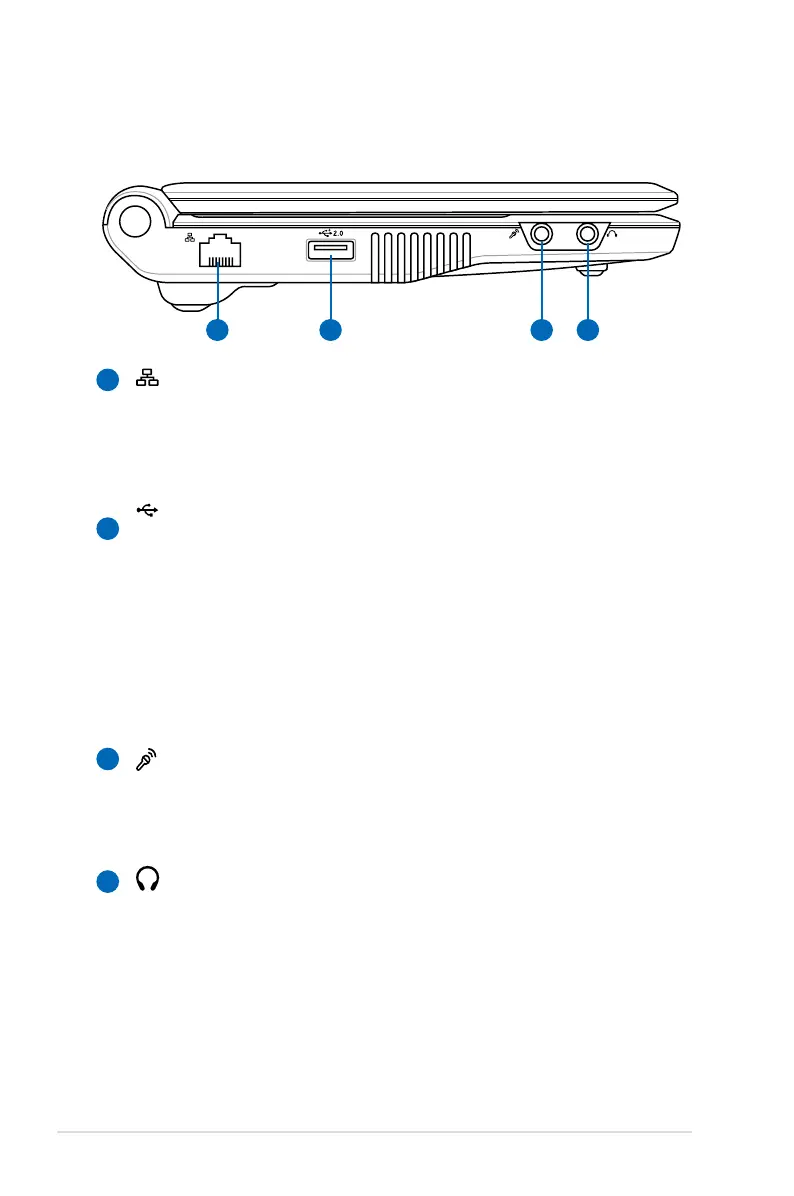
Left Side
Refer to the illustration below to identify the components on this
side of the Eee PC.
LAN Port
The eight-pin RJ-45 LAN port (10/100M bit) supports a
standard Ethernet cable for connection to a local network.
The built-in connector allows convenient use without
additional adapters.
USB Port (2.0/1.1)
The USB (Universal Serial Bus) port is compatible with USB
2.0 or USB 1.1 devices such as keyboards, pointing devices,
cameras, and storage devices, connected in a series up to
12Mbits/sec (USB 1.1) and 480Mbits/sec (USB 2.0). USB
allows many devices to run simultaneously on a single
computer, with some peripherals acting as additional plug-
in sites or hubs. Also, it supports hot-swapping function.
Microphone Jack
The microphone jack is designed to connect the
microphone used for Skype, voice narrations, or simple
audio recordings.
Headphone Output Jack
The 1/8” stereo headphone jack (3.55mm) connects the Eee
PC’s audio out signal to amplified speakers or headphones.
Using this jack automatically disables the built-in speakers.
1
2
3
4














 To Next Page