Chapter 2: Hardware Information
2-16
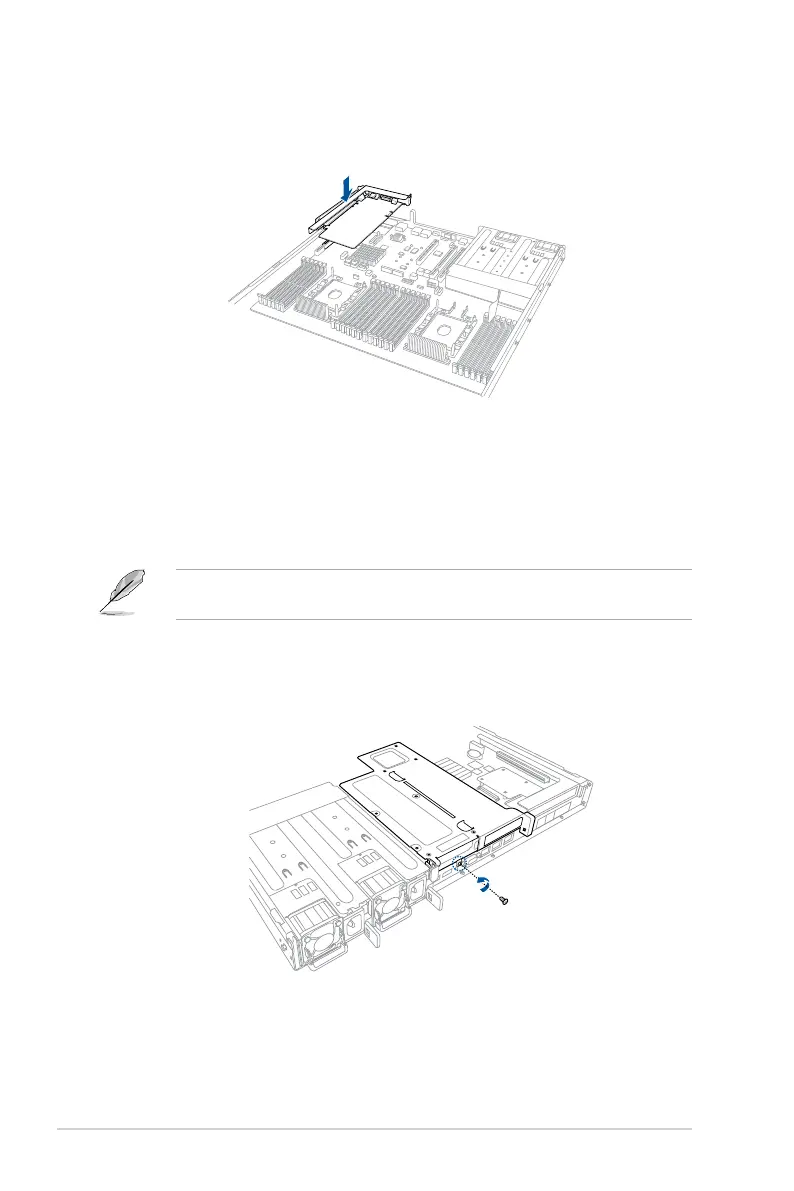
4. InstalltherisercardbracketandthePCIEexpansioncardassemblyintothePCIE
connector on the motherboard. Ensure that the golden connectors of the riser card
bracketisrmlyseatedinplace.
2.5.2 Installing an expansion card to the butterfly riser
card bracket
Thepre-installedbutteryrisercardbracketonthePCIE2slothasonePCIEx8slotandone
PCIEx16slot.AlthoughthePCIEx16slotisphysicallylongerthanthePCIEx8slot,bothof
theseslotsprovidesx8Gen3links.
ToinstallPCI-Ex8(Gen3x8link),proprietarycardstothebutteryrisercardbracket:
1. Removethescrewthatsecuresthebutteryrisercardbrackettothechassis.
ThePCIEx8slotsupportsproprietarycardssuchasASUSPIKEIIseriescards.Installyour
proprietarycardsintothisslottomaximizeitsuse.














 To Next Page