2-9
ASUS RS700-E9 Series
2.4 Hard disk drives
RS700-E9-RS4
Thesystemsupportsfour(4)2.5”or3.5”hot-swapSATA/SASharddiskdrives.Theharddisk
driveinstalledinthestoragedevicebayconnectstothemotherboardSATA/SASportsviathe
SATA/SASbackplane(SASdrivesrequireanoptionalASUSPIKEIIcard).
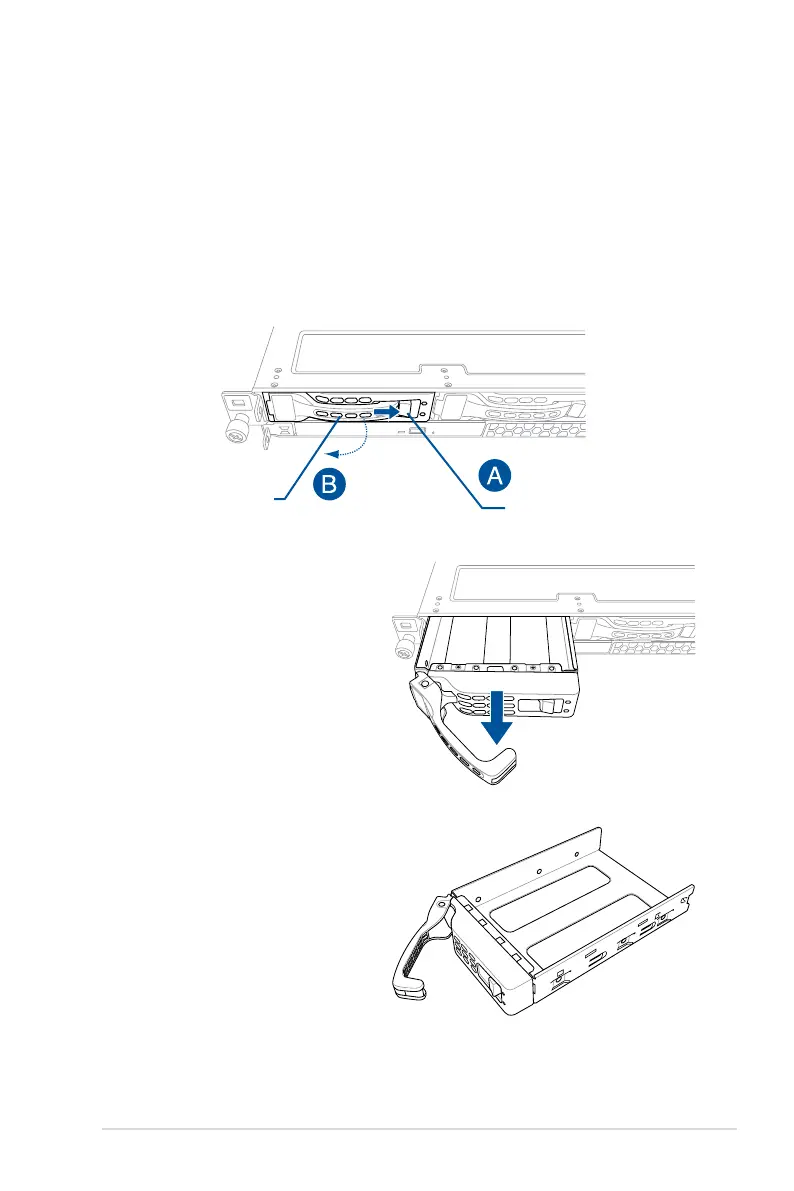
Toinstalla3.5”hot-swapSATA/SASstoragedevice:
1. Push the spring lock to the right (A) then pull the tray lever outward (B) to release the
drive tray. The drive tray ejects slightly after you pull out the lever.
2. Firmly hold the tray lever and pull the
drive tray out of the bay.
3. Placethedrivetrayonaatand
stable surface.
4. PreparetheSATA/SASstorage
device and the bundled set of
screws.
Spring lock
Tray lever














 To Next Page