2-15
ASUS RS700-E9 Series
2.5 Expansion slot
The barebone server comes with two PCIE slots - PCIE1 and PCIE2. These slots are pre-
installedwitharisercardbracketandabutteryrisercardbracketforinstallingPCIE
expansioncards.Youneedtoremovetheseexpansioncardbracketsifyouwanttoinstall
PCIEexpansioncards.
2.5.1 Installing an expansion card to the riser card bracket
The pre-installed riser card bracket on the PCIE1 slot supports Full-Height (FH) and Half-
Length(HL)PCIEx16expansioncards.
ToinstallaPCIEx16(Gen3x16link)FHorHLcardontherisercardbracket:
2. Remove the screw from the metal cover
(A),thenremovethemetalcover(B)
from the riser card bracket.
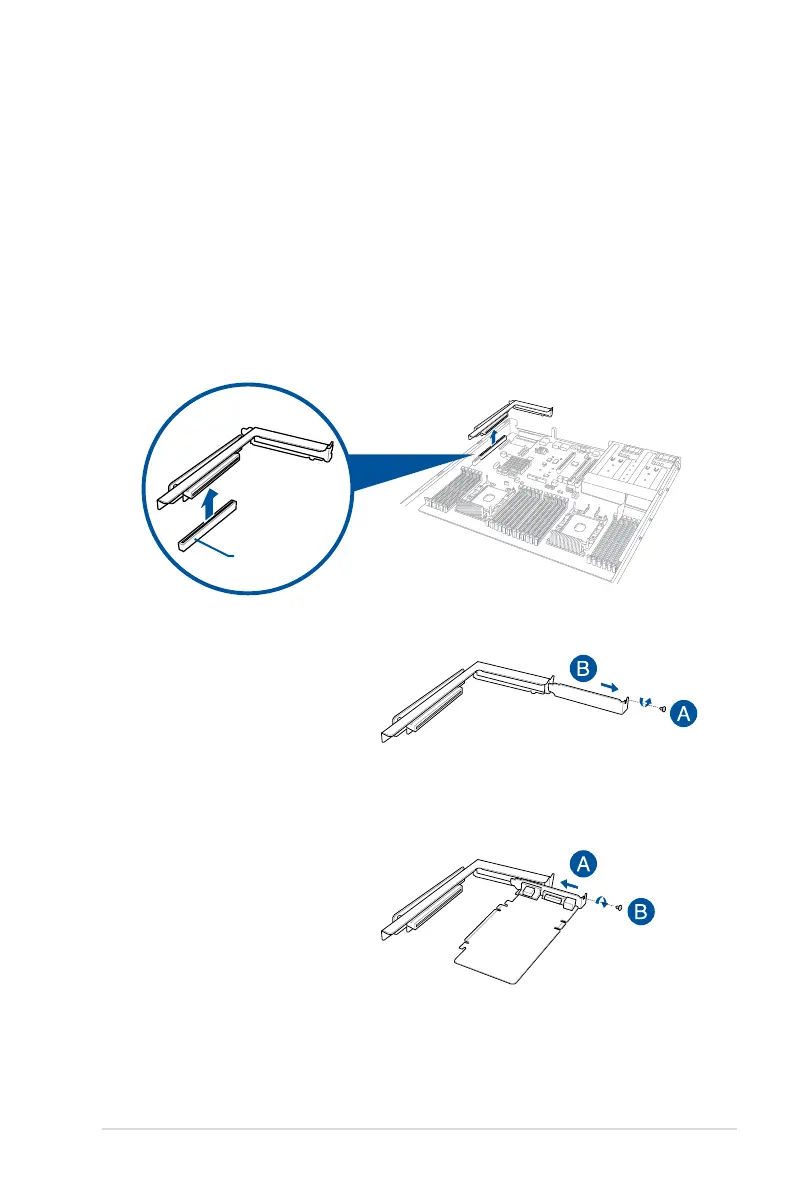
1. Firmlyholdtherisercardbracket,thenpullituptodetachitfromthePCIEx24sloton
the motherboard.
3. InstallthePCIEexpansioncardintothe
risercardbracket(A),thensecurethe
expansioncardwiththescrew(B).
PCIE x24 slot



 To Next Page