2-47
ASUS RS700-E9 Series
2.8 Removable/optional components
Thissectionexplainshowtoinstalloptionalcomponentsintothesystemandcoversthe
following components:
1. System fans
2. Redundant power supply module
3. Slim type optical drive (optional)
Ensure that the system is turned off before removing any components.
You may need to remove previously installed component or factory shipped components
when installing optional components.
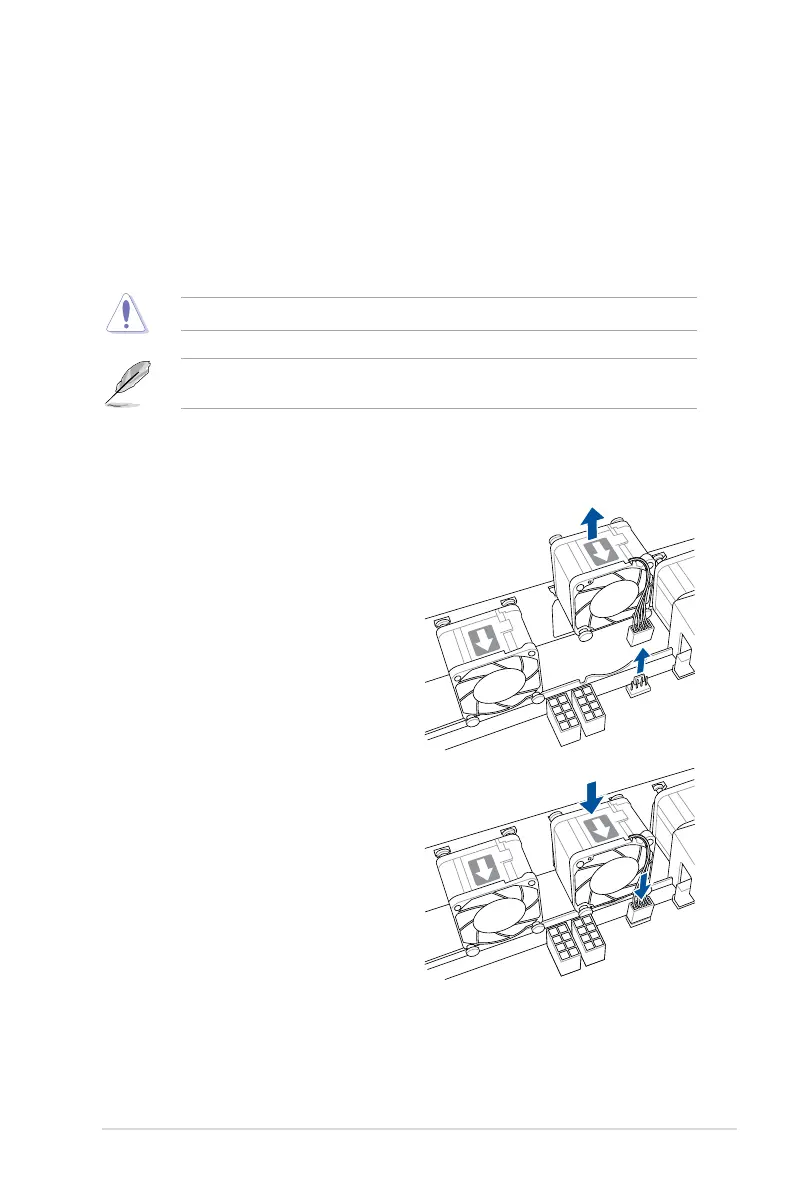
2.8.1 System fans
To uninstall the system fans:
1. Disconnectthesystemfancablefrom
the fan connector on the motherboard.
2. Liftthefan,thensetitaside.
3. Repeat steps 1 to 2 to uninstall the
other system fans.
To reinstall the system fans:
1. Insert the fan into the fan cage. The
airowdirectionalarrowonthefan
should point towards the system rear
panel.
2. Connect the system fan cable to the fan
connector on the motherboard.














 To Next Page