2-23
ASUS RS700-E9 Series
2.5.4 Installing an ASUS HFI-OMNI card
When you install a Intel
®
Xeon
®
Scalable Processors Family Series with OMNI-PATH FABRIC
tosocket2,youcaninstallanASUSHFI-OMNIcardtothex8slotonthebutteryrisercard
bracketandenjoyallthebenetsofthe100GIntel
®
Omni-Path Architecture.
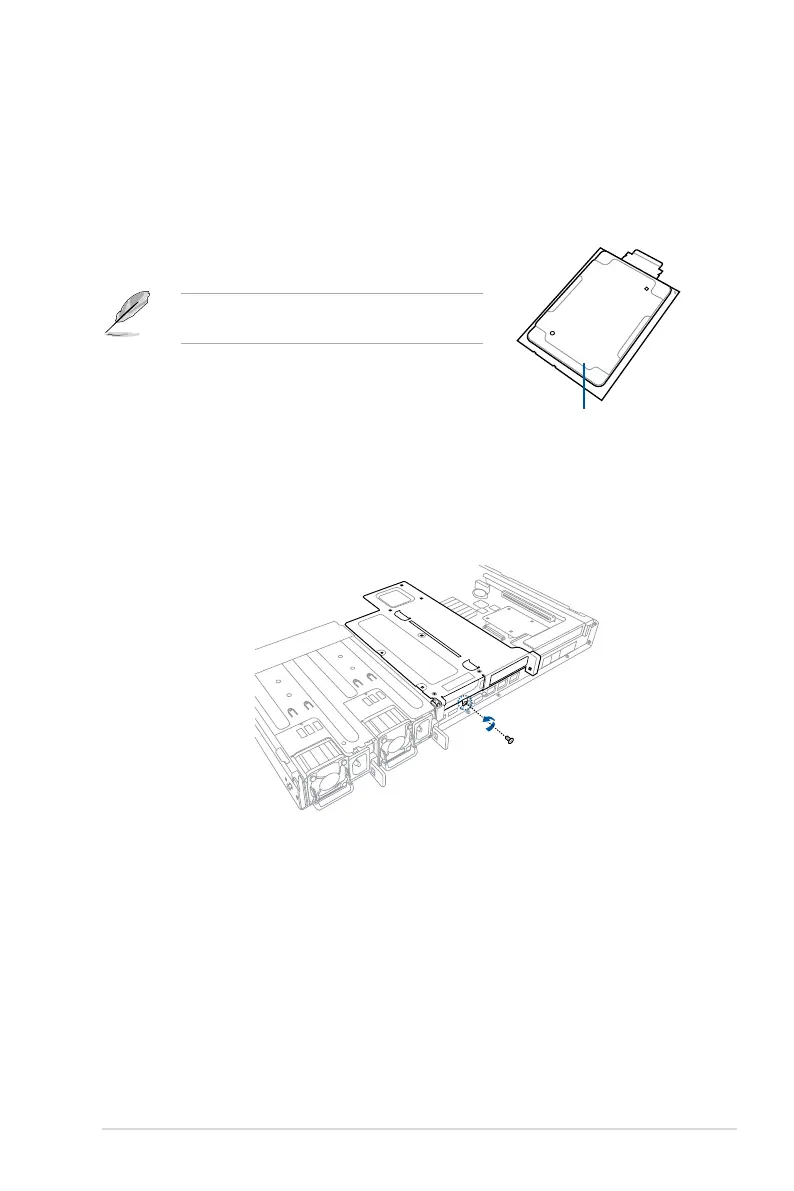
2. Removethescrewthatsecuresthebutteryrisercardbrackettothechassis.
1. Install a Intel
®
Xeon
®
Scalable Processors Family
Series with OMNI-PATH FABRIC to CPU socket 2.
Refer to section
2.2 Central Processing Unit (CPU)
for the steps on installing a CPU.
Intel
®
Xeon
®
Scalable Processors
Family Series with OMNI-PATH FABRIC



 To Next Page