2-39
ASUS RS720-E9 Series
7. Prepare the replacement ASUS
PCIE-NVME2-OCuLinkcard.
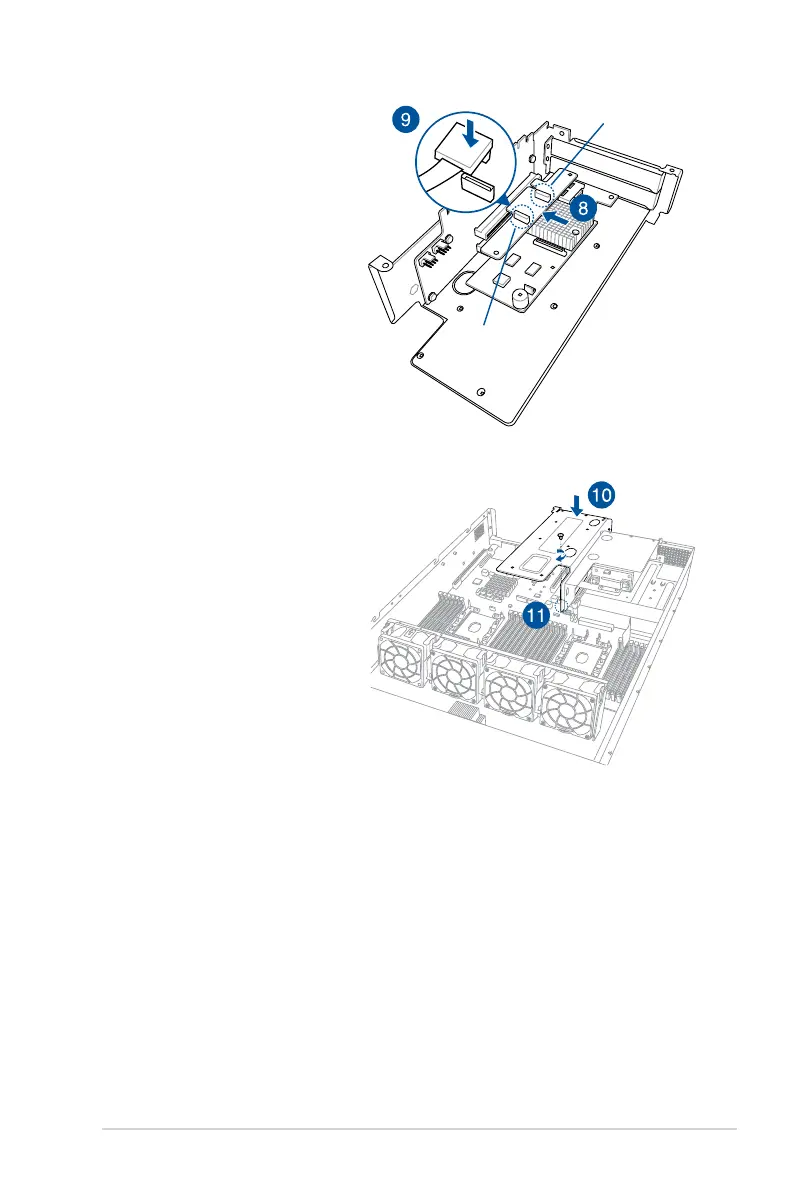
8. InstalltheASUSPCIE-NVME2-
OCuLink card into the PCIE slot.
9. Reconnect the OCuLink cables
to its corresponding slots.
10. Install the riser card bracket 2
andtheASUSPCIE-NVME2-
OCuLink card assembly
into the PCIE3 slot on the
motherboard. Ensure that the
golden connectors of the riser
cardbracket2isrmlyseatedin
place.
11. Secure the riser card bracket 2 to
the motherboard with the screw
removed in step 2.
12. Secure the riser card bracket 2
to the chassis with the screws
removed in step 1.
OCuLink port 2
OCuLink port 1














 To Next Page