Chapter 2: Hardware Information
2-38
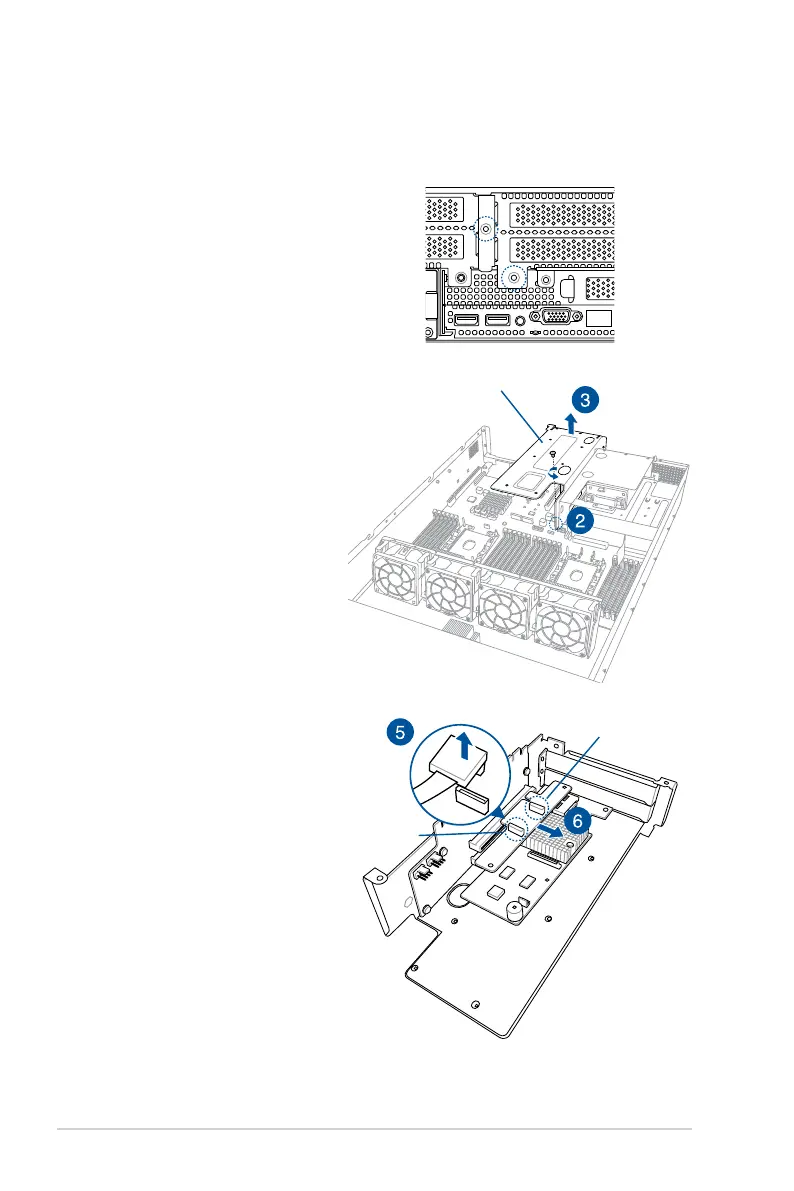
2. Remove the screw that secures
the riser card bracket 2 to the
motherboard.
3. Firmly hold the riser card bracket
2, then pull it up to detach it
from the PCIE3 slot on the
motherboard.
To replace the pre-installed ASUS
PCIE-NVME2-OCuLinkcardonthe
riser card bracket 2:
1. Remove the two screws that
secure the riser card bracket 2 to
the chassis.
4. Place the riser card bracket 2 on
aatandstablesurfaceinthe
orientation as shown.
5. Remove the OCuLink cables
from its corresponding slots.
6. Remove the ASUS PCIE-
NVME2-OCuLinkcard.
Riser card bracket 2
2.5.7 Replacing the ASUS PCIE-NVME2-OCuLink card
(for model with rear bay only)
OCuLink port 2
OCuLink port 1














 To Next Page