Chapter 3: Installation Options
3-4
8. Lift the server chassis and insert it into the rack rail.
Ensurethattherackrailcabinetandtherackpostsarestableandstandingrmlyonalevel
surface.
Ensure that the installed rack rails (left and right) are aligned, secured, and stable in place.
3. Secure the rail components to the rail using the bundled screws.
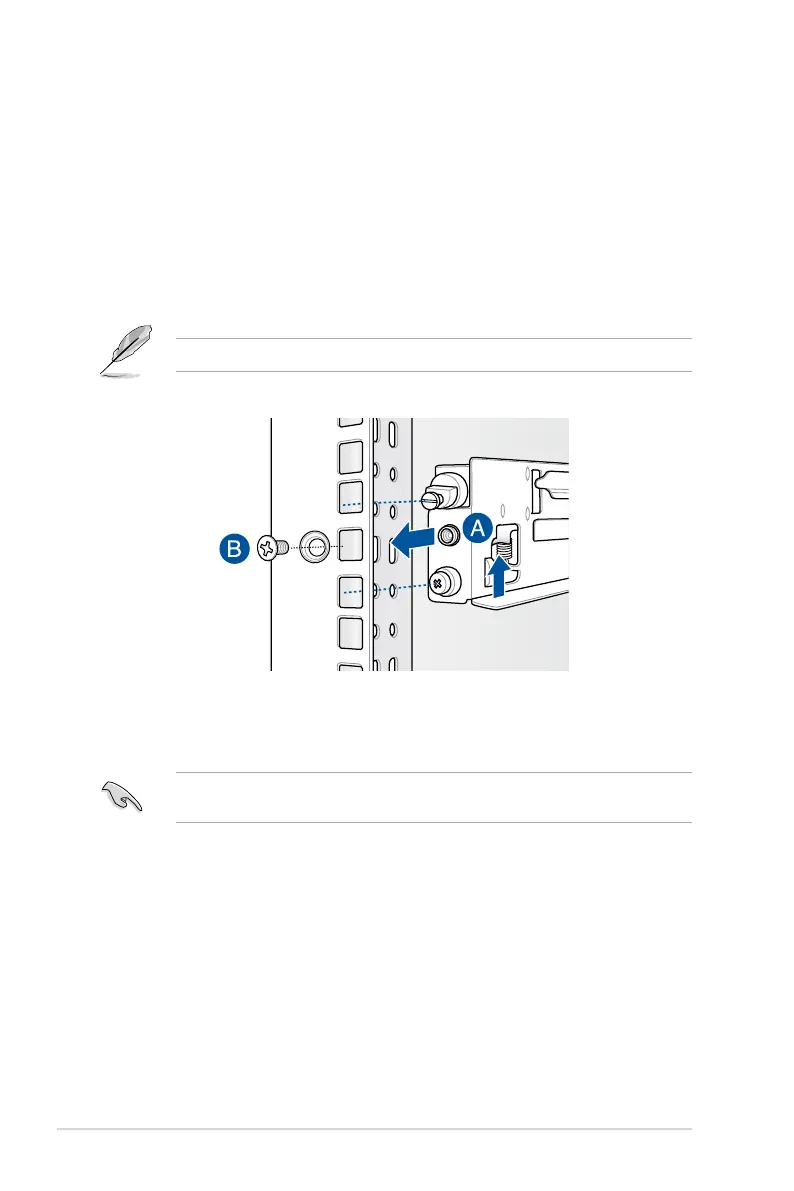
4. Press the spring lock (A) then insert the studs into the selected square mounting holes
on the rack post.
5. Press the spring lock on the other end of rail then insert the stud into the mounting hole
ontherackpost.Extendtherackrail,ifnecessary.
6. (Optional) Use the rail screw and rail washer (B) that comes with the kit to secure the
rack rail to the rack post.
7. Perform steps 3 to 5 for the other rack rail.














 To Next Page