29
IMPORTANT! To protect the hard drive, wait at least 5 seconds after turning OFF
your Notebook PC before turning it back ON.
IMPORTANT! DO NOT use emergency
shutdown while data is being written;
doing so can result in loss or destruction
of your data.
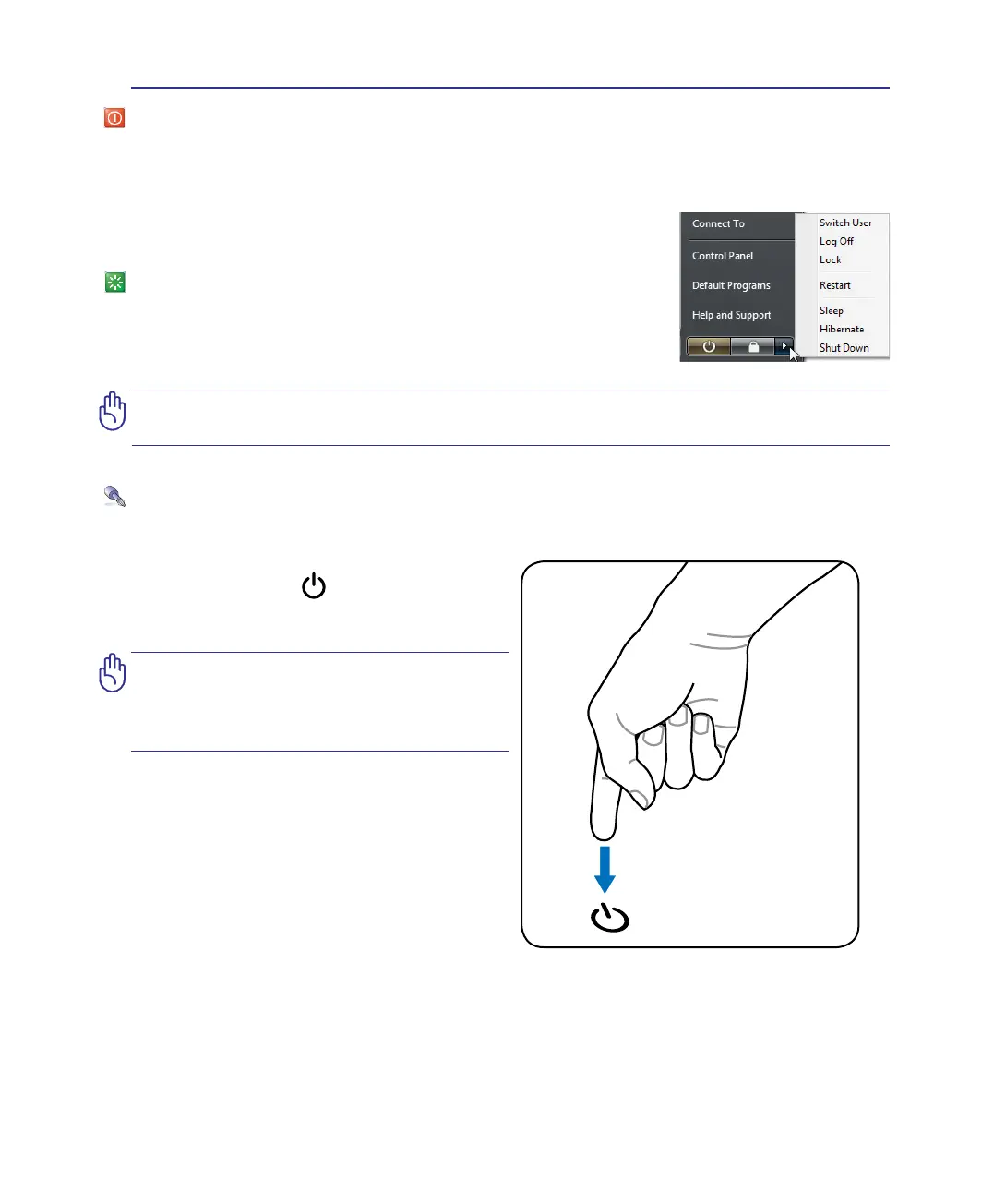
Emergency Shutdown
In case your operating system cannot properly turn OFF or restart, there is an additional way to
shutdown your Notebook PC:
Power Options
The power switch turns ON and OFF the Notebook PC or putting the Notebook PC into sleep or
hibernation modes. Actual behavior of the power switch can be customized in Windows Control Panel
“Power Options.”
For other options, such as “Switch User, Restart, Sleep, or Shut Down,”
click the arrowhead next to the lock icon.
Restarting or Rebooting
After making changes to your operating system, you may be prompted
to restart the system. Some installation processes will provide a dialog
box to allow restart. To restart the system manually, choose Restart.
Hold the power button over 4 seconds.
Getting Started 3


 To Next Page