46
Flash Memory Card Reader
Normally a memory card reader must be purchased separately in order to use memory cards from
devices such as digital cameras, MP3 players, mobile phones, and PDAs. This Notebook PC has a
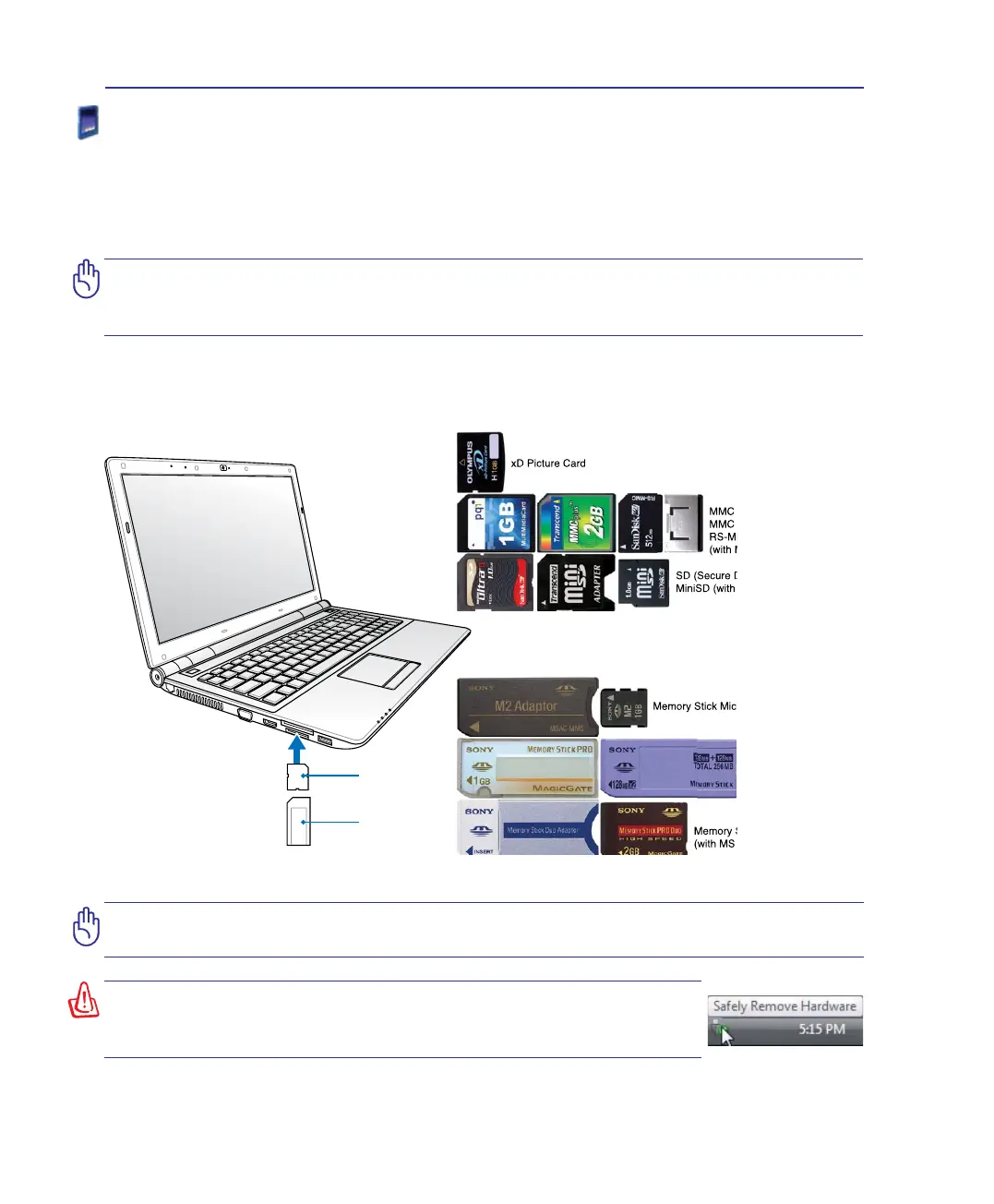
single built-in memory card reader that can use many ash memory cards as shown in the example
below. The built-in memory card reader is not only convenient, but also faster than most other forms
of memory card readers because it utilizes the internal high-bandwidth PCI bus.
WARNING! To prevent data loss, use “Windows Safely Remove
Hardware” on the taskbar before removing the ash memory
card.
IMPORTANT! Flash memory card compatibility varies depending on Notebook PC
model and ash memory card specications. Flash memory card specications
constantly change so compatibility may change without warning.
Flash Memory Card Examples
IMPORTANT! Never remove cards while or immediately after reading, copying,
formatting, or deleting data on the card or else data loss may occur.
Memory Stick Duo/Pro/Duo Pro/MG
(with MS adapater)
Memory Stick (MS)
Memory Stick Magic Gate (MG)
Memory Stick Select
SD (Secure Digital)
MiniSD (with SD adapter)
Memory Stick Micro (with MS adapter)
xD Picture Card
MMC (Multimedia Card)
MMC Plus
RS-MMC (Reduced Size)
(with MMC adapter)
Memory Stick Duo/Pro/Duo Pro/MG
(with MS adapater)
Memory Stick (MS)
Memory Stick Magic Gate (MG)
Memory Stick Select
SD (Secure Digital)
MiniSD (with SD adapter)
Memory Stick Micro (with MS adapter)
xD Picture Card
MMC (Multimedia Card)
MMC Plus
RS-MMC (Reduced Size)
(with MMC adapter)
4 Using the Notebook PC


 To Next Page