34
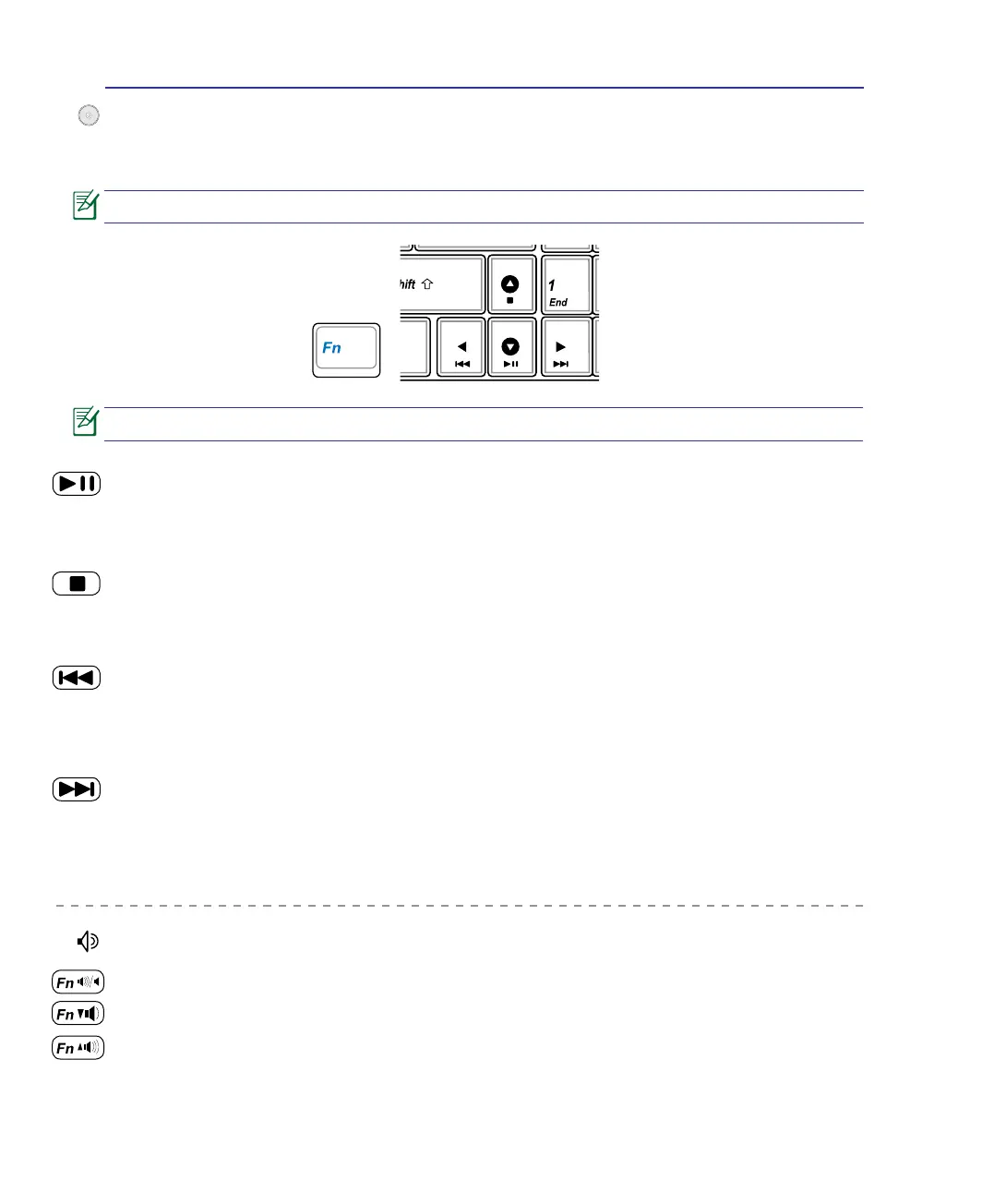
CD Play/Pause
During CD stop, begins CD play.
During CD play, pauses CD play.
CD Stop
During CD stop: Ejects the CD tray.
During CD play: Stops CD play.
CD Skip to Next Track (Fast Forward) & Audio Volume Up
During CD play, this button has two functions:
Track: Push once to skip to the next track during CD playing.
Audio: Hold down to increase audio volume.
Audio Volume Controls
Fn + Speaker Icons (F10): Toggles the audio volume ON and OFF
Fn + Down Speaker Icon (F11): Decreases the audio volume
Fn + Up Speaker Icon (F12): Increases the audio volume
Multimedia Control Keys (on selected models)
The multimedia control keys allow for convenient controlling of the multimedia application in the
Windows OS. The following denes the meaning of each multimedia control key on the Notebook PC.
CD Skip to Previous Track (Rewind) & Audio Volume Down
During CD play, this button has two functions:
Track: The rst push will restart the current track. Second push will skip to the previous track.
Audio: Hold down to decrease audio volume.
Use the [Fn] key in combination with the arrow keys for CD control functions.
Some control key functions may defer depending on Notebook PC model.
3 Getting Started


 To Next Page