38
IMPORTANT! The touchpad is electrostatic
or pressure-sensitive, so DO NOT use any
objects in place of your ngers. Doing so
may damage the touchpad’s surface.
Pointing Device
The Notebook PC’s integrated touchpad pointing
device is fully compatible with PS/2 mouse designed
with two or three buttons and a scrolling knob.
The touchpad is pressure sensitive and contains
no moving parts, hence, mechanical failures can
be avoided. A device driver is still required for
working with some application software.
Using the Touchpad
The touchpad allows you to use your ngers to
move the pointer around or select onscreen items
instead of using a standard mouse. To use the
touchpad, lightly press or tap your nger on the
touchpad.
Moving The Pointer
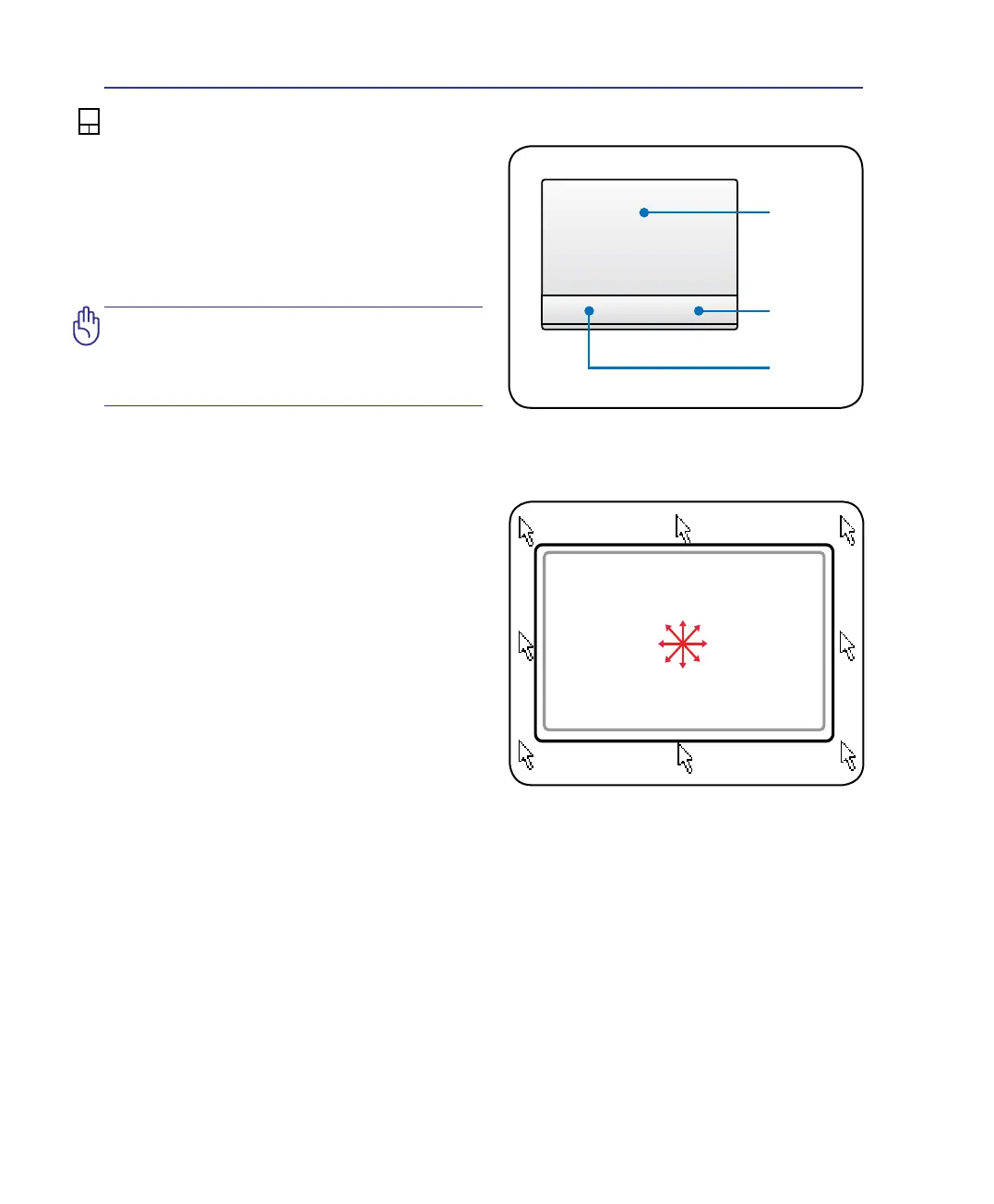
Place your nger in the center of the touchpad and
slide in any direction to move the pointer.
Slide nger
forward
Slide nger
left
Slide nger
backward
Slide nger
right
4 Using the Notebook PC
Pointer
Movement
Right Click
Left Click


 To Next Page