Home
Asus
Laptop
U50F
Page 48
Asus U50F - Page 48
90 pages
Manual
Save Page as PDF
To Next Page
To Next Page
To Previous Page
To Previous Page
Loading...
48
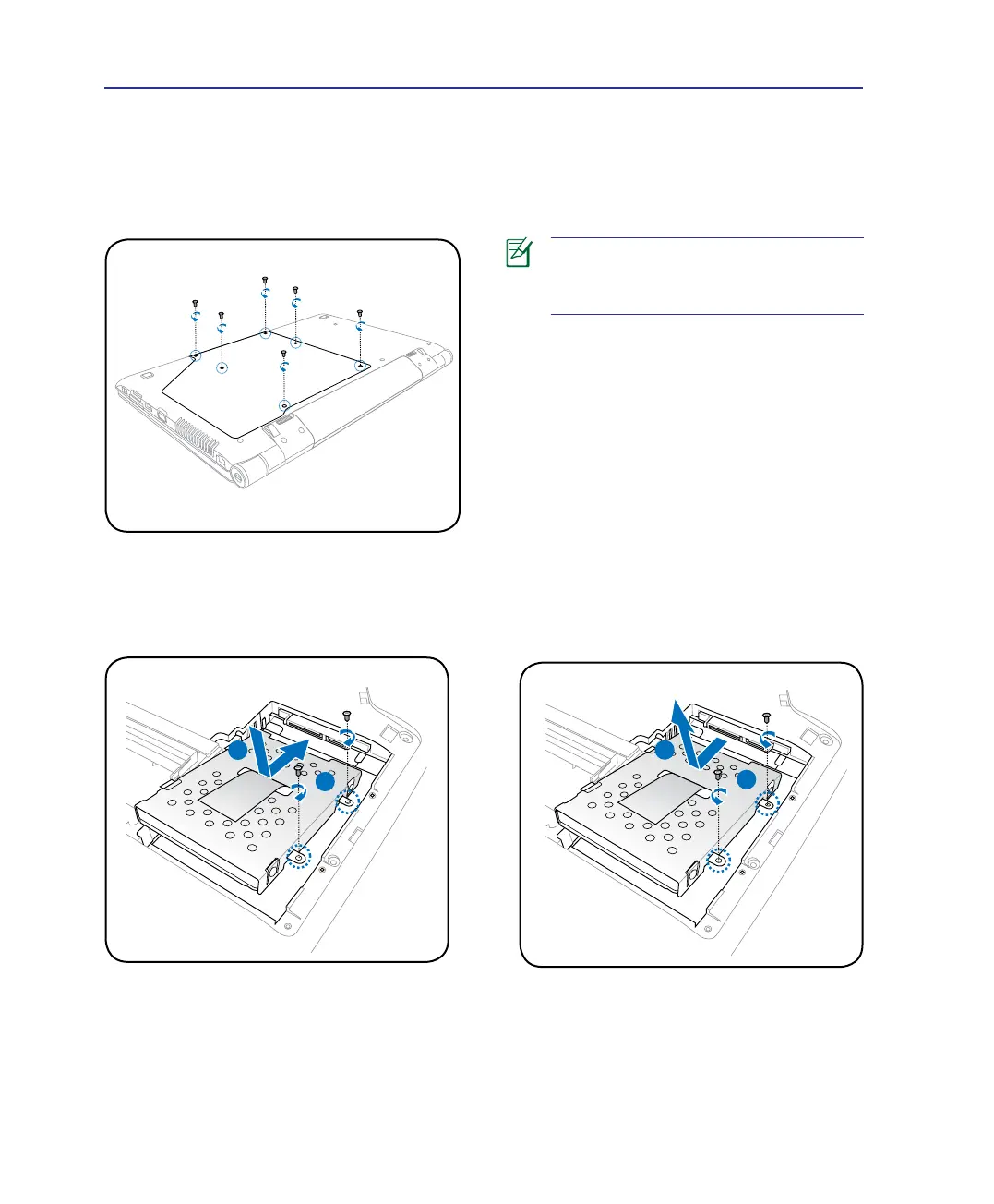
Removing the bottom cover:
Installing the hard disk drive:
Removing the hard disk drive:
Before
installing
or
removing
the
ha
rd
dis
k
dri
ve
,
remo
ve
t
he
b
ott
om
cover on your notebook PC.
2
1
2
1
4
Using the Notebook PC
47
49
Table of Contents
Main Page
Default Chapter
2
Table of Contents
2
1 Introducing the Notebook PC
5
About this User's Manual
6
Notes for this Manual
6
Safety Precautions
7
Transportation Precautions
8
Airplane Precautions
8
Preparing Your Notebook PC
9
Install the Battery Pack
9
2 Knowing the Parts
11
Top Side
12
Display Panel
13
Capital Lock Indicator
14
Bottom Side
15
Battery Pack
16
2 Knowing the Parts
17
Left Side
18
Lan Port
18
Expresscard Slot
19
Right Side
20
Optical Drive
21
Front Side
22
3 Getting Started
23
Power System
24
Using AC Power
24
Using Battery Power
25
Battery Care
26
Powering on the Notebook PC
27
The Power-On Self Test (POST)
27
Checking Battery Power
28
Charging the Battery Pack
28
Power Options
29
Power Management Modes
30
Sleep and Hibernate
30
Thermal Power Control
30
Special Keyboard Functions
31
Colored Hot Keys
31
Colored Hot Keys (Cont)
32
Extended Keyboard
33
Multimedia Control Keys (on Selected Models)
34
Switches and Status Indicators
35
Switches
35
Status Indicators
36
4 Using the Notebook PC
37
Network Connection
37
Pointing Device
38
Using the Touchpad
38
Touchpad Usage Illustrations
39
Dimming the Touchpad
41
Automatic Touchpad Disabling
42
Caring for the Touchpad
42
Storage Devices
43
Expansion Card
43
Optical Drive
44
Listening to Audio CD
45
Removing an Optical Disc
45
Using the Optical Drive
45
Flash Memory Card Reader
46
Hard Disk Drive
47
Memory (RAM)
49
Connections
50
Network Connection
50
Wireless LAN Connection (on Selected Models)
51
Windows Wireless Network Connection
52
Bluetooth Wireless Connection (on Selected Models)
53
Appendix
55
Optional Accessories
56
Usb Flash Memory Disk
56
Usb Floppy Disk Drive
56
Optional Connections
57
Printer Connection
57
Usb Keyboard and Mouse
57
Bluetooth Mouse Setup (Optional
58
Operating System and Software
60
Support Software
60
System BIOS Settings
60
Security Setting
61
Save Changes
62
Common Problems and Solutions
63
Battery Maintenance
64
Updating the Bios
67
Windows Vista Software Recovery
70
Glossary
72
Suspend Mode
75
Declarations and Safety Statements
76
Region Definitions
76
Regional Playback Information
76
Network Compatibility Declaration
77
Fcc Radio Frequency Interference Requirements
79
Federal Communications Commission Statement
79
Ce Mark Warning
80
France Restricted Wireless Frequency Bands
81
Wireless Operation Channel for Different Domains
81
Power Safety Requirement
82
Ul Safety Notices
82
Energy Star Complied Product
83
Takeback and Recycling
84
Cdrh Regulations
86
Laser Safety Information
86
Macrovision Corporation Product Notice
86
Optical Drive Safety Information
86
Service Warning Label
86
Notebook PC Information
88
Copyright Information
90
Limitation of Liability
90
Service and Support
90
Related product manuals
Asus U46E
100 pages
Asus U24A
100 pages
Asus U32U
102 pages
Asus UX305
108 pages
Asus UX325
98 pages
Asus UX433
104 pages
Asus UX410
100 pages
Asus UX32L
102 pages
Asus U36JC
102 pages
Asus UX392
102 pages
Asus UX305F
110 pages
Asus UX305C
100 pages


 To Next Page