3.4 Parametering the setting
3.4.1 General
Only the parameters accessible to levels:
U – End user.
I – Commissioning level.
S - Engineer level.
Are described in this document.
The access levels are specied in the second column of
the table by means of the letters U, I and S.
The OEM parameters are not described and require a
manufacturer's access code.
3.4.2 Setting parameters
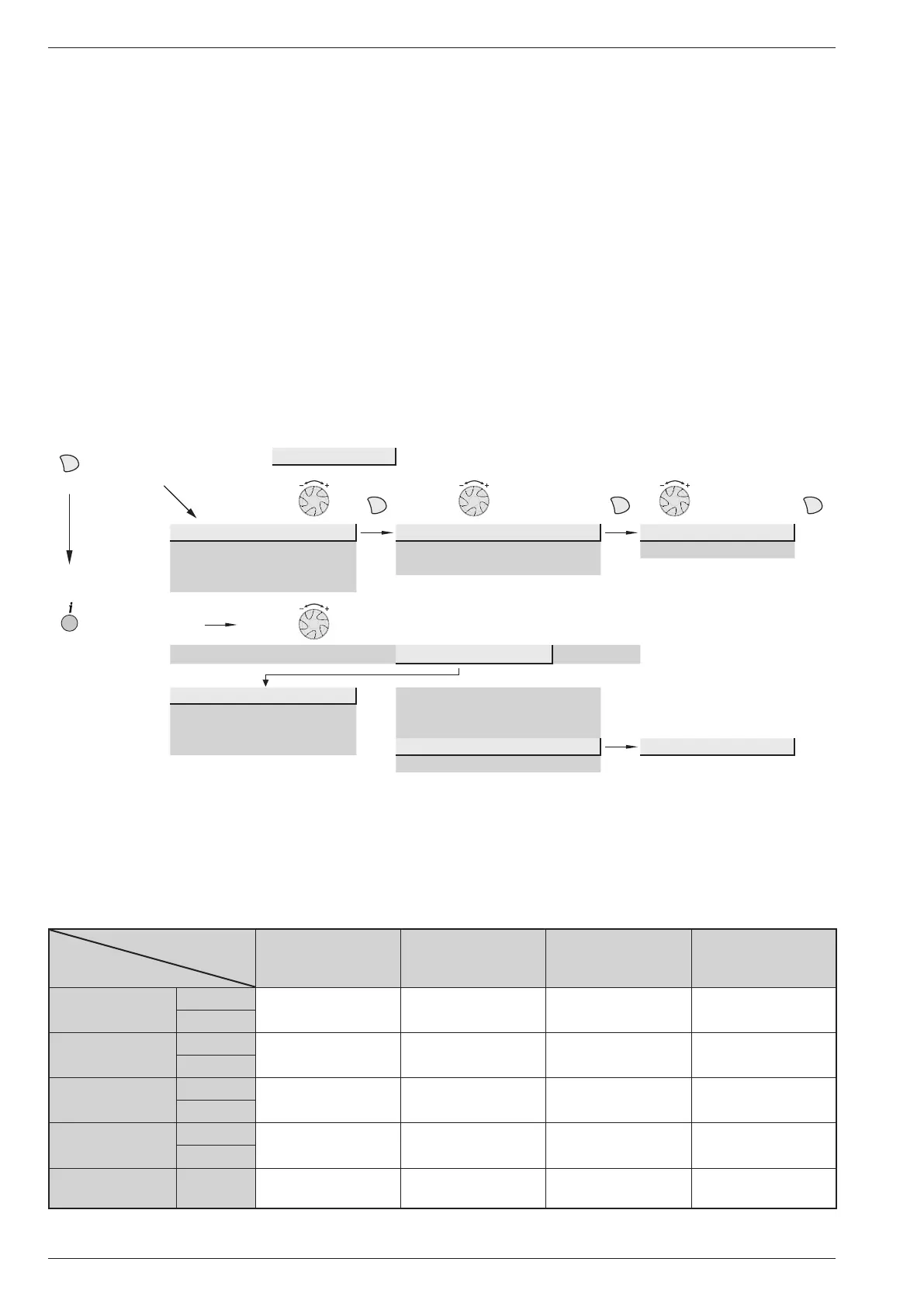
- Choose the desired level.
- Scroll the menu list.
- Choose the desired menu.
- Scroll the function lines.
- Choose the desired line.
- Adjust the parameter.
- Check the setting by pressing OK.
- To return the menu, press ESC.
If no setting is made for 8 minutes, the screen returns
automatically to the basic display.
3.4.3 Recommended settings according to the heat emitters installation
Very Low Temperture
radiators / Floor
heating-cooling
Low Temperature
radiators
Dynamic radiators or
fan coil heaters
Classic radiators
Heating curve
slope
720 (CC1)
from 0,25 to 0,5 from 0,5 to 1,25 from 0,4 to 1,1 * from 1,25 to 3
1020 (CC2)
Heating curve
displacement
721 (CC1)
0 0 4 * 0
1021 (CC2)
Flow temp
setpoint mini
740 (CC1)
factory setting
(17 °C)
factory setting
(17 °C)
30 or 35 °C *
factory setting
(17 °C)
1040 (CC2)
Flow temp
setpoint maxi
741 (CC1)
50 °C
factory setting
(55 °C)
65 °C * 65 °C
1041 (CC2)
Charging time
limitation (DHW)
5030
factory setting
(90mn)
factory setting
(90mn)
40mn
factory setting
(90mn)
Brief press
End user
OK OK
Time (of day) and date Hours / minutes 1 Hours 1...24 h
User interface Day / Month 2 Minutes 0...60 min
CC1 time programme Year 3
...
Press for
3 seconds
End user Commissioning
Specialist
OEM
Time (of day) and date
Hours / minutes 1
User interface
Day / Month 2
CC1 time programme Year 3
...
Start of summer time 4 01.01...31.12
End of summer time 5
Installation and operating manual "1578 - EN"
Heat Pump alféa extensa duo +
- 40 -



 To Next Page