7.2 Resetting the service timer
Timer card resetting procedure
To reset the timer card, continue as follows:
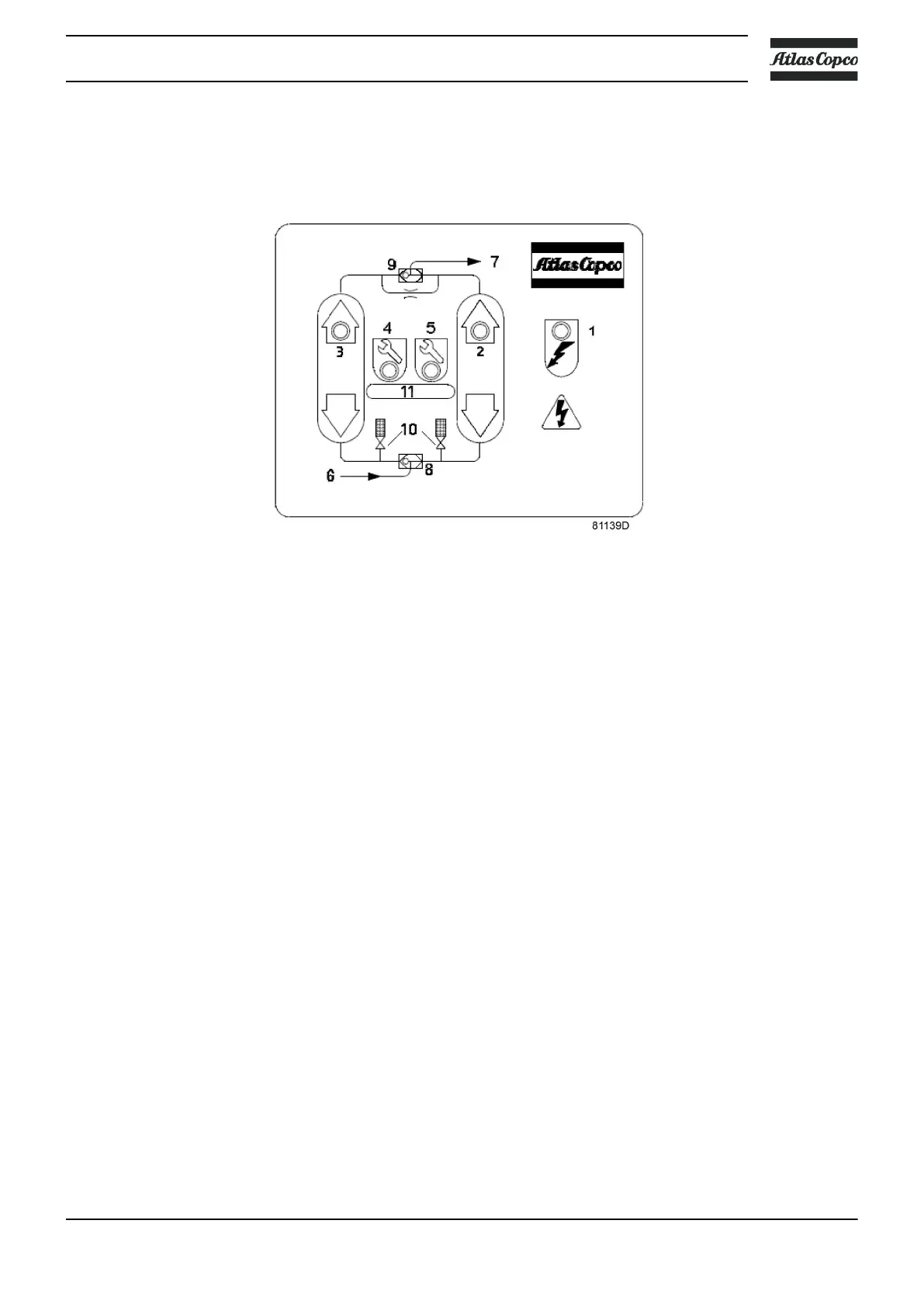
• At 11500 hours, the orange service warning LED (4) will flash, indicating that service will be needed
soon.
• At 12000 hours, the red service alarm LED (5) will flash, indicating that service is required.
• Close off the dryer as described in the stopping procedure, see section Operating instructions.
• Pull out the power cord of the dryer. LED (1) (power on) will extinguish. Perform the service plan as
scheduled.
• Restart the dryer by reconnecting the power cord. Refer to the start-up procedure. The counter will
restart, the dryer operating LED (1) becomes alight, and LED's (2 and 3) indicate the cycling status of
the dryer. The service warning LED (4) or service alarm LED (5) are still flashing.
• Reset the timer card by putting the service magnet during 5 seconds over the reed relay, located
behind the blue bar icon indicated by area (11) of the control panel. When the reset switch is closed,
the orange and red LED's illuminate continuously. Next, take the magnet away from the blue bar icon.
The service warning and alarm LED (4 and 5) will go out.
The timer card has now been reset and normal operation continues. The service counter has been reset to
0 .
7.3 Disposal of used material
Used filters or any other used material (e.g. desiccant, lubricants, cleaning rags, machine parts, etc.) must
be disposed of in an environmentally friendly and safe manner, and in line with the local recommendations
and environmental legislation.
Electronic components are subject to the EU Directive 2012/19/EC for Waste Electrical and Electronic
Equipment (WEEE). As such, these parts must not be disposed of at a municipal waste collection point.
Refer to local regulations for directions on how to dispose of this product in an environmental friendly
manner.
Instruction book
2920 7083 21 51


 To Next Page