The MicroTorque electric screwdriver is a precision tool designed for controlled tightening applications, primarily used in industrial settings where accurate torque and reliable fastening are critical. This quick start guide, published on March 29, 2019, with printed matter number 9839 1629 01, provides essential information for setting up and operating the device. It is applicable to products such as ETD MT and QMC, indicating its versatility across different models within the MicroTorque range.
Function Description
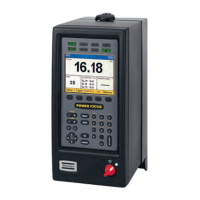
The MicroTorque electric screwdriver system is comprised of the screwdriver tool itself, the MT Focus 6000 controller, and a PC running ToolsTalk MT software. The core function of the system is to execute precise tightening programs, ensuring consistent and accurate torque application. The MT Focus 6000 controller acts as the central processing unit, managing the tightening process, storing Psets (tightening programs), and communicating with both the screwdriver tool and the PC. The ToolsTalk MT software on the PC allows users to configure the controller, create and modify Psets, and monitor tightening data.
The system facilitates the creation of customized tightening programs, known as Psets, which define parameters such as target torque, speed, and other control strategies. Once a Pset is created and activated, the electric screwdriver performs the tightening operation according to these predefined settings. This ensures that fasteners are tightened to the exact specifications required, which is crucial for product quality, safety, and longevity.
Important Technical Specifications
While specific numerical technical specifications like torque ranges or motor power are not detailed in this quick start guide, the document highlights the system's architecture and connectivity, which are key technical aspects.
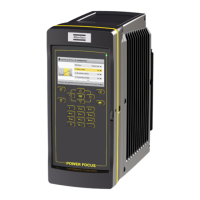
- Controller: MT Focus 6000. This controller is the brain of the system, responsible for executing tightening programs and managing communication.
- Connectivity:
- Tool to Controller: Connects via a dedicated MT tool cable. This ensures a robust and reliable connection for power and data transmission between the screwdriver and the controller.
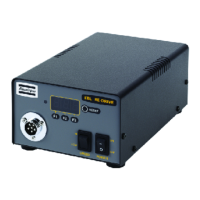
- Controller to Power Supply: Essential for powering the MT Focus 6000 controller and, subsequently, the screwdriver tool.
- Controller to PC: Can be connected via a USB cable or an Ethernet cable. This dual connectivity option offers flexibility for integration into various network environments and direct PC communication.
- Software: ToolsTalk MT. This PC-based software is integral for configuration, programming, and data management.
- Configuration Options: The system supports various configurations for buttons and lights, tool types, and controller settings, indicating a high degree of adaptability to different application requirements.
Usage Features
The MicroTorque system is designed for ease of use and flexibility in industrial environments.
- Quick Start Process: The guide outlines a straightforward setup process:
- Connect the tool to the MT Focus 6000 controller.
- Connect the MT Focus 6000 to a power supply and switch it on.
- Connect the MT Focus 6000 to a PC via USB or Ethernet.
- Open ToolsTalk MT software on the PC.
- Configure the system using ToolsTalk MT, including buttons, lights, tool, and controller settings.
- Create a Pset (tightening program) in ToolsTalk MT.
- Mount the bit onto the screwdriver and activate the Pset to begin operations.
- Programmability (Psets): The ability to create and adjust Psets in ToolsTalk MT is a core usage feature. This allows users to define specific tightening parameters for different applications, ensuring precision and repeatability. The guide mentions referring to the ToolsTalk MT Configuration Manual (98390526) for detailed instructions on Pset creation, indicating comprehensive programming capabilities.
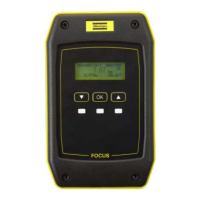
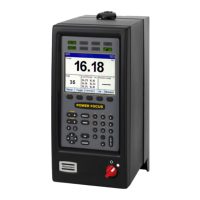
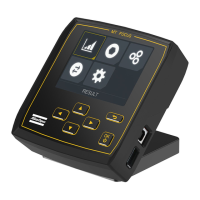
- User Interface: The MT Focus 6000 controller likely features a user-friendly interface, as suggested by the visual representation in the guide, which shows buttons and a display. The configuration options for "Buttons and lights" further imply customization of the controller's immediate operational feedback and controls.
- Safety Warning: A critical usage feature is the emphasis on safety. The warning about the tool potentially rotating during system initialization highlights the importance of keeping body parts, hair, and clothing away from the tool. This underscores the need for operators to be aware of potential hazards during operation and setup.
Maintenance Features
While the quick start guide does not explicitly detail maintenance features, it implicitly points to aspects that contribute to the system's maintainability and longevity.
- Documentation: The reference to the "ToolsTalk MT Configuration Manual (98390526)" for more information on configuration and Pset creation is a key maintenance-related feature. Comprehensive documentation is essential for troubleshooting, advanced configuration, and ensuring the system operates optimally over time.
- Software-Based Management: The reliance on ToolsTalk MT software for configuration and programming suggests that many adjustments and diagnostic checks can be performed digitally. This can simplify maintenance tasks, allowing for remote diagnostics or easier parameter adjustments without extensive physical intervention.
- Modular Design (Implied): The system's breakdown into tool, controller, and PC components suggests a modular design. This can simplify maintenance by allowing individual components to be serviced or replaced if necessary, rather than requiring the replacement of the entire system.
- Bit Mounting Instructions: The guide mentions referring to "PI for instructions of mounting the bit." This indicates that proper bit mounting procedures are documented, which is crucial for tool performance, accuracy, and preventing premature wear or damage to the bit and the tool itself. Correct bit mounting is a fundamental aspect of routine maintenance and operational readiness.
- Safety Instructions: The general warning to "Read all safety warnings and instructions" and to "Save all warnings and instructions for future reference" is a foundational maintenance practice. Adhering to safety guidelines not only protects personnel but also helps prevent damage to the equipment that could arise from improper handling or operation. This proactive approach to safety contributes to the overall reliability and lifespan of the device.
In summary, the MicroTorque electric screwdriver system is a sophisticated, programmable fastening solution designed for precision and reliability in industrial applications, supported by comprehensive software and clear operational guidelines.

 Need help?
 General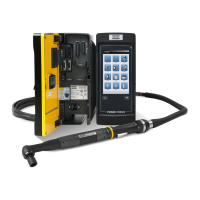



 To Next Page

