!
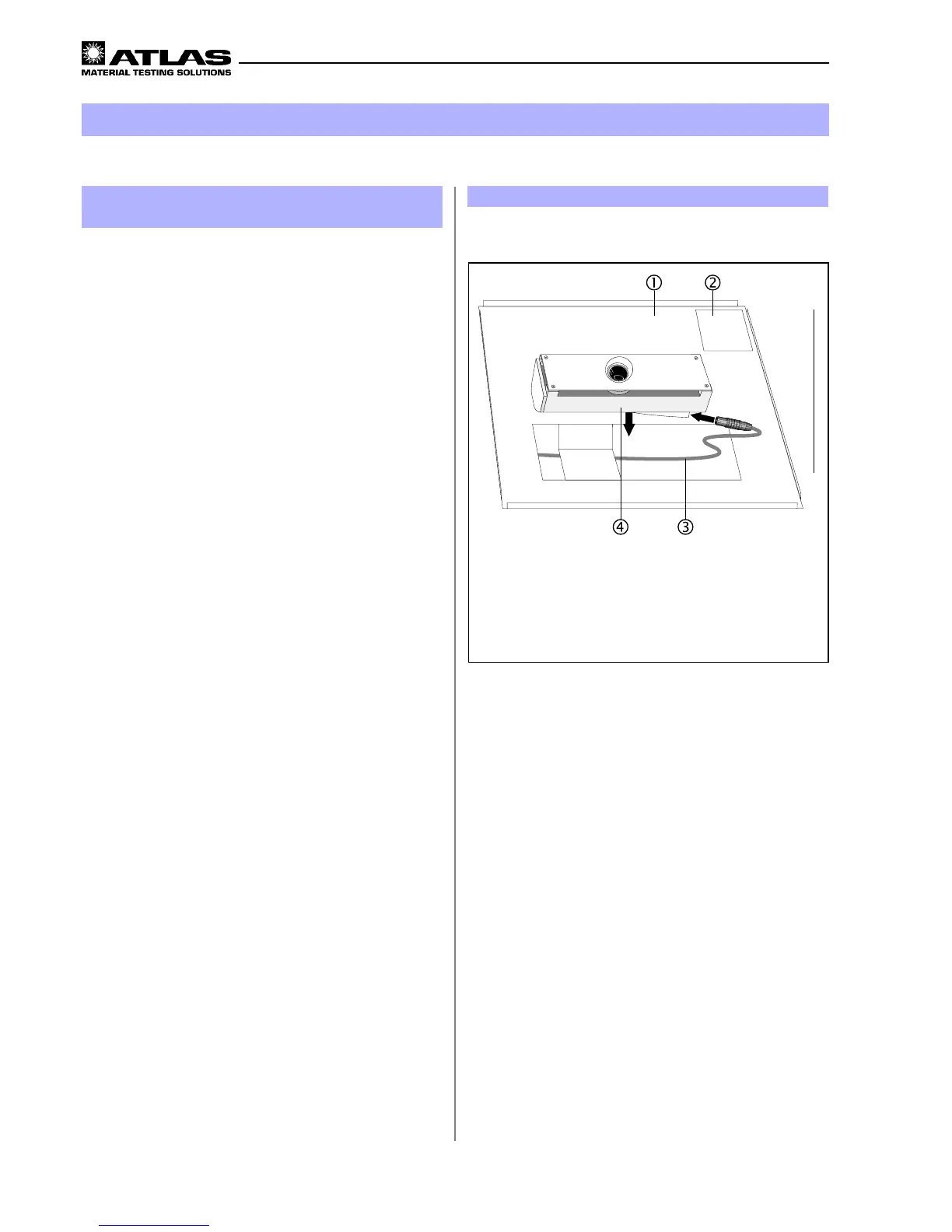
Adapter table for XenoCal Global-Sensor
"
Sensor receptacle for the black standard sensor
#
Connector cable
$
XenoCal Global-Sensor
8
Calibration
Figure 22
8.1 Calibration of the irradiance with the
XenoCal Global-Sensor
The equipment should be calibrated before and after eve-
ry test.
The optional XenoCal Global Sensor and an adapter for
the XenoCal sensor (see chapter 5 “Accessories”) are
necessary for the calibration.
1. Mount the adapter table
!
for the XenoCal Global-
Sensor instead of the sample table in the test cham-
ber.
Mount the adapter table
!
in such a way that the sen-
sor receptacle for the black standard sensor
")
is at
rightfront side of the test chamber.
2. Insert the connector cable
#
in the XenoCal Global
sensor
$
and guide the connector cable
#
below
the adapter table
!
to the PC.
3. Start the program XenoSoft and ONLINE-measure-
ment.
4. In the Suntest XLS+, start the calibration program and
input the irradiance at which the calibration is to be
done.
5 After about 30 minutes, input the actual irradiance va-
lue displayed in the XenoSoft to the corresponding
field in the display unit and confirm with “ENTER”.
6. At the end of the automatic cooling period, the cali-
bration factor calculated by the software is indicated
in the display unit and automatically taken into account
during every subsequent test.
Test chamber door side



 To Next Page
 Loading...