Setting Up Your t68WD
Assembling the AC Adapter
15
2.2 Assembling the AC Adapter
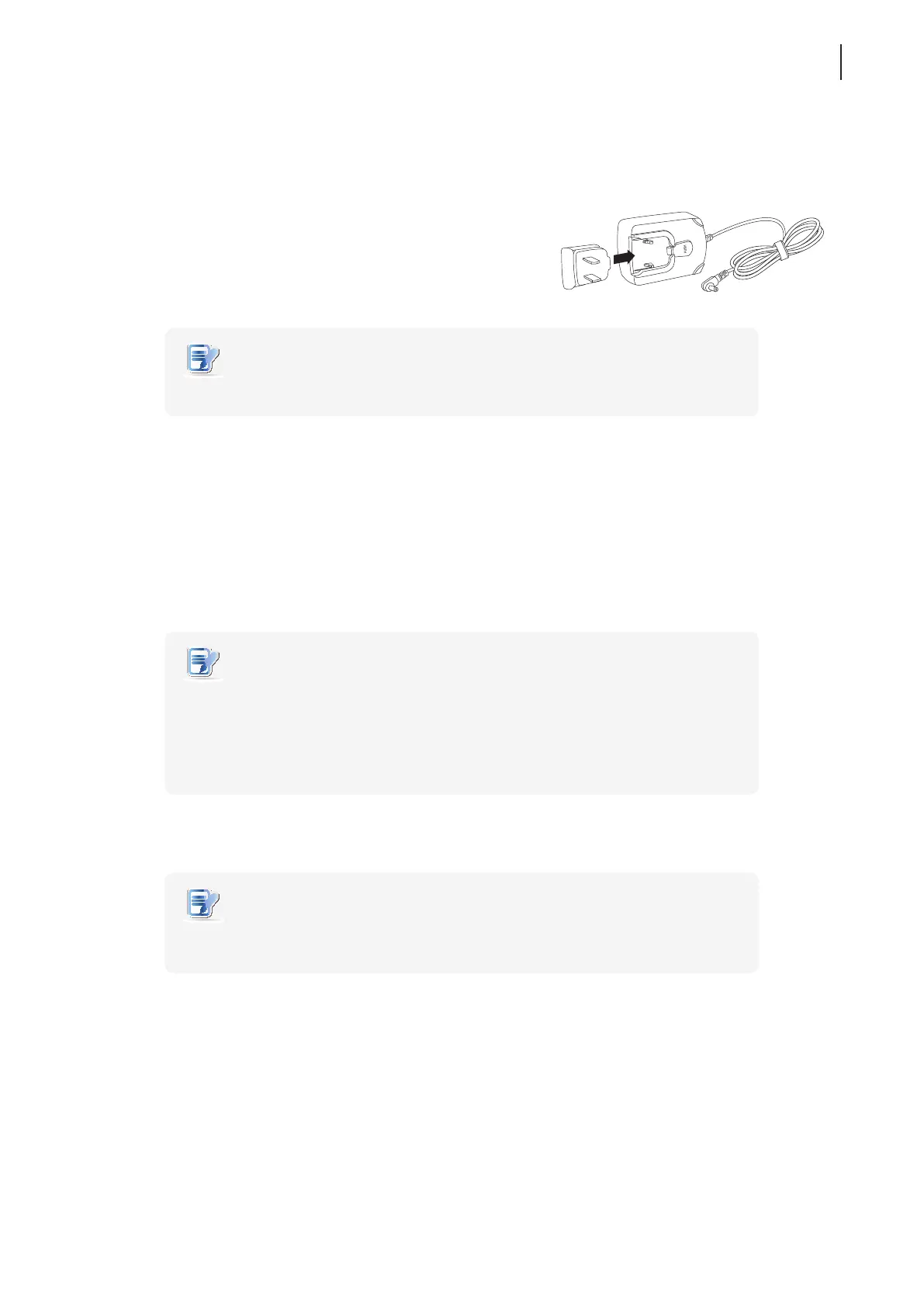
To assemble the AC adapter for your t68WD, please do the following:
1. Unpack your thin client package and take out the AC adapter
and its detached plug.
2. Slide the plug into the AC adapter until it clicks into place.
NOTE
• The supplied plug may vary, depending on dierent areas.
2.3 Getting Connected
To make connections for your t68WD, please do the following:
1. Connect your t68WD to your local network with an Ethernet cable.
2. Connect a keyboard and mouse to your t68WD.
3. Connect and turn on the monitor(s).
NOTE
• In case that only the VGA monitor is available, use the supplied DVI-I to VGA
adapter to connect your t68WD and monitor.
• Please note that you need to connect and turn on your monitor(s) before powering
up your thin client. Otherwise, the client may fail to set an appropriate resolution
for the monitor(s).
4. Connect your t68WD to a power outlet using the AC adapter included in the package.
NOTE
• For detailed instructions on how to assemble the supplied AC adapter, please refer
to section “2.2 Assembling the AC Adapter” on page 15.
5. Connect other peripherals for your t68WD if needed.



 To Next Page