37
3 Menu Functions and Settings
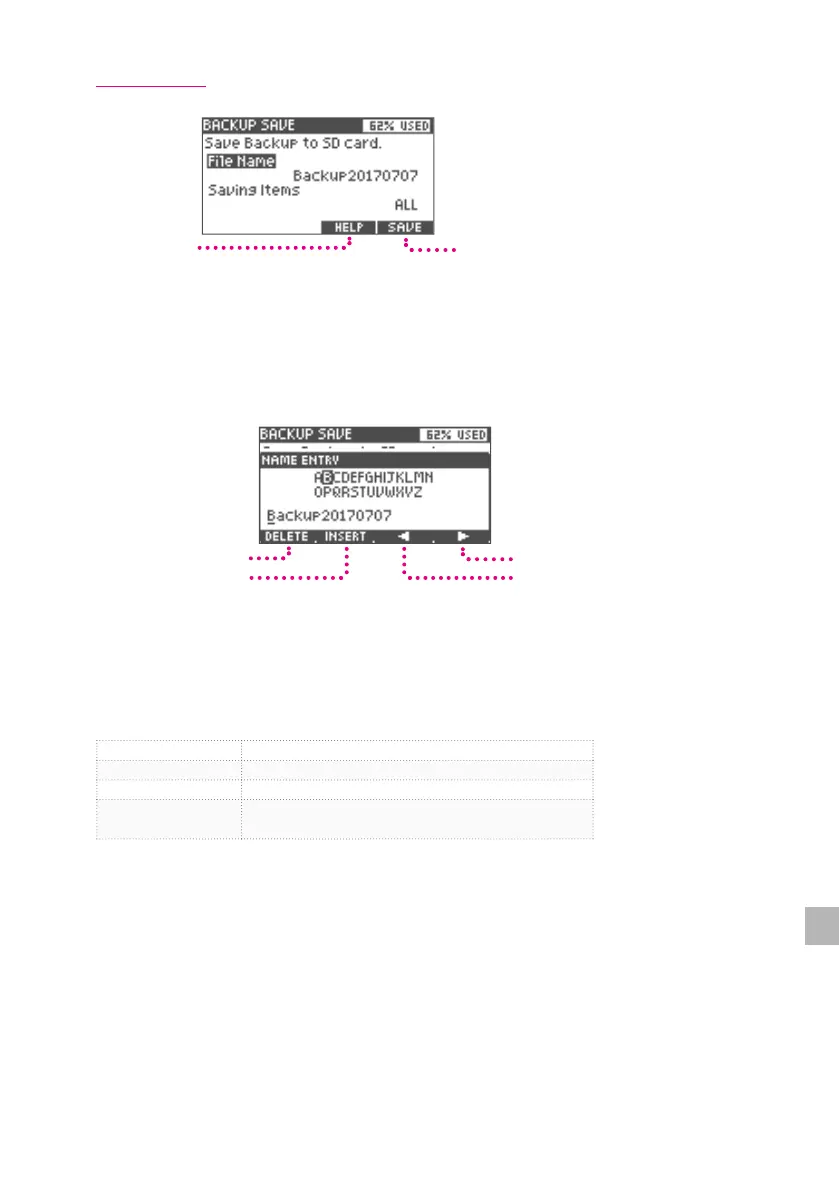
Backup Save
Save
Help Screen
Display
1
Use the value knob to select "File Name" and press the [ENTER] button.
2
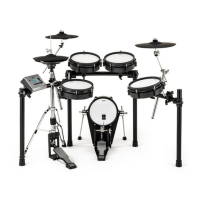
Enter the backup le name.
Move the position with the pointer and change the characters with the value knob.
Right pointer
Left pointer
Insert character
Delete character
3
Press the [ENTER] button to conrm the le name.
4
Use the value knob to select "Saving Items" and press the [ENTER] button.
5
Select the item you want to save and conrm by pressing the [ENTER] button.
KIT Use to save all drum kits.
TRIGGER Use to save the trigger settings.
KIT+TRIGGER Use to save the drum kit and trigger settings.
ALL
Use to save all data stored in the xD3.
*Data can not be read into other xD3s.
6
Press the [5] (SAVE) button to save settings.
When saving is completed, the word "Completed" is displayed.
*When ALL is selected, it takes about 10 minutes to complete the save process.


 To Next Page