38
3 Menu Functions and Settings
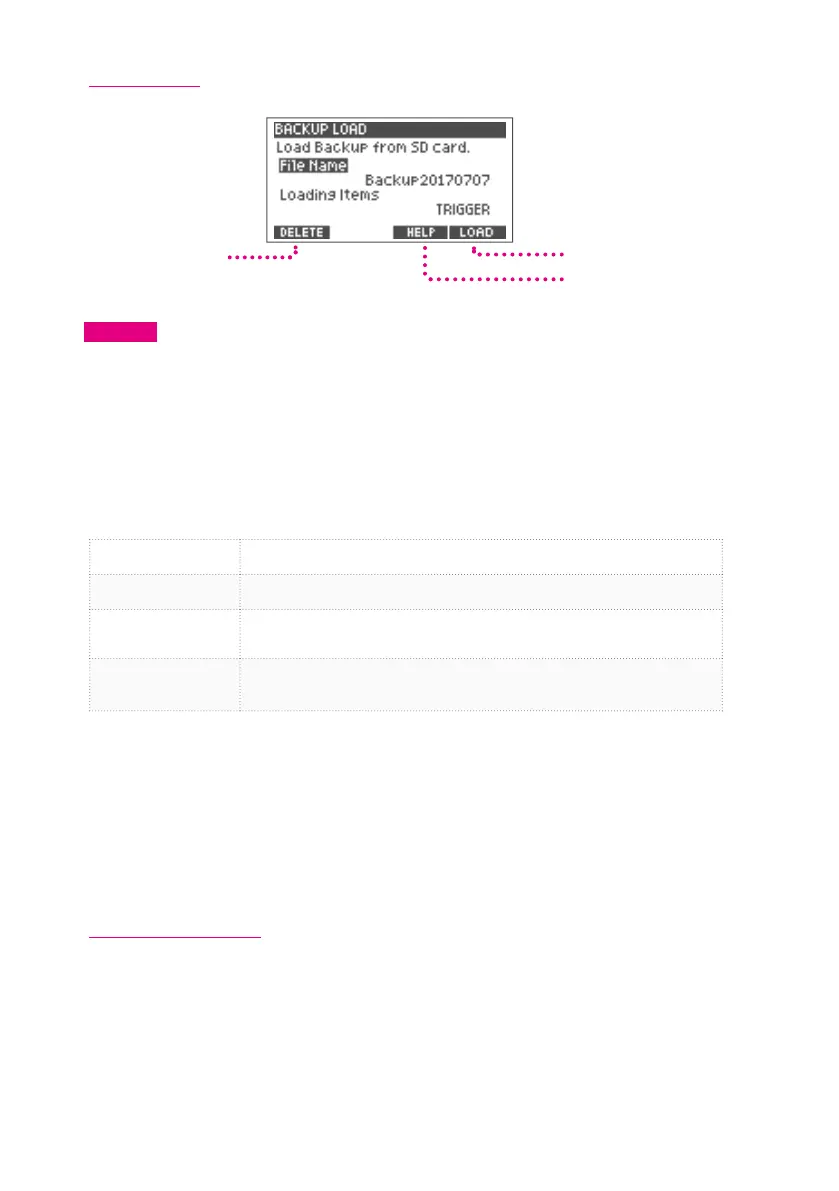
Backup Load
Load Backup
Help Screen Display
Delete Backup
CAUTION
When you load the backup, some or all of the data in the xD3 will be deleted.
1
Use the value knob to select "File Name" and press the [ENTER] button.
Use the value knob to select the le name to load and press the [ENTER] button to conrm.
2
Use the value knob to select "Loading Items" and press the [ENTER] button.
3
Select the item to load and press the [ENTER] button to conrm.
*The following items can be selected depending on the contents of the backup.
KIT
Select to load drum kits.
*The drum kits in the xD3 will be deleted and overwritten.
TRIGGER
Select to load the trigger settings.
*The trigger settings in the xD3 drum module will be deleted and overwritten.
KIT+TRIGGER
Select to load drum kit data and trigger settings.
*The drum kit data and trigger settings in the xD3 drum module will be overwritten and
deleted.
ALL
Select to load all data in xD3.
*All data in the xD3 drum module will be deleted and overwritten.
*Data saved in other xD3s can not be loaded and read.
4
[5] Press the (LOAD) button to save.
When loading is complete, the screen indicates “Completed.”
*When ALL is selected, it takes about 10 minutes to load.
5
Press the power button to turn o the power, and then turn the power on again.
Backup is now loaded.
Deleting Backup File
Delete the backup le in the SD card.
1
In step 1 above, select the le to be deleted.
2
Press the [2] (DELETE) button.
Conrmation message will be displayed.
3
[5] Press the (OK) button to delete.
To cancel the deleting process, press the [2] (CANCEL) button.


 To Next Page