39
3 Menu Functions and Settings
Import Kit
1
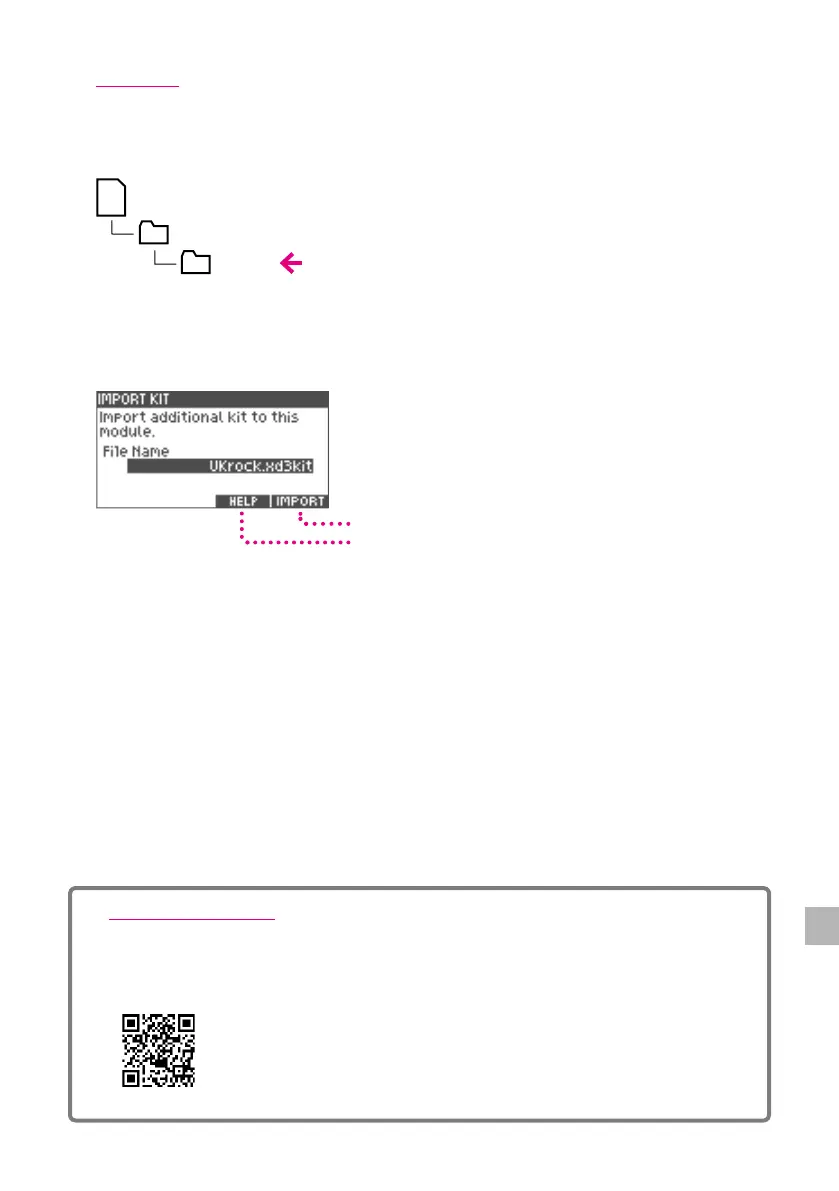
Place the downloaded drum kit le (xxxx.xd3kit) in the Import folder of the SD card.
SD Card
ATV
Import
*If there is no "Import" folder, it will be created once the SD card is inserted into the xD3.
2
Insert the SD card in to the xD3.
Import
Help Screen Display
3
Select the drum kit le to import with the value knob.
4
Press the [5] (IMPORT) button to import.
When the import is completed, the screen indicates “Completed.”
*It takes about 5 minutes to import.
*The downloaded drum kit le can only be imported in to the xD3 when the encoded product IDs match.
If the products IDs do not match, the following message is displayed.
"This xD3 doesn’t have permission to import "xxxx"."
ATV SOUND STORE
You can purchase additional drum kits for the xD3 drum module on the website linked below.
*To obtain your product ID required for account registration, please see p.33.
http://store.atvcorporation.com/


 To Next Page