24
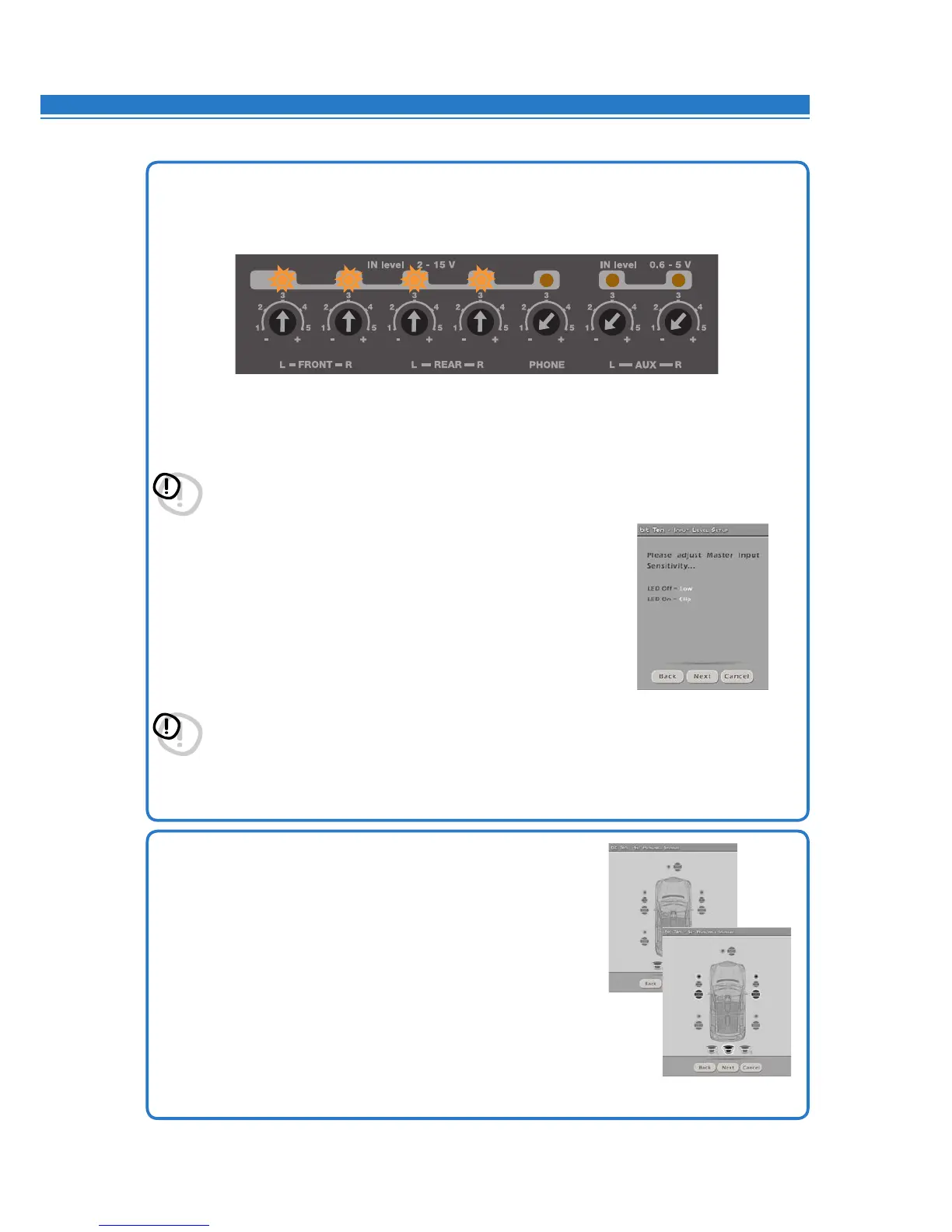
9. How to calibrate the bit Ten IN Level inputs.
This procedure is delicate and requires particular attention. Improper execution can invalidate the final acoustic results.
The bit Ten outputs must be disconnected from the amplifiers.
•Whileplayingtrack1oftheCD,turnthefirstknobtowardsthehighestsensitivity(position+).
•WhentheorangeLEDlightsuporflashes,stopturningandgobackslightlyuntiltheLEDturnsoff.
•ItisnormalfortheLEDtoflashbriefly;thisindicatecorrectsensitivitycalibration.
•Repeattheprocedurefortheother3Front/Rearknobs.
•Notethecalibrationlevelusedbytheheadunitvolumecontrol.
Press BACK to go back to the previous step.
Press NEXT to go ahead with the setup procedure.
Press CANCEL to exit the procedure.
WARNING:
Audiosystemsinstalledasstandardbycarmanufacturersoftencomewithequalizedoutputs.
This means that the response curve is not flat and the difference between the highest and the lowest
levelcanreach6dB.BycalibratingthedevicesothattheLEDneverlightsup,thebitTensensitivitymay
besuboptimal(low)andyoumayexperiencenoise(whistle)onthespeakers.AfewquickLEDflashes
indicate only a small distortion when handling maximum peaks (very occasional) of music tracks.
Ifthesourceisnotequalized,responseisflatandtheLEDswillalwaysbeonoralwaysoff.Inthiscase,
calibratingiseasybecauseyouwillsimplyneedtoadjusttheknobssothattheLEDsturnoffjustbelow
the point they turn on.
10. How to select the speakers available in the system.
Speakers can be selected just by clicking on them.
If the left tweeter, left midrange or left woofer are selected, the software
provides the ability to automatically also activate the right tweeter, right
midrange or right woofer. Once started, this choice sets the dedicated
crossover type and frequencies with default settings. If you do not use
passive crossover filters, each speaker corresponds to an output channel.
The bit Ten has 5 output channels; not using passive crossover filters
allows you to pilot 5 amplified channels. Of course you can select more
than 5 speakers, in which case the system will help implement passive
crossovers.
Press BACK to go back to the previous step.
Press NEXT to go ahead with the setup procedure.
Press CANCEL to exit the procedure.
Important:
Somefactoryheadunitsrequirealowloadimpedancetoenabletheoutputs
(usuallytheRearsection).Ifduringthecalibrationprocesstheinputsignallevelcan’tbeadjusted,
it could be necessary to connect in parallel a 47Ω - 3W resistor to the input cables of the channels
showing the issue.
8


 To Next Page