25
13.
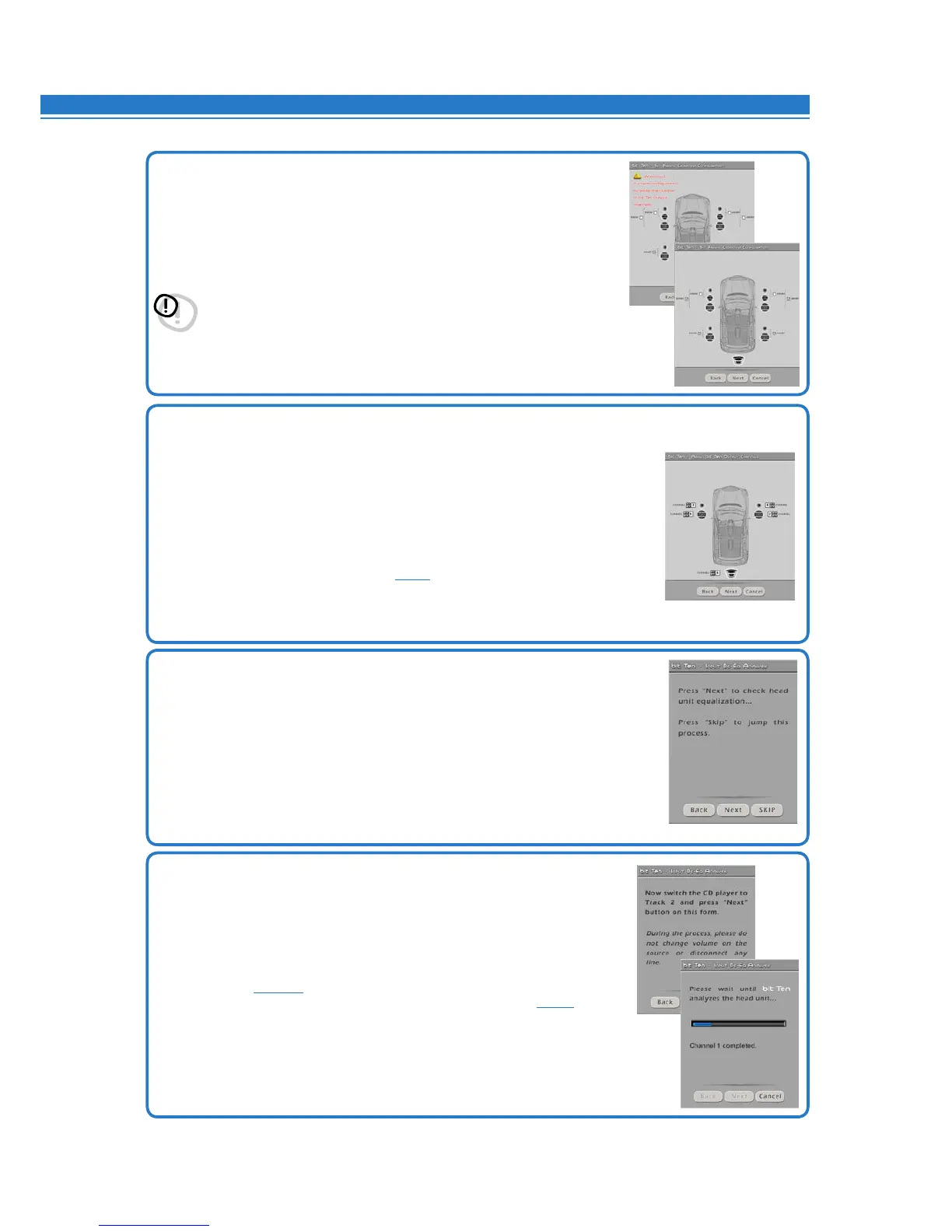
Source equalization analysis.
Sourcede-equalization(De-Eq)isonlyrequiredifthesourceisequalized.
OEM sources (installed as standard by the car manufacturer) often have a high output
level(speakeroutput)withpresetequalizationthatcannotbedeleted.
Byreplacingthefactoryaudiosystem(speakersand/oramplifiers),thisequalization
is harmful.
The bit Tenhasanautomaticproceduretoverifyequalizationand,ifpresent,
can eliminate it.
Press BACK to go back to the previous step.
Press NEXT to go ahead with the setup procedure.
Press CANCEL to exit the procedure.
14.
Equalization analysis: setting the source.
To run this procedure, follow the instructions as listed below:
• Disconnectallthebit Ten RCA outputs (Front, Rear, Sub) if already connected
to the amplifiers.
• Playtrack2ofthebit Ten CD.
• Setalltoneandequalizercontrolstozero(0).
• Setbalanceandfadertocenter(0).
If the calibration volume is lost, to find it simply proceed again as described in
paragraphs
8.1.8 - 8.1.9
and verify that the IN LEVEL LEDs flash occasionally.
The DRC can display the calibration level, if your system has it
(see 10.2).
Press BACK to go back to the previous step.
Press NEXT to go ahead with the setup procedure.
Press CANCEL to exit the procedure.
11.
How to select passive crossovers for speaker groups.
You can set if passive crossovers exist that manage speaker functional groups.
Eg.: If the audio system has passive crossovers, the software will ask you to set
them, otherwise press NEXT. A 2 or 3-way passive crossover only takes a
single channel. If the sum of crossovers and / or speakers exceeds 5 output
channels, the software won’t allow you to continue. Recheck the crossover
setting or, by BACK, the speaker configuration.
WARNING: A coaxial speaker should be considered
a Tweeter + Woofer + 2-way Crossover.
Press BACK to go back to the previous step.
Press NEXT to go ahead with the setup procedure.
Press CANCEL to exit the procedure.
12. Processor outputs (Ch1÷Ch5) allocation.
The bit Ten features 5 output channels. The software will automatically assign a
number from 1 to 5 to each crossover or speaker.
The numbers match the corresponding output channels (e.g. 3=CH3).
With DEFAULT settings, you will have: CH1=Front L; CH2=Front R; CH3= Rear L;
CH4= Rear R; CH5= Sub.
Automatic numbering can be adjusted using the cursors next to the numbers.
In case a number is repeated or incorrect an error message will be shown.
To then check if the channel number and the actual name (e.g. 3=CH3 -> Rear L)
are consistent, open the CHANNEL MAP
(see. 8.8).
Press BACK to go back to the previous step.
Press NEXT to go ahead with the setup procedure.
Press CANCEL to exit the procedure.
8


 To Next Page