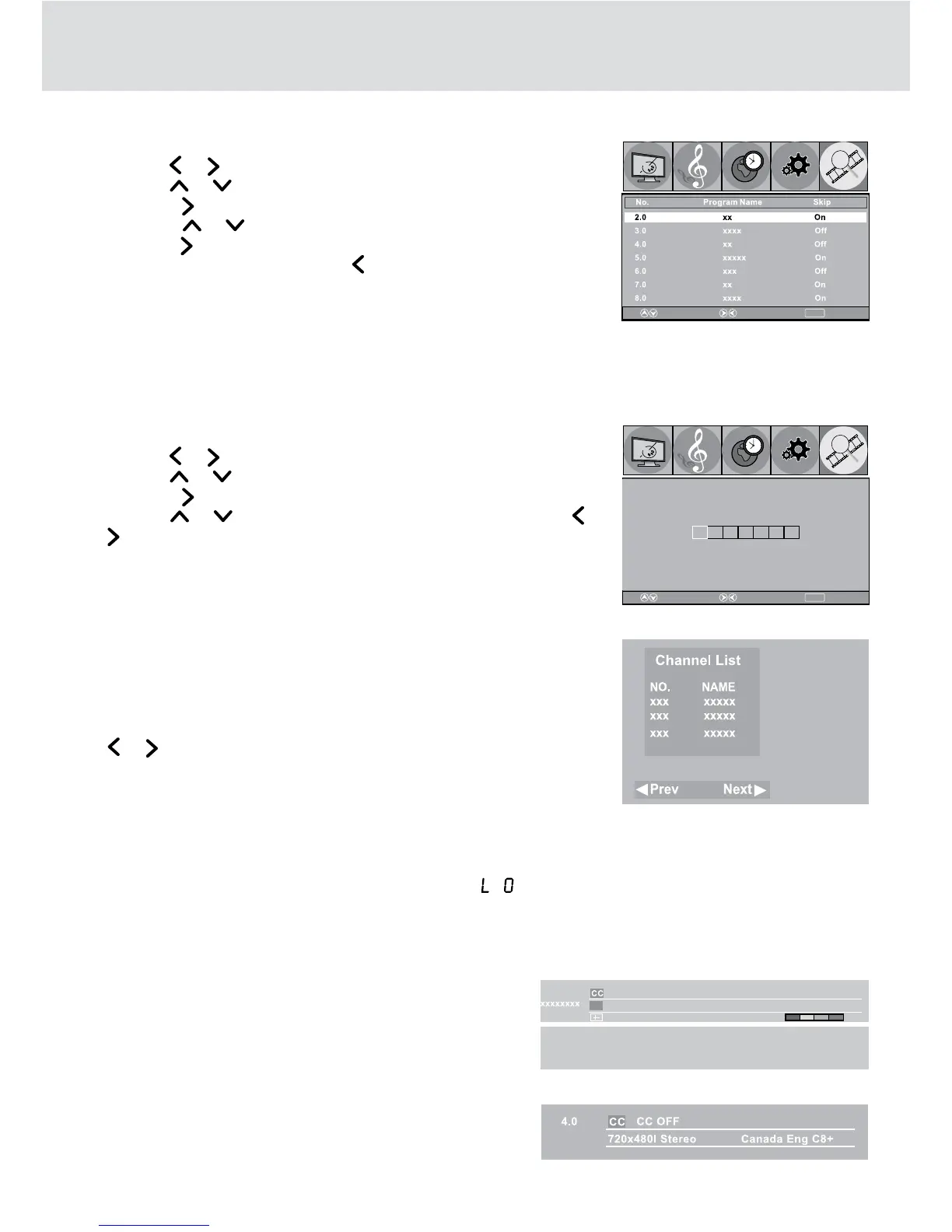
ATSC TV mode:
Press the DISPLAY button, the upper window will pop up,
then press the DISPLAY button again, the lower window will
pop up. Press the DISPLAY button once to exit.
NTSC TV mode:
Press the DISPLAY button, the below window will pop
up, then press the DISPLAY button once to exit.
USING THE TV
Channel Skip
1. Press TV MENU button.
2. Use the
or button to select TV.
3. Use the or button to select Channel Skip.
4. Press the button to enter.
5. Press the or button to select a channel.
6. Press the button to select the last channel of the page; press again
to go to the next page. Press the button to select the first channel
of the page; press again to return the previous page.)
7. Press the ENTER button to shift between On / Off. (Select On to skip
the selected channel. )
8. Press the TV MENU button to return to the previous menu.
9. To exit the MAIN MENU and return to the normal screen, press the EXIT button on the remote control.
Channel Label
You can edit a label for each channel.
1. Press TV MENU button.
2. Use the or button to select TV.
3. Use the or button to select Channel Label.
4. Press the button.
5. Use the or button to select the number or letter. Use the or
button to move and edit the next character.
6. Press the ENTER button to confirm.
7. After editing, the Channel and Channel Label will be shown on the
screen when you press the DISPLAY button.
Watching Television
Viewing a television station after the auto/manual search for channels.
1. Press the FUNCTION button to TV mode.
2. Press the CH buttons to select a channel, or press the number button
on the remote control to select the channel you want to watch. Or you
may press the ENTER button to show the Channel List, then use the
or button to select a previous or next channel.
•Forchannels1to9,enterone-digitchannelnumber.
•Forchannels10to99,enterthetwo-digitchannelnumber.
•Forchannels100orover,enterthree-digitchannelnumber.
NOTE:
• Whenachannelisselected,thechannelnumberisdisplayedinthetoprightcornerofthescreen.This
number will disappear after a few seconds.
• When MUTE is pressed, the sound is mute and the “ ” indicator always blinks on the LCD display until
MUTE is pressed again or VOL is pressed.
MENU
ReturnAdjustSelect
Picture
Audio
Time
Setup TV
MENU
ReturnAdjustSelect
Picture
Audio
Time
Setup TV
X
5.1
CC OFF xxxxxxxxxxxxxxxx x
Bad
HD 1920xX1080i Audio 1/2 TV-PG /
2009/07/31 07:00 AM 07:00 AM-07:30 AM
Xxxxxxxxxxxxxxxxxxxxxxxxxxxxxxxxxxxxxxxxxxxxxxxxxxxxxxxxxxxxxxxx
xxxxxxxxxxxxxxxxxxxxxxxxxxxxxxxxxxxxxxxxxxxxxxxxxxxxxxxxxxxxxxxxx
xxxxxxxxxxxxxxxxxxxxxxxxxxxxxxxxxxxxxxxxxxxxxxxxxxxxxxxxxxxxxxx
xxxxxxxxxxxxxxxxxxxxxxxxxxxxxxxxxxxxxxxxxxxxxxxxxxxxxxxxxxxxxxx


 To Next Page