TV SETUP
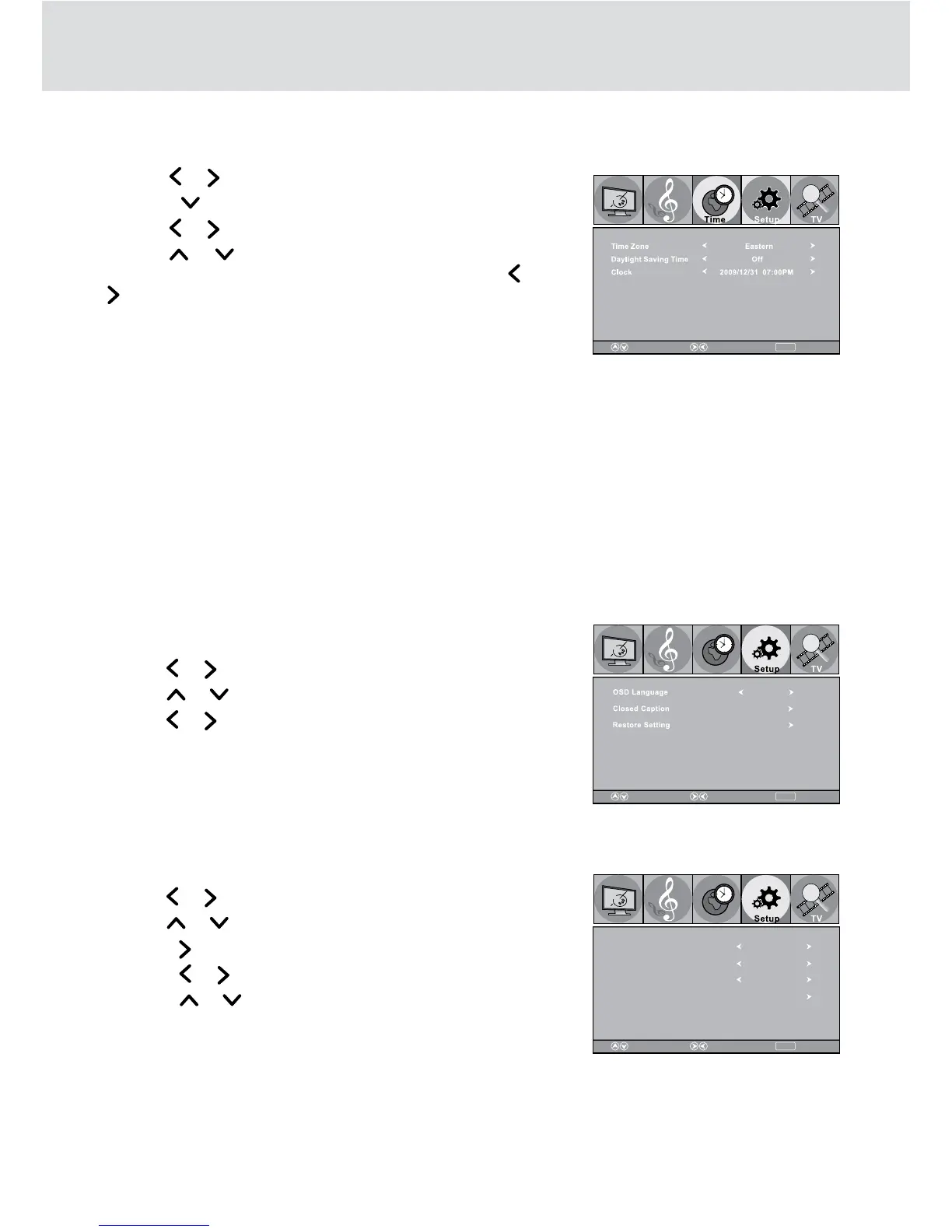
Time Setting
1. Press the TV MENU button.
2. Use the
or button to select Time.
3. Press the
button to enter the time settings.
4. Use the
or button to make adjustment.
5. Use the
or buttontoselecttheoptions(TimeZone,
Daylight Saving Time or Clock). Adjust them using the or
button. Press the TV MENU button to return to the previous
menu.
6. Repeat step 3 to adjust other options.
7. To exit the MAIN MENU and return to the normal screen,
press the EXIT button on the remote control.
NOTE: Only for DTV/ATSC input source mode, thus it is not available in other input source mode.
Time Zone
: Select the time zone from Eastern / Central / Mountain / Pacific /
Alaska / Hawaii.
Daylight Saving Time: Select On to activate daylight savings time.
Clock: Display the current time.
Setup Menu
OSD Language
1. Press the TV MENU button.
2. Use the
or button to select Setup.
3. Use the
or button to select OSD Language.
4. Use the
or button to make adjustment.
5. Press the TV MENU button to go back to previous menu.
6. To exit the TV SETUP MENU and return to the normal screen,
press the EXIT button on the remote control.
Closed Caption
1. Press the TV MENU button.
2. Use the
or button to select Setup.
3. Use the
or button to select Closed Caption.
4. Press the
button to enter.
5. Press the
or button to make adjustment.
6. Press the
or button to move the highlight bar.
7. Press the TV MENU button to go back to previous menu.
8. To exit the TV SETUP MENU and return to the normal screen,
press the EXIT button on the remote control.
NOTE:
This function only works on ATSC programs broadcast with captions.
MENU ReturnAdjustSelect
Picture
Audio
MENU ReturnAdjustSelect
Picture
Audio
Time
English
MENU ReturnAdjustSelect
Picture
Audio
Time
CC Mode Off
CC1
Analog Closed Capti on
Digital Closed Capti on
Service1
Digital Capton Styl e


 To Next Page