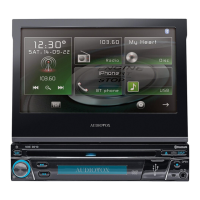
Why is the image on my Audiovox VME 9425 Car Receiver blurred?
- WWayne MccarthySep 2, 2025
If the image on your Audiovox Car Receiver is blurred, distorted, or dark, it may be because the disc is illegally copied. Try using an original disc instead.
Why is the image on my Audiovox VME 9425 Car Receiver blurred?
If the image on your Audiovox Car Receiver is blurred, distorted, or dark, it may be because the disc is illegally copied. Try using an original disc instead.
How do I correct the image aspect ratio on my Audiovox VME 9425?
If you're seeing a prolonged image or an improper height/width ratio on your Audiovox Car Receiver, it's likely due to an improper aspect ratio setup. Use the correct aspect ratio setting to resolve this.
What causes playback interruption on Audiovox VME 9425 Car Receiver?
If playback is interrupted on your Audiovox Car Receiver, the disc may be dirty or scratched, so try cleaning or replacing it. It's also possible the file is damaged or a bad recording; in that case, recreate the disc with good files.
How to fix flashing image on Audiovox VME 9425?
If you're seeing a flashing image or interference on the screen of your Audiovox Car Receiver, it could be because the DVD isn't compatible with the current TV system settings; change the setup to accommodate the disc. Alternatively, check the video signal connections and correct any improper wiring.
Why does my Audiovox VME 9425 Car Receiver reset when the engine is off?
If your Audiovox Car Receiver resets itself when the engine is off, it could be due to an incorrect connection between the ACC and positive battery wire. Check the wiring and correct it.
What to do if there is no image on my Audiovox VME 9425?
If you're not getting any image on your Audiovox Car Receiver, check the connection to the parking brake wire and correct if necessary. Also, ensure the parking brake is engaged by stopping the vehicle in a safe place and applying it.
What to do if a disc does not play back on my Audiovox VME 9425?
If a disc isn't playing back on your Audiovox Car Receiver, consider these possibilities: * The disc may be warped or scratched; use a disc in good condition. * The disc could be dirty or wet; clean it with a soft cloth. * The laser pickup might be dirty; clean it with a cleaning disc. * The disc might be incompatible; use a compatible disc. * The disc region code may not be compatible with the unit; use a disc with the proper region code. * The disc could be inserted upside down; insert it with the label side up.
How to resolve poor sound quality on Audiovox VME 9425?
Poor sound quality or distortion on your Audiovox Car Receiver can stem from a few sources. Ensure you're using an original disc, not a pirated copy. Also, verify that the speaker power rating is compatible with the unit and check the speaker contacts for any shorts.
Why is my Audiovox Car Receiver having weak station searching?
If your Audiovox Car Receiver is having trouble finding stations, it could be due to a few reasons. Make sure the auto antenna is fully extended and that the auto antenna control cable is properly connected. Additionally, check if the LOCAL function is activated and turn it off if it is.
What to do if there is no audio output from my Audiovox VME 9425?
If you're experiencing no or low audio output from your Audiovox Car Receiver, consider these potential issues: * Check the wiring of the audio output connection and correct any errors. * Increase the volume level, as it may be set too low. * Review the wiring diagram and check the 'MUTE' connection. * Inspect the speakers for damage and replace them if necessary. * Adjust the channel balance to the center position if it's heavily biased. * Ensure speaker wiring isn't in contact with any metal parts of the car; insulate the connections if it is.
| Brand | Audiovox |
|---|---|
| Model | VME 9425 |
| Category | Car Receiver |
| Screen Size | 7 inches |
| Screen Resolution | 800 x 480 pixels |
| Touchscreen | Yes |
| DVD Player | Yes |
| CD Player | Yes |
| AM/FM Tuner | Yes |
| Presets | 30 |
| Remote Control | Yes |
| Power Output | 50 watts x 4 channels |
| Bluetooth | Yes |
| USB Port | Yes |
| SD Card Slot | Yes |
| Navigation | No |
| Type | DVD Receiver |
| Inputs | USB, AUX |
| Outputs | RCA Preouts |
| Supported Formats | MP3, WMA, JPEG |
Details on DVD playback capabilities including fast forward and slow motion.
Specifications for CD, MP3, and WMA disc playback and compatibility.
Capabilities of the AM/FM tuner, including presets and frequency spacing.
Features for connecting and controlling Apple iPod and iPhone devices.
Identification and explanation of all front panel buttons and ports.
How to turn the unit on/off, mute audio, and select sources.
Detailed steps for adjusting bass, mid, treble, and filter frequencies.
List of vehicle functions controllable via steering wheel controls.
How to access sub-menus and adjust individual features.
Adjusting DRC, Loudness, Subwoofer, and EQ Q-factor settings.
Customizing LED colors, camera input, and video signal settings.
Explains on-screen indicators and touch keys for tuner functions.
Supported file formats and compatibility for MP3/WMA discs.
Connecting via HFP and detailed steps for pairing a mobile phone.
Troubleshooting power, audio output, and reset issues.