Need help?
Do you have a question about the Audix RAD-360 and is the answer not in the manual?
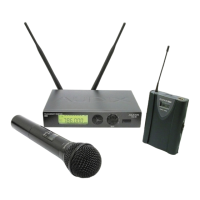
Describes the handheld and bodypack transmitter options.
Explains how wireless mics operate using RF signals in the UHF band.
Lists elements that can interfere with RF signals, like metal and people.
Lists the frequency ranges available for different regions (USA, International).
Key safety and operational rules for using the system.
Guide to verifying all included components after unpacking.
Lists the items typically included in the RAD-360 package.
Details the LCD screen, SET, UP, DOWN buttons, and GAIN control.
Explains the operation of the POWER switch on the receiver.
Describes the unbalanced, balanced audio outputs, and antenna sockets.
Explains the power plug input and serial number location.
Details the LCD screen, buttons, grill, body, and power switch.
Identifies the battery compartment cover and its access method.
Describes antenna, power switch, LCD, connectors, and controls on front/back.
Covers sliding latches, metal cover, pad, gain, and belt clip.
Step-by-step guide for connecting the power cable to the receiver.
Instructions on how to attach and lock the antennas to the receiver.
How to connect the receiver's audio output to a PA system.
How to connect the receiver's output to a guitar amplifier.
Steps for installing batteries in the handheld transmitter.
Steps for installing batteries in the bodypack transmitter.
How to access the frequency setting menu on the receiver.
Steps to set and save the desired frequency on the receiver.
Explains why transmitter and receiver frequencies must match.
How to access the frequency setting menu on the handheld transmitter.
Steps to set and save the desired frequency on the handheld transmitter.
Important note regarding using one transmitter per receiver.
How to access the frequency setting menu on the bodypack transmitter.
Steps to set and save the desired frequency on the bodypack transmitter.
Important note regarding using one transmitter per receiver.
How to lock the receiver to prevent setting changes.
How to unlock the receiver to allow setting changes.
How to navigate to the lock settings on the handheld transmitter.
Steps to enable the lock feature on the handheld transmitter.
How to save the lock setting on the handheld transmitter.
How to navigate to the unlock settings on the handheld transmitter.
Steps to disable the lock feature on the handheld transmitter.
How to save the unlock setting on the handheld transmitter.
How to lock the bodypack transmitter to prevent setting changes.
How to unlock the bodypack transmitter to allow setting changes.
How to access the sensitivity adjustment menu on the handheld transmitter.
Steps to increase or decrease the output level (-0 dB to -24 dB).
How to save the adjusted sensitivity setting on the handheld transmitter.
How to adjust the input sensitivity of the bodypack transmitter.
Specific gain and pad settings for using the bodypack with a guitar.
Lists the types of microphones and cables compatible with the bodypack.
Instructions on how to connect various mics and cables to the bodypack.
Guidance on powering on, matching frequency, and mic placement for optimal sound.
Safety precautions when connecting guitar/bass cables to prevent loud noises.
How to adjust gain and pad settings for lavaliere/headset options.
Specific gain adjustment instructions for guitar/bass use.
Recommendations for storing and caring for the bodypack transmitter.
Solutions for common problems like no signal, crackling, and distortion.
How to initiate the scan feature on the receiver.
Steps to scan for and find operating transmitter frequencies.
How to save the found frequency settings.
Explains the visual indicators for battery life on the transmitter.
Tips for maintaining line of sight and proper antenna positioning.
Advice on preventing interference from amplifiers and computers.
Guidelines for antenna cable runs to minimize signal loss.
How to avoid blocking the transmitter's antenna.
Importance of using fresh batteries for consistent performance.
Specific placement advice for lavaliere and headset microphones.
Warning against setting multiple transmitters to the same frequency.
Using sensitivity settings to manage gain and noisy environments.
Tips for using multiple wireless systems in the same area.
Solutions for lack of sound or low audio output from the system.
Diagnosing issues where RF signal is present but no audio is heard.
How to resolve issues causing distorted audio output.
Covers frequency range, response, and signal-to-noise ratios.
Detailed technical specs for the RAD-360 receiver unit.
Detailed technical specs for the RAD-360 handheld transmitter.
Lists all accessories provided with the RAD-360 system.
Lists additional accessories that can be purchased separately.
Lists available receiver, transmitter models, and capsule assemblies.
Details microphones for bodypack and specific bodypack transmitter specs.
Provides detailed physical dimensions for the receiver and transmitter.
 General
| Type | Wireless Microphone System |
|---|---|
| Frequency Response | 50 Hz - 18 kHz |
| Polar Pattern | Cardioid |
| Impedance | 200 ohms |
| Color | Black |
| Type of System | Analog UHF |
| Battery Life | 8 hours |
| Connector | XLR |

 To Next Page