8. Commissioning
Display text
SIMA² software texts.
8.1. User level
Depending on the user level, different functions of SIMA² can be modified. For some
functions, a minimum user level is provided.The minimum possible user level of
SIMA² is Observer (1). Altogether, 6 user levels are available whereby level 5 and
level 6 are reserved for AUMA Service as well for administration.The preset password
for user levels 1 – 4 is: Sima12345!. Higher level users can change or reset lower
level passwords.
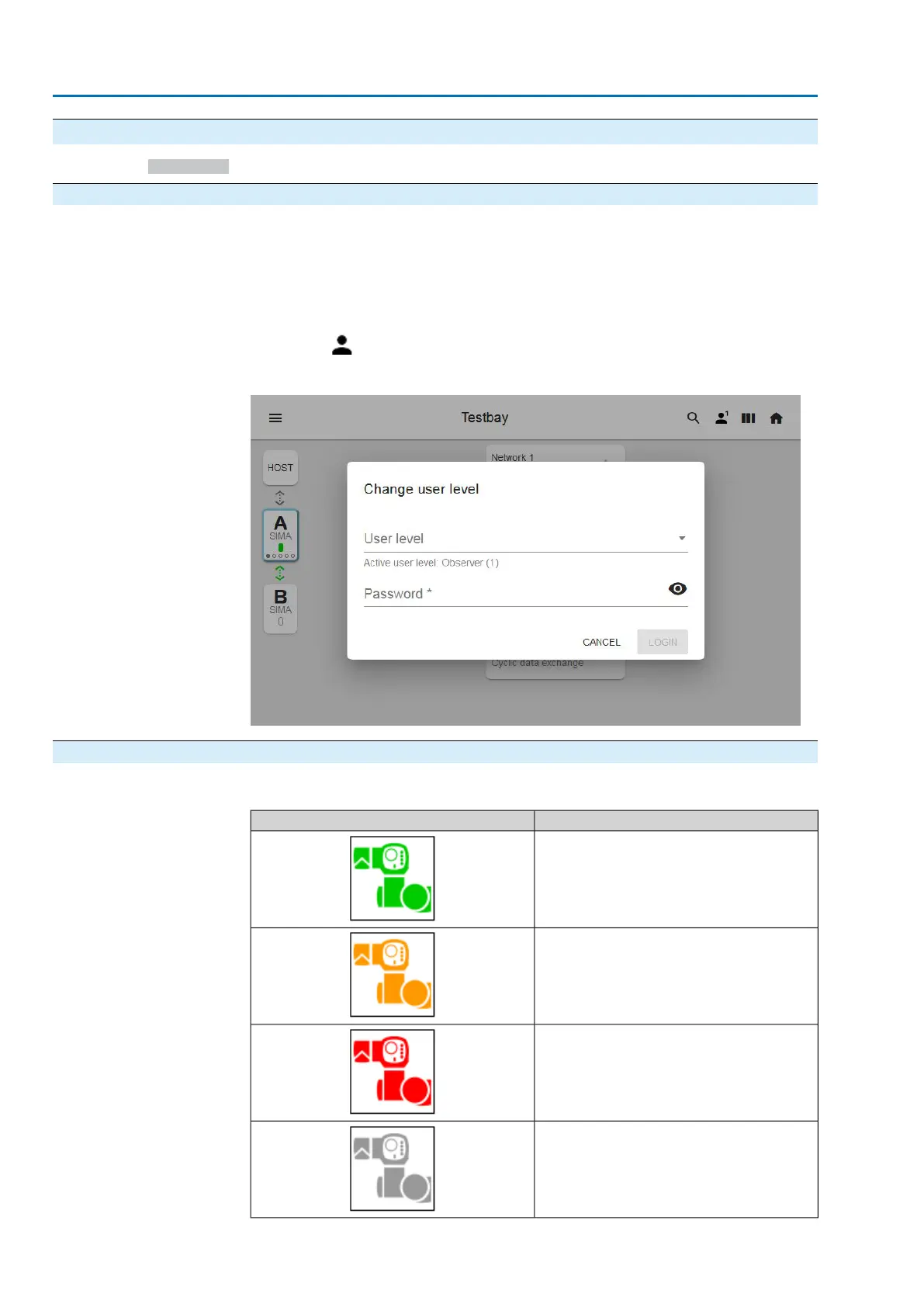
The symbol is used to select a higher level when entering the respective password:
Figure 24: Change user level
8.2. Actuator status
Table 18: Possible status for actuators
StatusIndication
OK
Actuator is failure-free and ready for operation
WARNING
Actuators indicates a warning.
FAULT
Actuators indicates a fault.
NOT READY REMOTE
The actuator can only be operated locally.
26
SIMA² Master Station
Commissioning MODBUS RTU, MODBUS TCP/IP to DCS


 To Next Page