English
61
3.9.8 Volume of voice notications
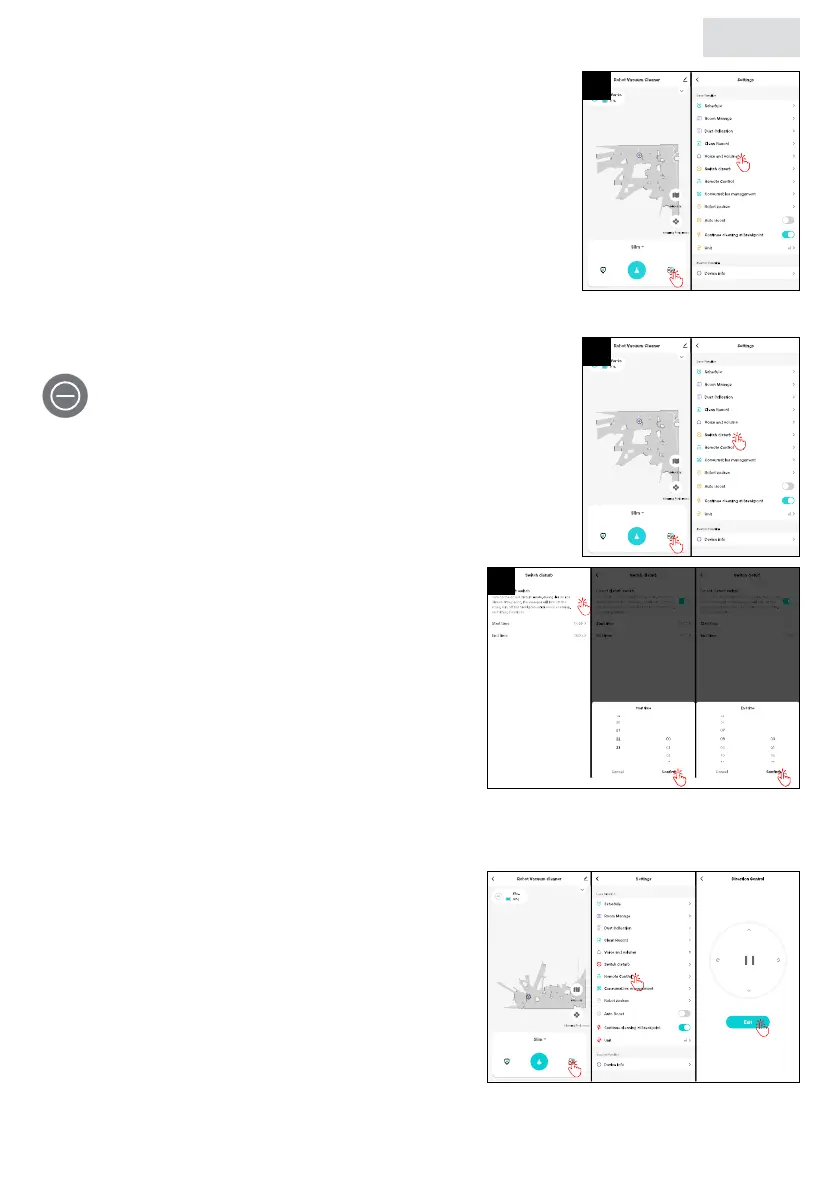
You can adjust the volume and language of voice notications
in the app to your liking.
1. Tap “Settings > Voice and volume”.
2. At “Volume Setting” set the volume by moving the slider.
3. At “Voice Data”, select the desired language by tapping
“Use” after the language.
3.9.9 Do not disturb mode
When you activate the “Do not disturb” mode, the robot
will not automatically clean or play voice guidance. You
can use the app to turn the mode on or off.
1. Tap “Settings > Switch disturb”.
2. Tap the button near “Do not disturb switch”
to activate it. Tap “Start time” to set the start
time and tap “Conrm” to save the set time.
Tap “End time” to set the end time and tap
“Conrm” to save it.
3.9.10 Remote control
You can use the remote control in the app to control the driving direction of the robot yourself.
1. Tap “Settings > Remote Control”.
2. Control the driving direction with the arrows
and rotary buttons.
3. Press to start/pause the robot.
4. Press “Exit” to exit this functionality.
1
1
2


 To Next Page