60
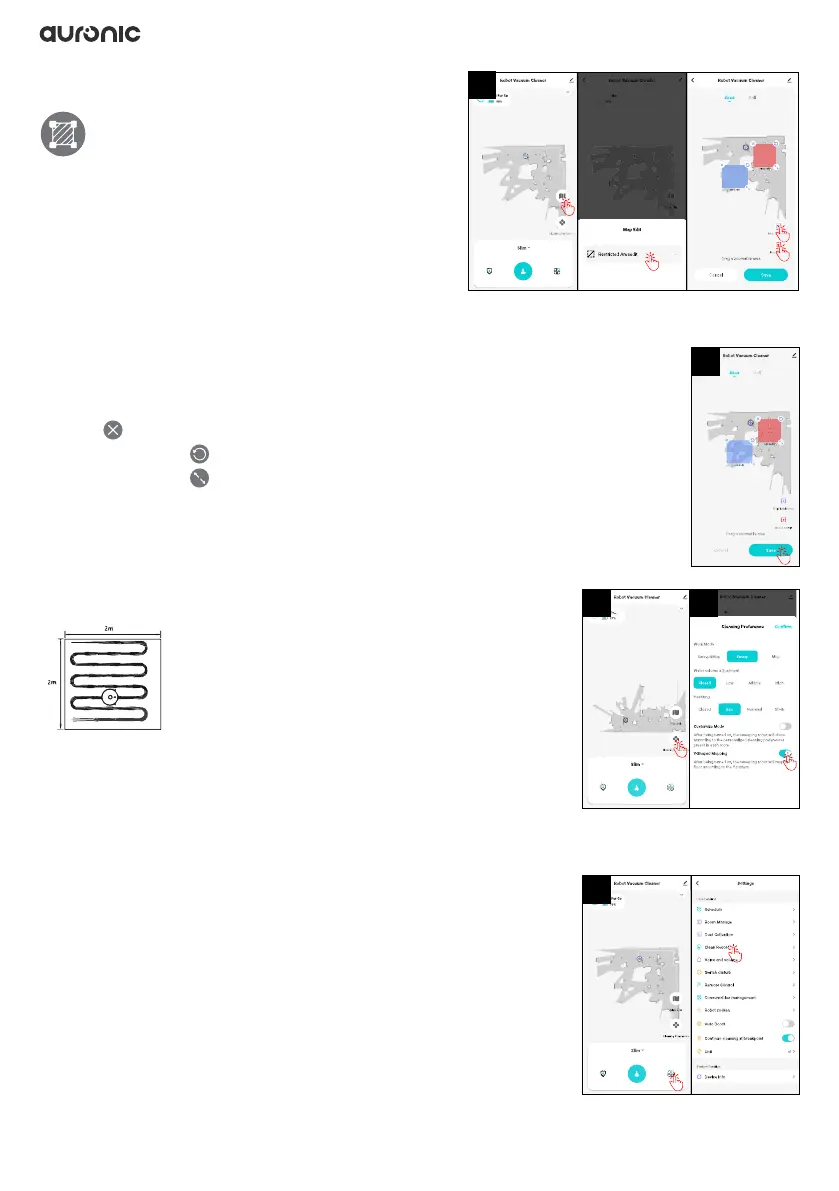
3.9.5 Setting virtual wall/forbidden zone
You can set one or more zones not to be
cleaned. The robot will not clean the set
zone(s) and will only clean other zones.
1. Tap “Map Edit > Restricted Areaedit > +” to add
a zone to be avoided by the robot during the
cleaning process.
• Mop forbid area (blue): forbidden zone for mopping
• Mop + sweep (red): forbidden area for mopping and vacuuming
2. Set the zone by adjusting the blue block:
• Tap to clear the zone.
• Press and hold to rotate the zone.
• Press and hold to increase/decrease the zone.
3. Tap “Save” to save the map.
3.9.6 Mopping in a Y pattern
You can set the robot
to mop in a Y pattern.
1. In the app, tap “Cleaning Preference.”
2. Activate mopping in a Y pattern by checking the “Y-Shaped
Mopping” option.
3. If you turn on the robot to mop now, it will mop in a Y pattern.
3.9.7 Logbook
In the app, you can view the log of the robot’s clean records.
1. Tap “Settings > Clean Record.”
2. If you want to clear the log, tap “Clear”.
1
3
1
1 2


 To Next Page