64
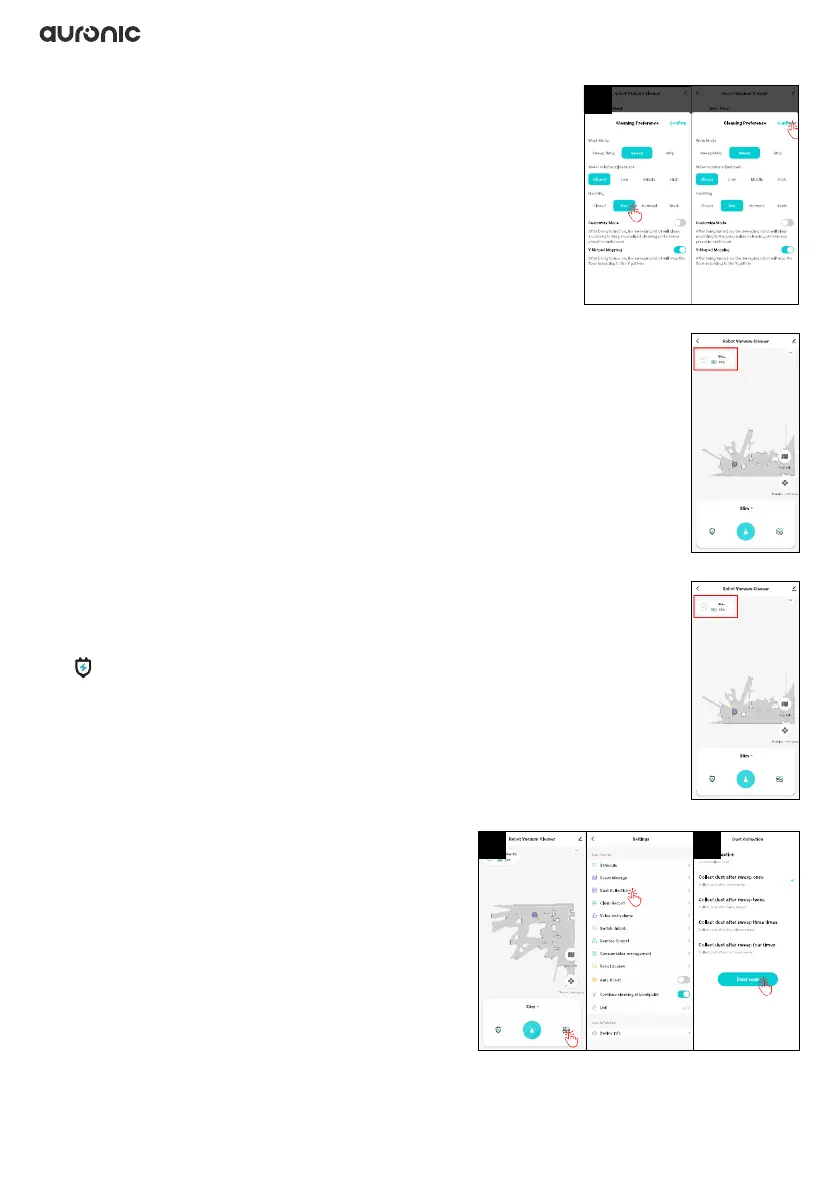
3. At “Hechting” you can set the suction by tapping
the desired position:
• Closed: no suction
• Eco: low suction/economic mode (low battery consumption)
• Normal: normal suction power
• Strong: high suction power
4. Tap “Conrm” to save your choices.
3.9.18 Status and battery charge
The app displays the current status and battery charge of the robot in the
upper left corner.
3.9.19 Send robot back to the charging station
In the app, you can instruct the robot to return to the charging station.
The robot will stop cleaning and automatically return to the charging station.
Tap in the app to send the robot back to the charging station to recharge.
3.9.20 Emptying the dust collector into the
dust bag
You can set when the robot’s dust collection bag
should be emptied into the external dust collection
bag.
1. Tap “Settings > Dust Collection”.
2. Select the desired mode and tap “Dust now” to
save the selected mode.
4
1 2


 To Next Page