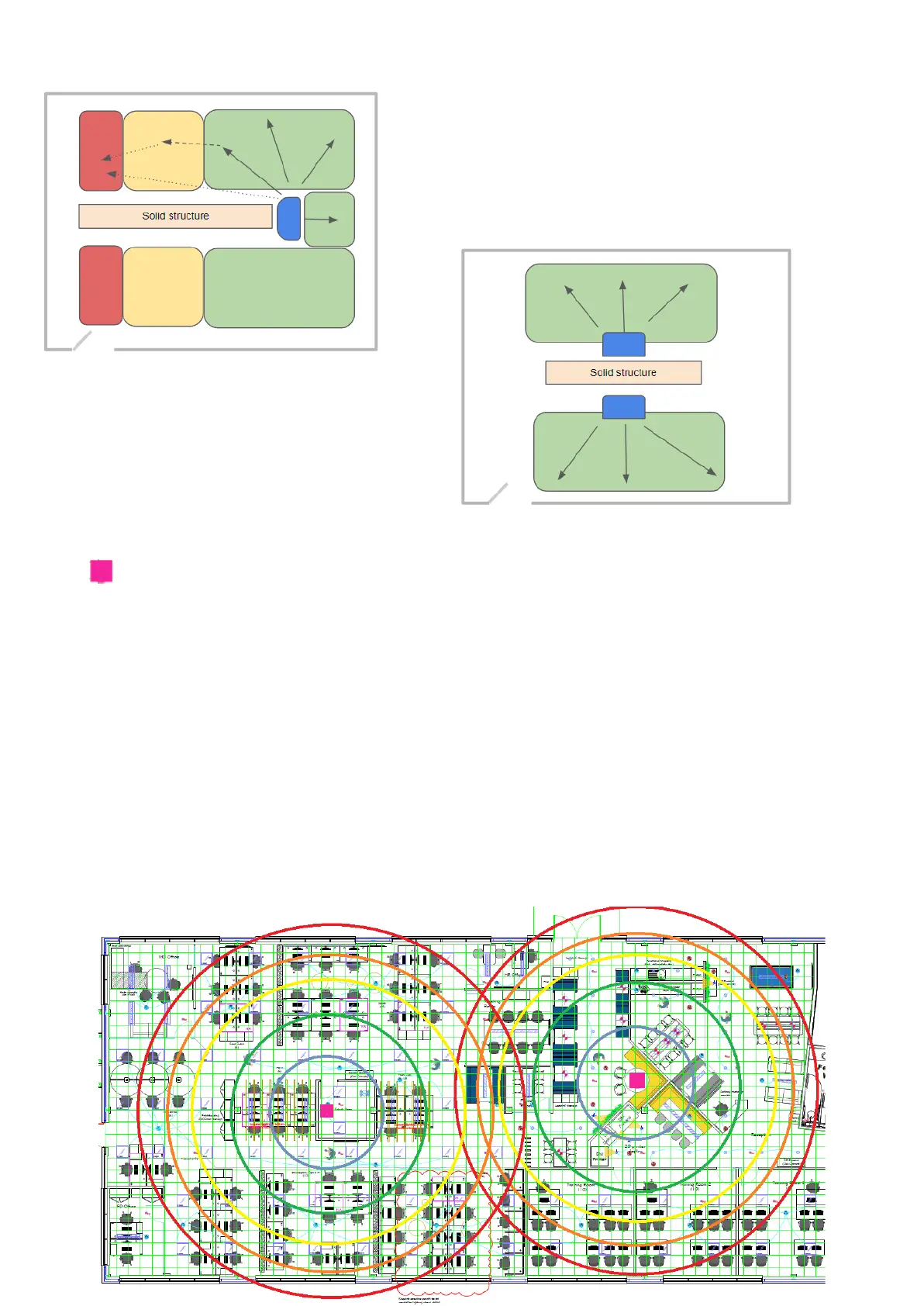
Hub location is important
If a space is large some devices furthest from the hub may
not work due to a weak signal.
● The Zigbee signal has to be above a certain level to
perform consistently.
● Zigbee hops will work better if there is no
interference from other systems.
Sometimes more hubs are better than one.
● This layout can create a better performing
experience for the end user
● Gives flexibility in the different areas
Mesh Guide
To help understand how the mesh works, detailed in the image below are the signal boundaries:
Hub
-60 to -69 - Blue - Good
-70 to -79 - Green - Acceptable
-80 to -89 - Yellow - Poor
-90 to -99 - Orange - Bad
<-100 - Red - Difficult
However, do be aware that there are many external factors that will affect the performance of the
overall system such as Phones, High Powered Speakers, Wall Amount & Thickness, Building
structure, Spacing of Devices & other Internet Connected Devices.
Remember, every device is competing for signal and will attempt to “talk” over one another.
Even a Mesh Test might have different results as the signal fluctuates constantly. But it is a very good
way to gauge what is going on.



 To Next Page