How to Reboot Hub
1. Turn off Hub by unplugging both cables
2. Wait 1 Minute
3. Turn on Hub by plugging the Ethernet, then the power cable back in first and wait for 2 Green
Lights
How to Reboot ZigBee Mesh
1. Turn off Hub by unplugging both cables
2. Turn off Devices from the Mains
3. Turn on Hub by plugging the Ethernet cable first, then the Power cable and wait for 2 Green
Lights
4. Starting from the closest Device to the Hub, proceed to turn on Devices one by one if possible,
otherwise circuit by circuit
5. Proceed until you have turned on the last/farthest away Device
How to Reset Amazon Alexa / Google Home Skills
You can either simply remove then re-install the Aurora AOne Skill which will resolve most issues,
otherwise you can try Rebooting the Hub or Mesh whilst the Skill is removed then installing it again.
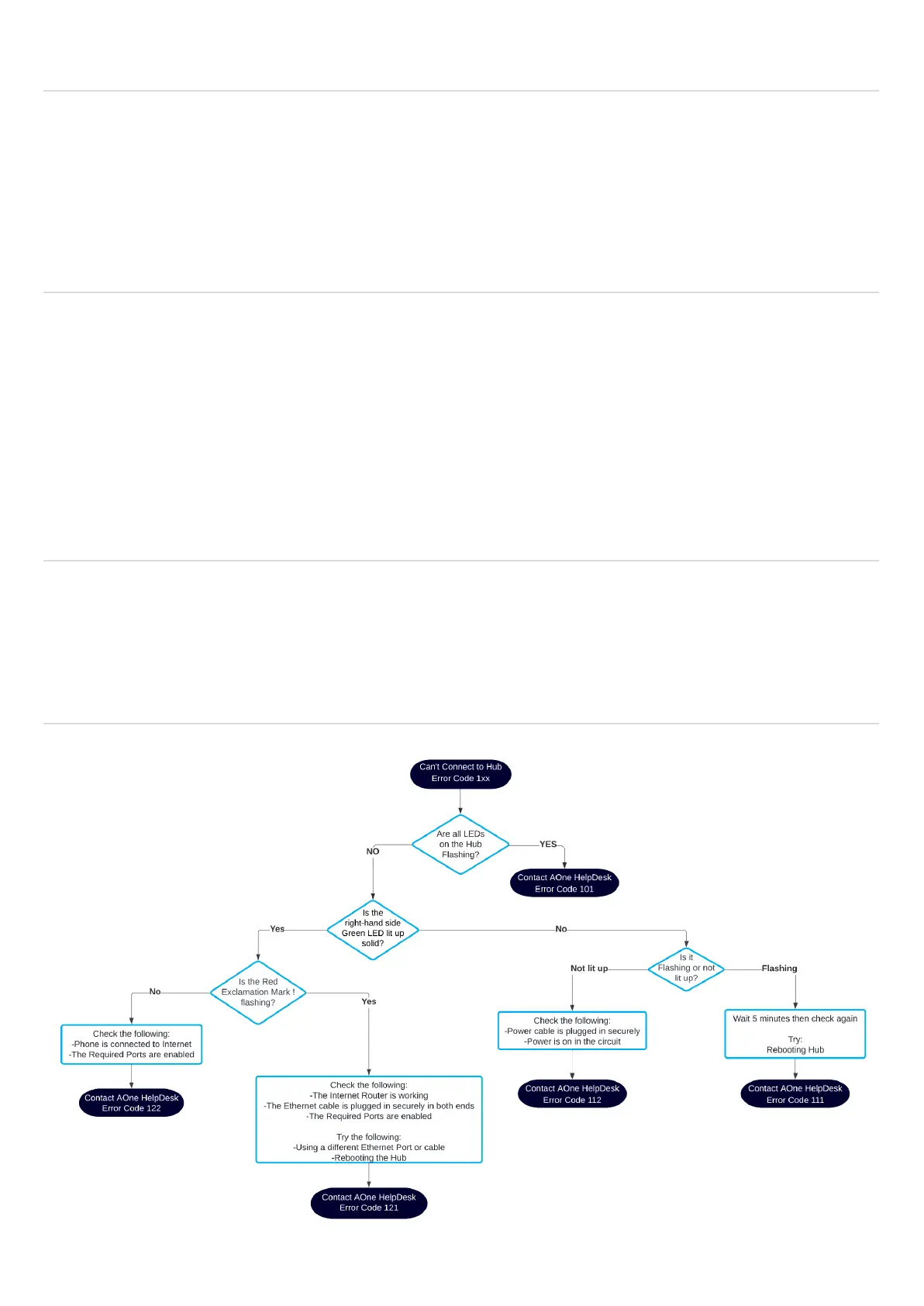
Can’t Connect to Hub (Step-by-Step Flowchart)



 To Next Page