65
Update
The Update application allows you to download the latest released software. The updates
can improve the MaxiCOM applications’ capabilities, typically by adding new tests, new
models, or enhanced applications to the database.
The tablet automatically searches for available updates for all of the software when it is
connected to the Internet. Any updates that are found can be downloaded and installed
on the device. This section describes installing an update to the MaxiCOM system.
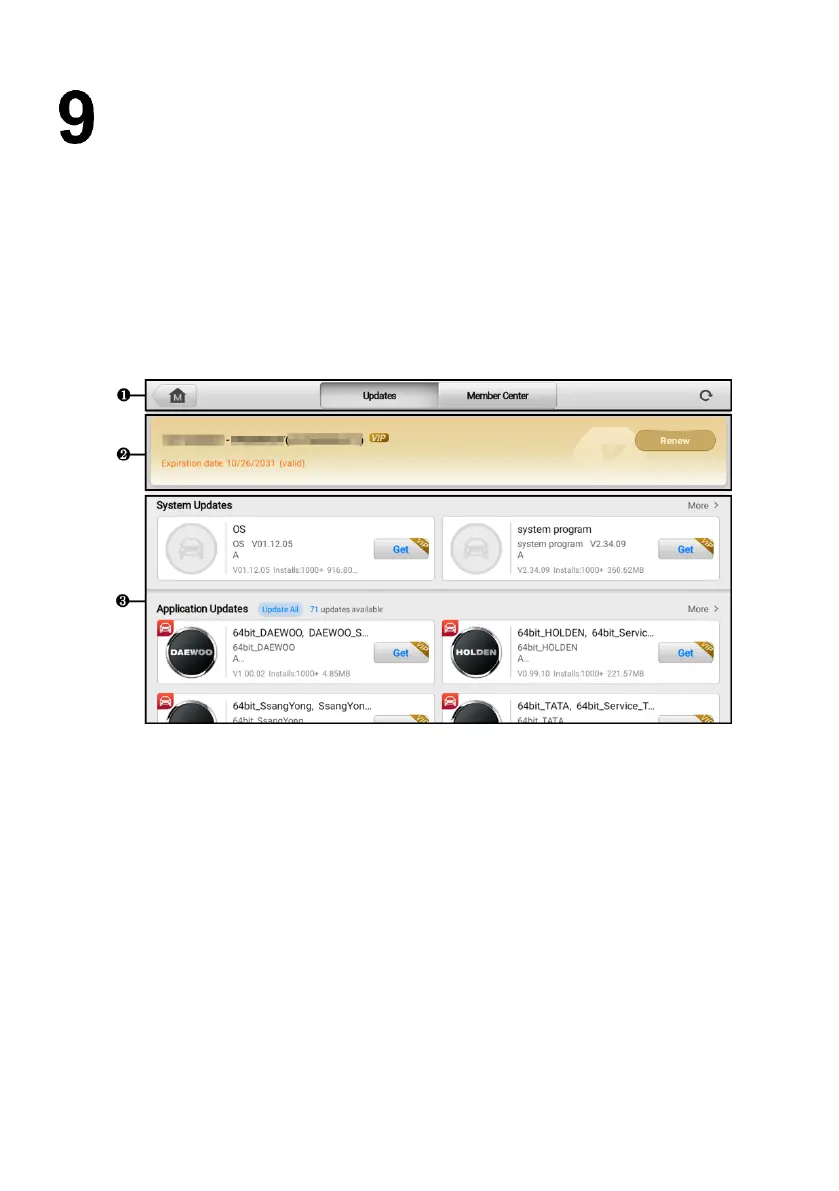
Figure 9-1 Update Screen
1. Top Tool Buttons
Updates — tap to display the Update screen, which is displayed by default
after tapping the Update application button.
Member Center —tap to enter the Member Center screen.
Refresh — refreshes the available update list.
2. Information Bar — displays your Autel ID, the tablet model information, subscription
validity period and other related information. Tap Renew to extend subscription.
3. Main Section — displays the available updates.










 To Next Page