73
MaxiViewer
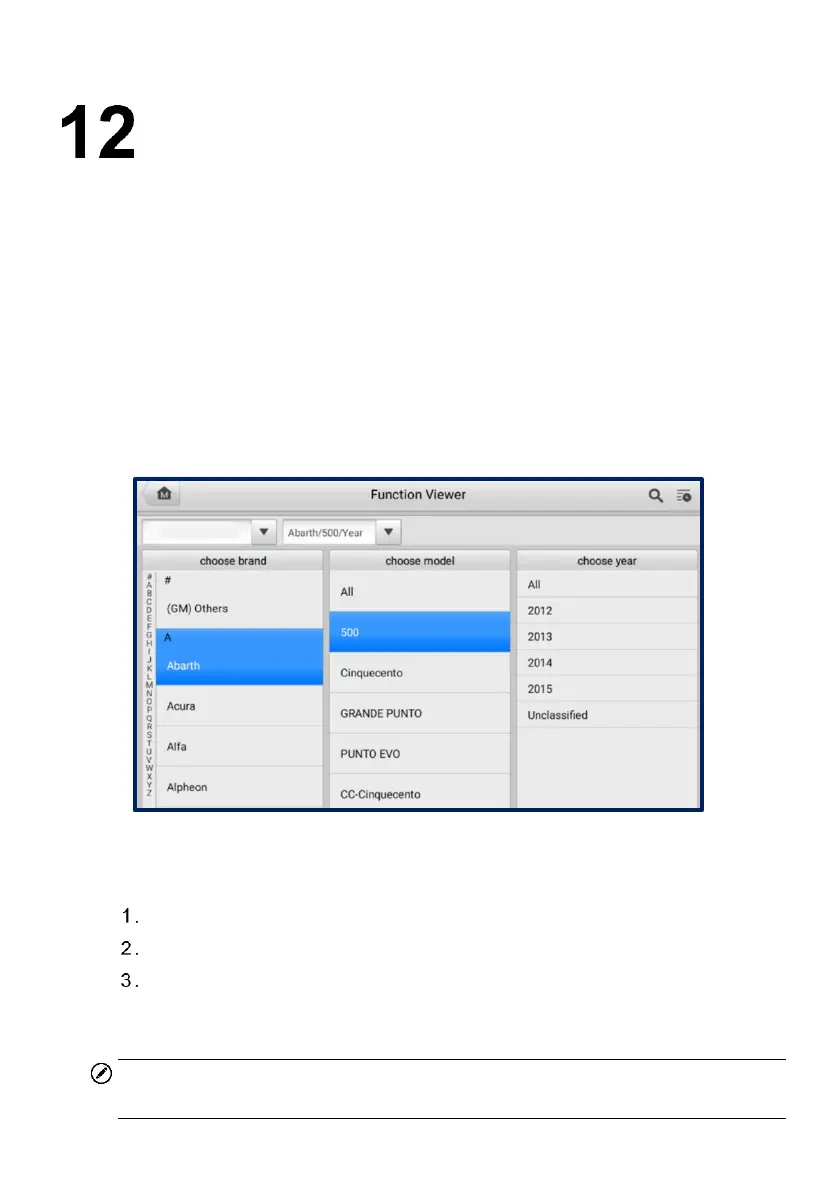
The MaxiViewer application allows you to search the functions supported by our tools
and the version information. There are two ways of searching, either by searching the
product and the vehicle or searching the functions.
To Search by the vehicle
1. Tap the MaxiViewer application on the Job Menu. The Function Viewer screen
will appear.
2. Select a product from the Product type drop-down list.
3. Select the vehicle brand, model, and year. The screen will display all the
functions supported by the selected tool for the selected vehicle.
Figure 12-1 Function Viewer Screen 1
To search by functions
Tap MaxiViewer on the Job Menu. The Function Viewer screen will appear.
Select a product from the Product type drop-down list.
Tap the Search icon. Enter the desired function in the search box. All functions
supported by the selected product for the desired vehicle are displayed with
vehicle's system, type, function, sub function, and version.
NOTE
Fuzzy search is supported.













 To Next Page