77
Autel User Center
Software updates are available for free for the first year from the date of purchase. The
Autel User Center application allows you to register your tool to download the latest
released software, thereby enhancing the functionality of the MaxiCOM application by
adding new vehicle models or enhanced applications to the database.
There are two ways for product registration:
Register the product using the tablet
To log in with your account and register your tool
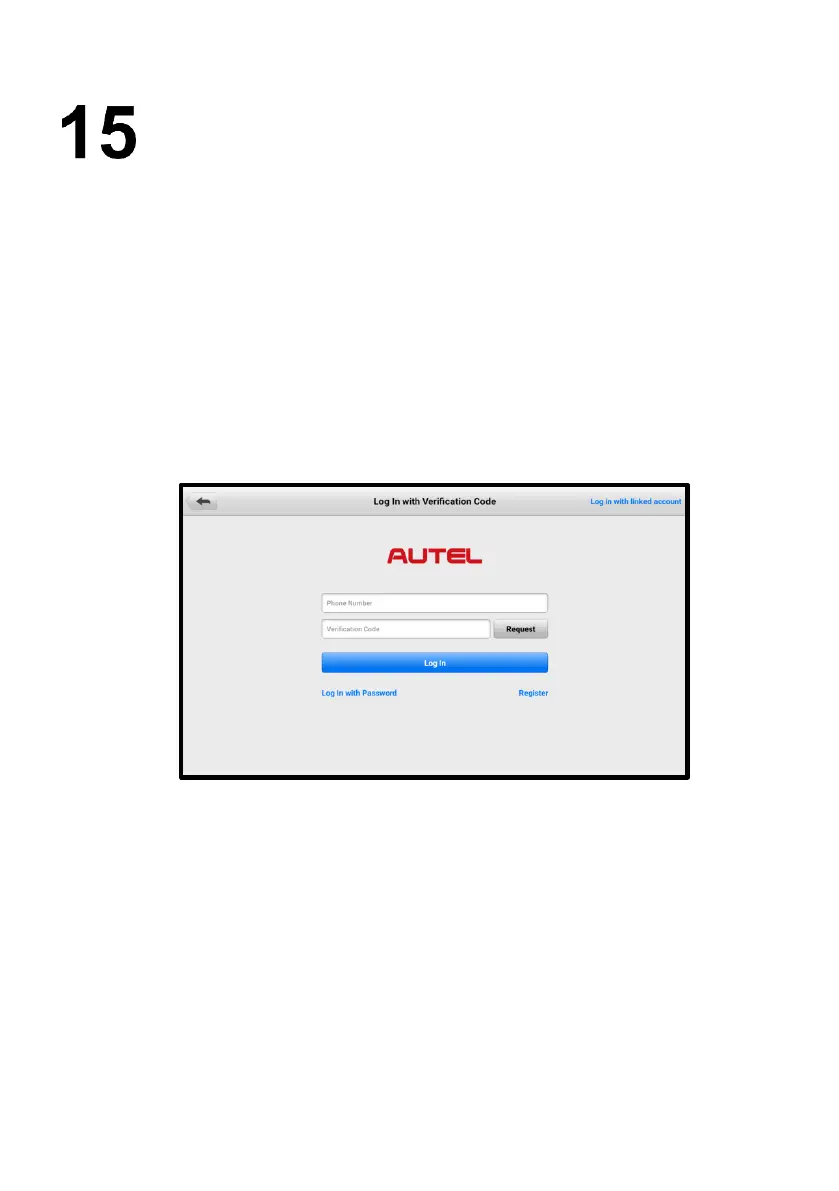
1. Tap Autel User Center from the Job Menu. The following screen displays.
Figure 15-1 Autel User Center Screen
2. If you already have an Autel ID, you can log in with your phone number and
verification code, or tap Log In with Password to log in with your Autel ID and
password. If you don't have an Autel ID yet, tap Register to create an Autel ID.
3. Once your account is successfully registered, you will enter the main menu of
the Autel User Center.
4. Select Device Management on the main menu.
5. Tap the Link Device button on the upper-right corner of the Device
Management screen. The serial number and password of the device will
automatically appear on the Link Device screen.










 To Next Page