3
Chapter 2 General Introduction
The MaxiSys Mini
TM
is an evolutionary smart wireless diagnostic device developed for
customers looking for a tool with ultra mobility and modern design while still delivering
ultimate performance. Featuring the powerful A9 quad-core 1.40GHz processor, a 8.0
inch LED capacitive touch screen, and long-distance wireless communication, based
on the multitasking mobile operating system, and combined with the best possible
coverage of OE-level diagnostics, the MaxiSys Mini is the ideal solution to manage your
repair jobs smartly and conveniently with greater mobility.
There are two main components to the MaxiSys system:
MaxiSys Display Tablet -- the central processor and monitor for the system
Vehicle Communication Interface (VCI) -- the device for accessing vehicle data
This manual describes the construction and operation of both the devices and how they
work together to deliver diagnostic solutions.
2.1 MaxiSys Display Tablet
2.1.1 Functional Description
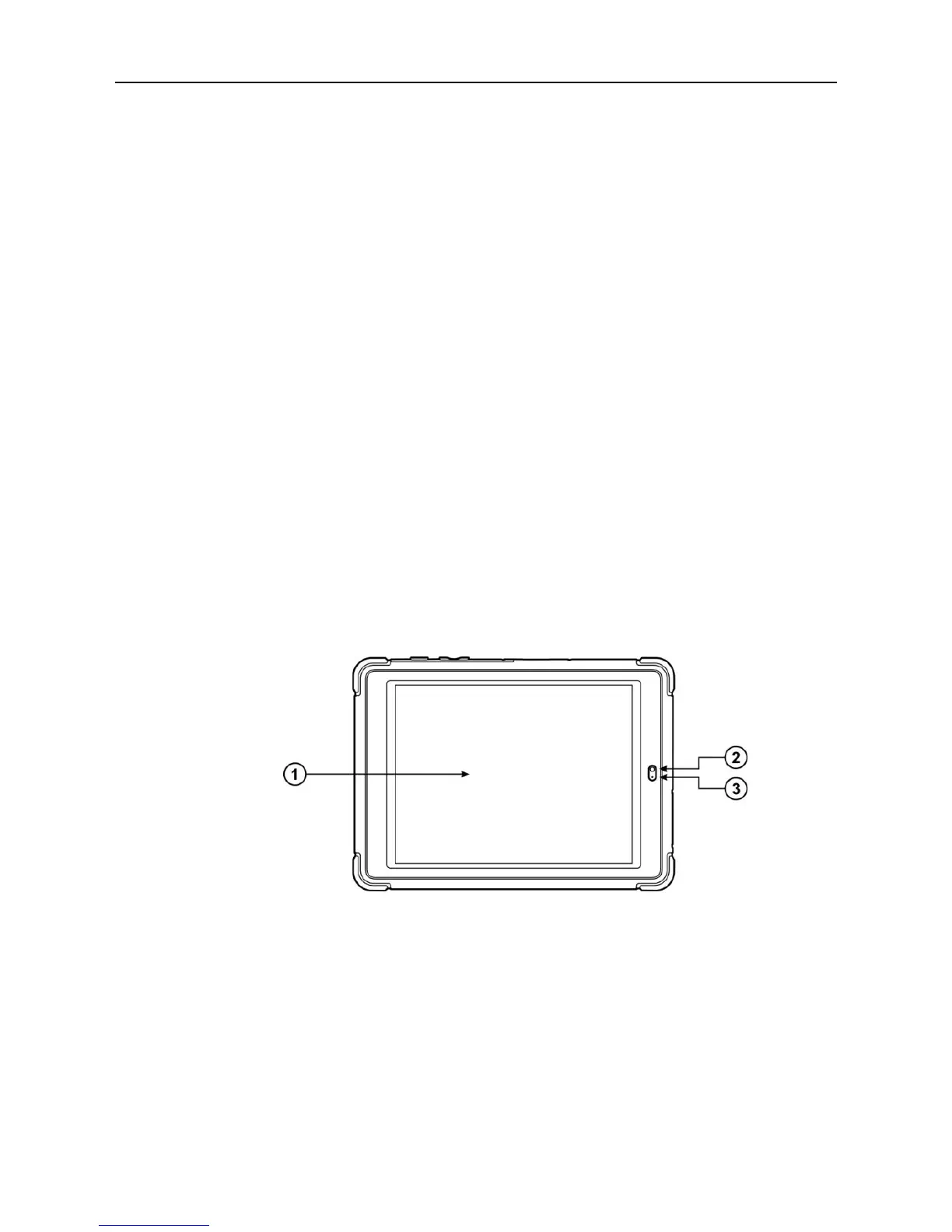
Figure 2-1 MaxiSys Tablet Front View
1. 8.0” LED Capacitive Touch Screen
2. Ambient Light Sensor – detects ambient brightness
3. Microphone













 To Next Page