Diagnostics Operations Navigation
28
5. Check if the vehicle information is correct, and then from the
confirming screen, select:
a) Yes to continue.
b) No to return to the vehicle selection menu.
6. Select Yes and the Vehicle Diagnostics screen displays. (Figure
4-2)
4.3.4 Alternative Vehicle Identification
Occasionally, you may identify a test vehicle that the tester does not recognize;
the database does not support, or has some unique characteristics that
prevent it from communicating with the tester through the normal channels. In
these instances, you are provided with the OBD direct entry, through which
you can perform generic OBD II or EOBD tests. See 4.8 Generic OBD II
Operations on page 48 for additional information.
4.4 Navigation
This section describes how to navigate the Diagnostics interface and select
test options.
4.4.1 Diagnostics Screen Layout
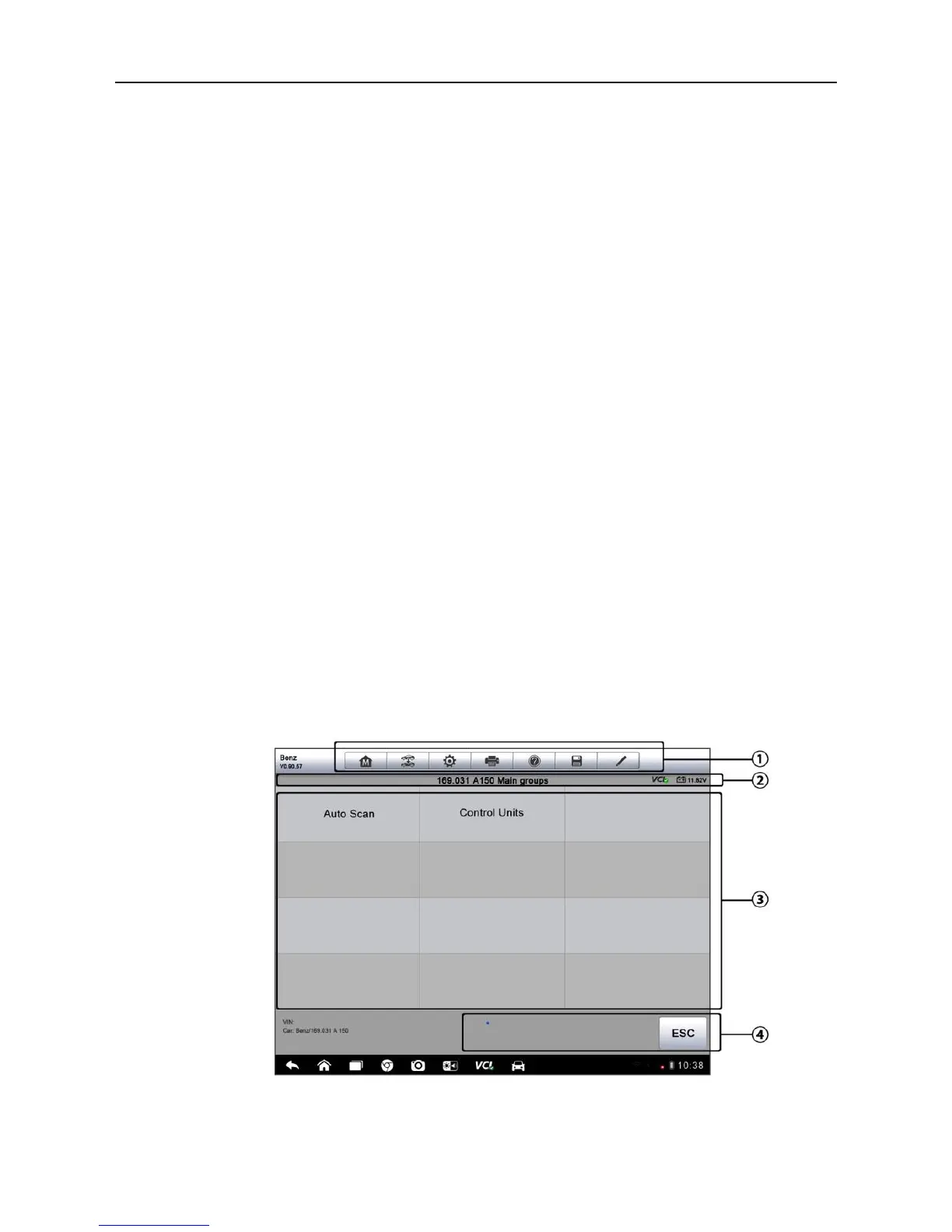
The Diagnostics screens typically include four sections. (Figure 4-6)
Figure 4-6 Sample Diagnostics Screen













 To Next Page