Diagnostics Operations Getting Started
22
the Diagnostics application button on the MaxiSys Job Menu, the screen then
opens the Vehicle Menu.
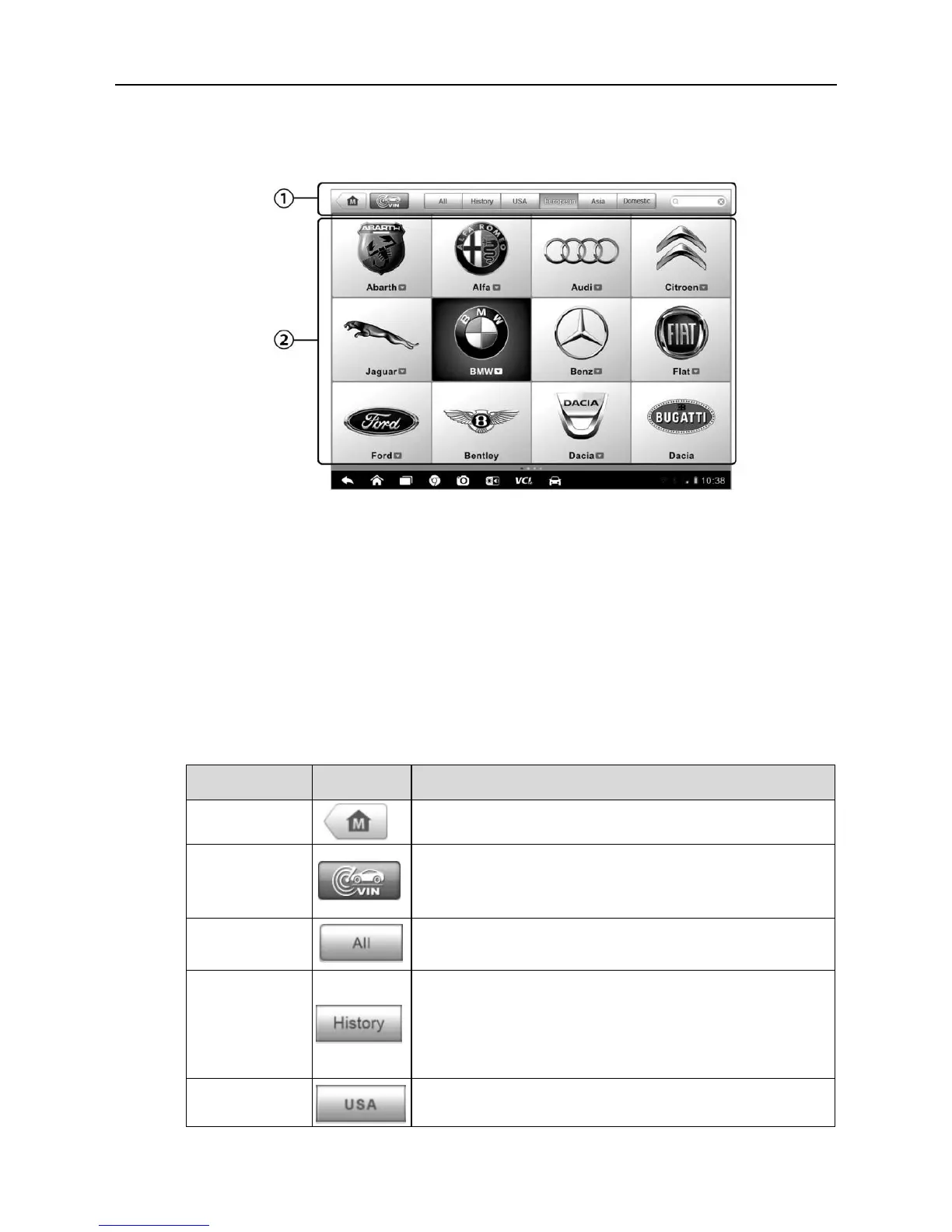
Figure 4-1 Sample Vehicle Menu Screen
1. Top Toolbar Buttons
2. Manufacturer Buttons
Top toolbar Buttons
The operations of the Toolbar buttons at the top of the screen are listed and
described in the table below:
Table 4-1 Top Toolbar Buttons
Returns to the MaxiSys Job Menu.
Touching this button opens a dropdown list; tap
Auto Detect for auto VIN detection; tap Manual
Input to enter VIN manually.
Displays all the vehicle makes in the vehicle
menu.
Displays the stored test vehicle history records.
This option provides you direct access to the
previously tested vehicle recorded during
previous test sessions. See 8.1 Vehicle History
on page 70.
Displays the USA vehicle menu.













 To Next Page