Need help?
Do you have a question about the auto maskin DCU 305 R3 and is the answer not in the manual?
Describes how to access the Alarm List view and its content for connected sensors.
Explains how to access the Information view for static user data and timers/counters.
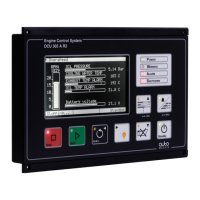
Explains the operation of the red STOP button and its associated LED indicator for engine shutdown.
Details the operation of the green START button for manual engine starting and its LED indication.
Describes the toggle function of the STANDBY button for selecting between Standby and Manual modes.
Explains using the Acknowledge button to reset alarms and silence the buzzer.
Details Comli, Modbus, and CAN J1939 protocols and relevant port pin configurations.
 General
| Brand | auto maskin |
|---|---|
| Model | DCU 305 R3 |
| Category | Control Unit |
| Language | English |


 To Next Page