Installation Instructions GDO-12V1 Hiro
™
19
A - Adjustment Mode Parameters
10. Appendix
LED Indicators Parameter OPEN OPEN &
STOP
STOP CLOSE &
STOP
CLOSE
LAMP LED Light Time 180s 120s 60s 30s 0s
AUX LED Aux Time / Mode Toggle 60s 30s 1s Mimic Light
A/C LED A/C Function 90s 60s 30s 15s OFF
A/C & BEAM LED’S P.E A/C Function 60s 30s 15s 5s OFF
OBST LED Margin Setting 20 units 15 units 12 units 9 units 7 units
OPEN / STOP / CLOSE
LED’S
PG3 custom setting When all three lights are illuminated a custom setting is in place.
Parameters can be still adjusted to those listed above.
Changing Motor Speed
In order to change the motor speed, limits need to be cleared.
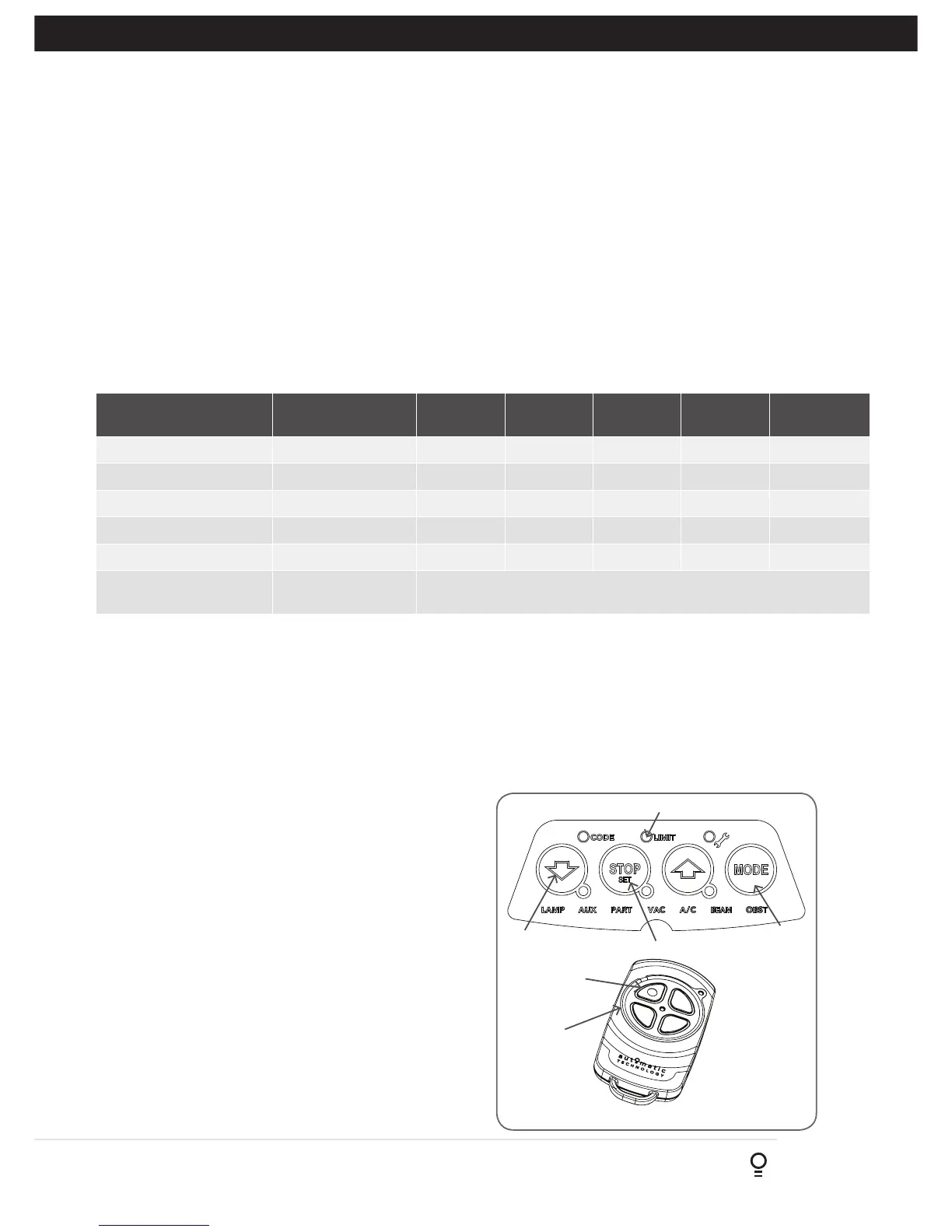
a. Press the MODE button repetitively until the LIMIT LED is
on.
b. Press OPEN or CLOSE buttons until the OPEN and CLOSE
LEDS are on. Press SET / STOP for 2 secs, beeper will
beep twice and CLOSE LED will start to flash.
c. Move the door to the half way position using the
programmed transmitter.
d. Press the MODE button to highlight the LIMIT LED.
e. Press Button 4 on the transmitter to inch the door closed.
f. While inching a press of the RED STOP / SET button on the
opener changes the speed setting as below:
(i) 1 press of SET - LOW (1 beep)
(ii) 2 press of SET - MED (2 beeps)
(iii) 3 press of SET - HIGH (3 beeps)
g. To change the motor speed for openening, press Button 1
to inch open then follow step f above.
h. Proceed to Section 6 to reset the limits via Opener or
Appendix D to set via transmitter.
Fig B.1
Adjustment Mode
Adjustments can be made to functions such as Light times, Auto Close functions etc. The below table shows the parameters
that can be altered.
a. Press and release the MODE button until the Spanner LED (Adjustment Mode) is highlighted.
b. One of the word LED’s (LAMP, AUX, etc) will highlight.
c. Use the BLUE CLOSE or GREEN OPEN buttons to move to the particular parameter.
d. Press RED STOP / SET to enter the adjustment mode.
e. The OPEN, STOP and CLOSE LEDS will now flash and indicate the parameters value as shown in table below.
f. Use the BLUE CLOSE or GREEN OPEN buttons to adjust the parameter value by one step up or down.
g. Press RED STOP / SET to save the new value or MODE to cancel the edit - flashing will stop.
h. To enter another parameter repeat from Step a.
B - Motor Speed
Appendix
MODE
Button 4
BLUE CLOSE Button
Button 1
RED STOP/SET Button
LIMIT LED







 To Next Page