Owner Installation Instructions GDO-7V1 SecuraLift®
17
Step 15. Setting travel limits positions
method one: via the control panel
IMPORTANT NOTE: The OPERATE button
will not function until the open and close limits
positions are set.
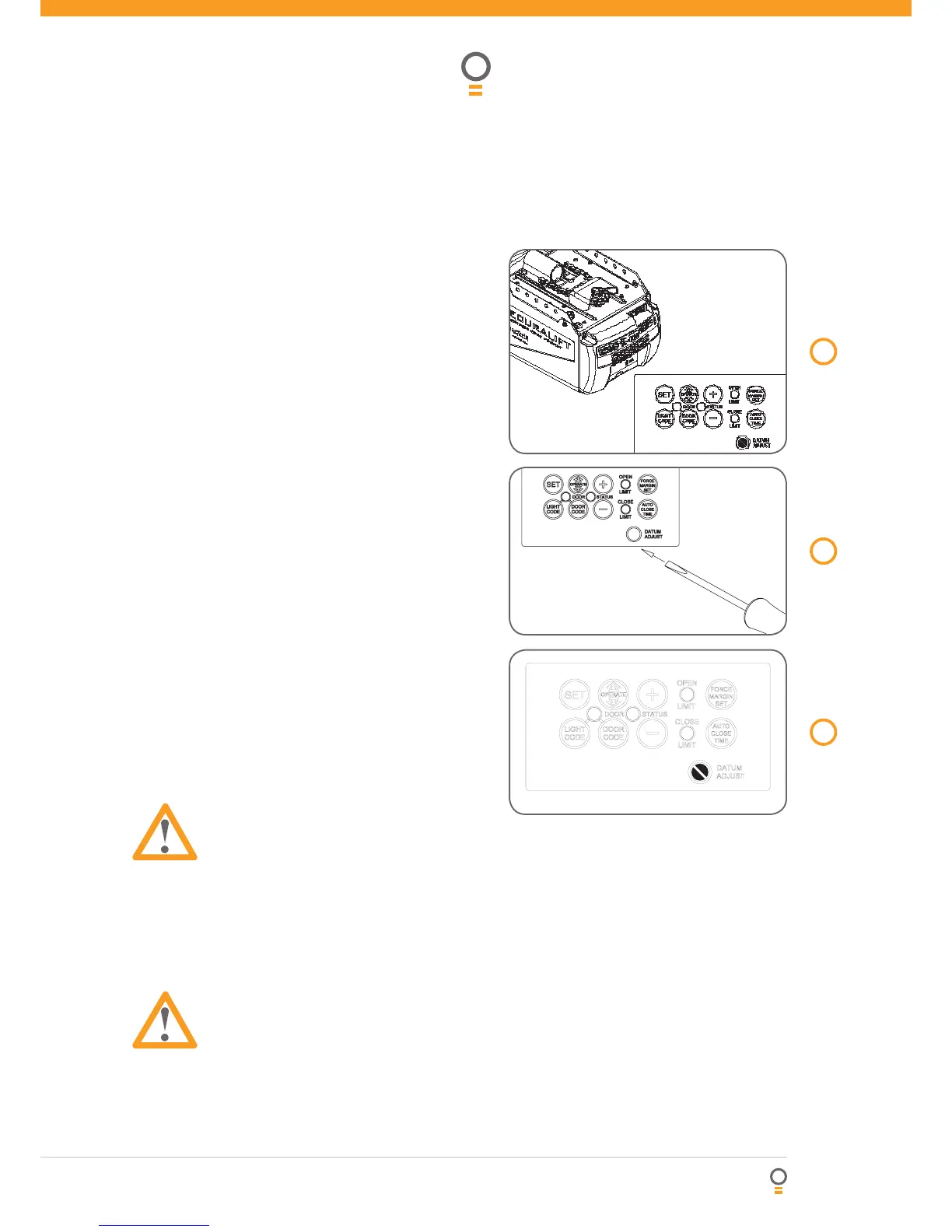
15.1. Setting datum position
1. Move the door manually to engage the
shuttleassembly onto the chain index.
2. Turn power on - the Close Limit LED should
beflashing.
3. Press and hold Minus (-) or Plus (+) button to
movethe door to half way open position.
4. Using a small blade screw driver turn the
datumadjust screw slowly until the yellow status
LED just illuminates.
NOTE: If the status LED is already illuminated when
the door is half way up then turn the datum adjust
screw until the LED goes off then turn back one notch
to illuminate again.
15.2. Setting limits positions
NOTE: The door and shuttle must be engaged into the
chain index and should be open approximately half way.
1. Press red Minus (-) button and hold it, the door will
start closing. Release the button once you have
reached your desired closed limit position. (Fig. 21)
2. Press the set button. This action will store
intomemory the closed limit position.
3. Press the green Plus (+) button, the door will
startopening. Release the button once you have
reached your desired open limit position.
IMPORTANT WARNING: Please be aware that
the garage door will start closing automatically
once step 4 is performed. The door will also
automatically re-open after fully closing with
a small pause between the cycles.
4. Press the Set button. This action will store into
memory the door limit position. The door will now
automatically close to its limit position then fully
open to calculate the safety obstruction forces (ISS).
Please be aware of the above warning.
The opener can now be operated via the operate button.
WARNING: DO NOT TURN DATUM ADJUST
SCREW AFTER LIMIT SETTING, OTHERWISE
OPENER WILL NOT FUNCTION CORRECTLY.
Setting limits
19
fig
20
fig
21
fig
15.3. Resetting door limit positions
The door travel limit positions can be deleted for
new positions by the following steps below:
1. Press and hold the Close button (Fig. 21) for
six (6) seconds until you hear three beeps and
the red Close Limit LED starts to flash. Release
the button.
2. Follow STEPS 15.1 and 15.2 to set new travel
limit positions.
Go to STEP 17 and test the Safety Obstruction
Force.




 To Next Page