20
GDO-7V1 SecuraLift® Owner Installation Instructions
18.3. Setting the transmitter to
operate pet (pedestrian) mode
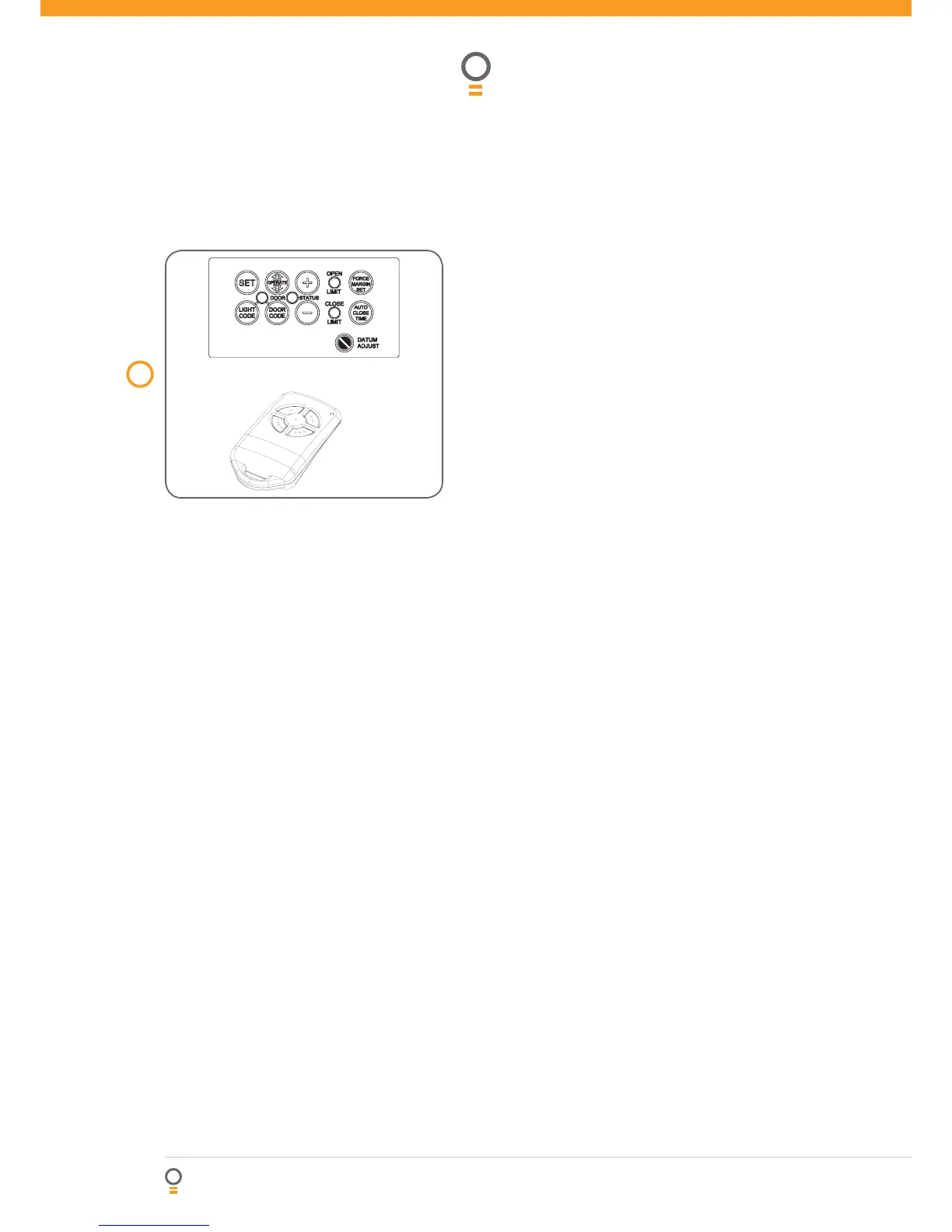
1. Press and hold Door Code button and the Close
button (Fig. 26).
2. Press the button on the transmitter you would like
to use to control pedestrian mode for two seconds,
pause for two seconds. Press the same button again
on the transmitter for two seconds.
3. Release all buttons to store the transmitter in
memory.
4. Press the transmitter button to test if it operates
the pedestrian mode To change the default pet
(pedestrian) door opening position, refer step 24 on
page 19.
18.4. Setting the transmitter to
operate vacation mode
1. Press and hold Light Code button and the Close
button (Fig. 26).
2. Press the button on the transmitter you would like to
use to control vacation mode for two seconds, pause
for two seconds. Press the same button again on the
transmitter for two seconds.
3. Release all buttons to store the transmitter in
memory.
4. To test, press and hold the transmitter button set
for vacation mode for five seconds to set Vacation
Mode.
To reset Vacation Mode press the same button for
two seconds. Please note that when vacation mode is
activated all stored transmitters will be locked out. This
mode can only be deactivated by a transmitter which
has been stored to activate this mode.
Coding transmitters
26
fig
Step 18. Setting transmitters codes
Make sure to connect the battery to the
transmitters. The memory in the openers receiver
can store up to 24 different remote control
transmitters.
18.1. Storing the transmitters code
1. Press and hold the Door Code button (Fig. 26).
2. Press the button (one of four) on the transmitter
you would like to use to control the door for
two seconds, pause for two seconds. Press the
same button again on the transmitter for two
seconds.
3. Release the Door Code button.
4. Press the transmitter button to test if it operates
the door.
18.2. Setting the transmitter
to operate the courtesy light
The transmitter can be programmed to operate
the courtesy light on the door opener.
1. Press and hold Light Code button (Fig. 26).
2. Press the button on the transmitter you would
like to use to switch on the light for two
seconds, pause for two seconds. Press the
same button again on the transmitter for two
seconds.
3. Release all buttons to store the transmitter in
memory.
4. Press the transmitter button to test if it switches
on the light.




 To Next Page